Apple’s Magic Trackpad Ambitions: The Mouse Is Dead

Apple’s Magic Trackpad Ambitions: The Mouse Is Dead

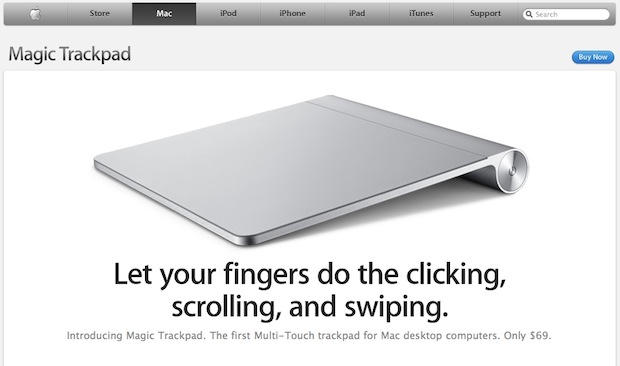
Apple’s Magic Trackpad looks like an optional peripheral for now, but it’s much more than that. It’s several nails in the mouse’s coffin. It may even be a stake through its heart.

Apple’s intent for the Magic Trackpad is clear: it’s a replacement for the mouse that brings multitouch gestures to the desktop. As more and more people use multitouch on their mobile devices, it’ll become more natural to use them on the desktop also.

Doug Engelbart invented the mouse, but Apple’s first Macintosh brought it to market and popularized it. And now, after more than 26 years as the primary UI device for desktops, Apple is beginning to phase it out. The success of Apple’s iOS platform, which uses multitouch as its primary interface, shows the path of Apple’s trajectory — it’s multitouch all the way.


Apple has already begun this transition: first with multitouch trackpads on MacBook laptops, followed by the Magic Mouse, which adds multitouch gestures to its top surface.

For now, Apple is somewhat shy about the Magic Trackpad’s ambitions. “Use it in place of a mouse or in conjunction with one on any Mac computer,” says the Magic Trackpad product page.

But in 2011, and maybe even sooner, the Magic Trackpad will be an optional replacement for the mouse when you buy a new iMac or other desktop. Perhaps by then it will have replaced the mouse entirely.

Apple can’t make the switch suddenly; it can’t just start shipping trackpads with every desktop instead of mice. It first has to train customers how to use it. Apple is very mindful of such considerations. Remember how Steve Jobs and Apple’s iPad ads reinforce the notion that people already know how to use the iPad, thanks to the iPhone, even though the iPad is brand new.

DON'T MISS
Hope You Like Trackpads, Because Apple Is Killing Off The Magic Mouse [Updated]

So it’s an optional peripheral for now, but it will probably be included in the box in a year from now. Perhaps it will take longer; after all, the mouse has been around for 26 years. Will Apple start giving them away to schools, to train new users?

The iOS has already trained people to use multitouch instead of a mouse. The issue with the Magic Trackpad is that it’s still shackled with the abstraction of a pointer; however, it’s close enough to iOS to enable intuitive user input, and that alone means I’ll be shocked if it doesn’t eventually replace the mouse.

TechRadar: Apple declares that the mouse is dead

About the author

Leander Kahney

is the editor and publisher of Cult of Mac, and author of three books about technology culture: Inside Steve’s Brain, the New York Times bestseller about Steve Jobs; Cult of Mac; and Cult of iPod. Leander has written for Wired, MacWeek, Scientific American, and The Guardian in London. Follow Leander on Twitter @lkahney and Facebook.

(sorry, you need Javascript to see this e-mail address)| Read more posts by .

Posted in News |

  • http://web.me.com/giosaccone GioSaccone

    It is too early to say “The mouse is dead”, but Magic TrackPad represents a major change

  • matt

    clearly you have never tried to use an adobe product with a track pad.

  • http://www.cultofmac.com/the-clamcase-turns-your-ipad-into-a-netbook/41945 Eric Meek

    i agree, this will replace the mouse for general use sooner or later but graphic artist and 3d artists and gamers will always need and use a mouse or Wacom Pen on t he desktop. To use the trackpad for 3d art, it will need to enable at least 3 clicks and your fingers are to cumbersome. But we are on our way for sure.

  • Xavier

    This will replace the mouse the day the iPad replaces computers.
    Seriously. It’s like Steve saying the PC is dead. For most work, a trackpad, or an iPad, are good enough, and will replace the PC (in the sense Personal Computer, including Mac).
    Now, if you use your computer for serious precise work, you’ll still need a PC (or a Mac) and a mouse. I am happy to use my macbook with an external keyboard and a mouse (and a big screen). Couldn’t do my scientific work without. But of course I am not the “standard” home consumer.

  • http://www.hoggworks.com/ Brian Hogg

    I think you for got a few words repeatedly throughout your article:

    “for the mac.”

    It won’t replace the mouse, but it might replace the mouse for the mac. Bit of a difference there. :)

  • trospero

    I’ve ordered one already, as I immediately identified this as a tool that will fit with my computing environment (for the most part) and as something that could easily replace my mouse. I like to try new concepts and learn new tools to expand my understanding of computers. Exercising your brain is a good thing ;-)

    I have been using the Magic Mouse since its release and have found it changed how I use a mouse. The touch surface is very compatible with how my brain works and things like two finger swiping have become standard practices in my daily usage. I see the Magic Trackpad as being the next step in a similar direction. I won’t mind it one bit if the mouse left my work environment entirely. I’m curious to see how well it works with the Adobe Creative Suite. This may be the one place where the mouse might be required. (Or my Wacom tablet) We’ll see!

  • Andrei Timoshenko

    One finger to move the cursor around tires the hand as is imprecise. The trackpad will replace the mouse when it starts to offer accurate whole-hand/4-5 finger cursor movement with one-finger swipes reserved for something else.

  • Ken Cohen

    I hope you’re wrong about this. I’ve used a mouse with my Macs (as we all have) for the last 22 years. Bought a MB Pro last fall and still can’t get used to the trackpad. Imprecise, too many hotspots with different functions, too many different swipes to remember, many of which make little sense to me. And I don’t really like sliding my fingers around on something that feels vaguely like it has a tiny electric current running through it. I work much faster and more accurately with the 3-button Logitech mouse that I’ve had for the past 5 or so years.

  • IcyFog

    I can make finer movements with a mouse than I can with a trackpad.

  • Darcy McGee

    I don’t perceive an accuracy difference between using my PowerBook’s trackpad and a mouse.

    I do like to have two devices for input as part of a long term plan to avoid RSI related injuries though. The Magic Trackpad isn’t going to be that second device.

  • Matt

    VectorWorks with a trackpad? Hell No!

  • Steve

    Until they lobotomise the desktop experience down to iOS levels (not necessarily a bad thing) it will never replace the precision of a mouse.

  • Joseph

    Agreed it will replace the mouse. For those saying it’s not as precise as a mouse, that may be your experience with other trackpads to date, but why is moving your finger less precise than moving an plastic ball with your hand? I don’t get it. If your frame of reference is the trackpad on notebooks, the precision problem is mainly a result of the position of the pad in relation to your body and the screen.

  • Forest

    As long as desktop PC/Mac gaming exists, the mouse will never die.

  • Mezzrow

    This is just the next logical progression, just like the iPad is. That’s why I was sure the rumors about the trackpad might be right, because they fit with where Apple was going with multitouch. I’m totally down with it, plus I finally need to replace my Mighty Mouse.

  • Mezzrow

    Although I’m just old-fashioned enough to wish for a wired version.

  • Adam

    The way I see it: By next year, the keyboard will INCLUDE the magic trackpad – it will be one device. Apple will no longer make a mouse, or if they do, it will be an add-on accessory for those wanting to use pro applications. The mouse won’t be dead, but it will be an endangered species…

  • John Brownlee

    “The way I see it: By next year, the keyboard will INCLUDE the magic trackpad – it will be one device. Apple will no longer make a mouse, or if they do, it will be an add-on accessory for those wanting to use pro applications.”

    God, we can only hope: Apple’s mice have been uniformly terrible forever.

  • Poops

    I think the one’s who are most excited about a dedicated track pad over a mouse are Mac owners who’ve never had the pleasure of using a Power Book/Mac Book/Mac Book Pro. If you’ve primarily used a desktop Mac, I could understand being excited about ditching the mouse….but, my hand gets real tired trying to do real work while using my G4 Power Book’s trackpad. It’s truly an awful experience for graphic design work. I can’t wait to plug my mouse back in. The mouse is just too accurate and keeps my hand fatigue-free after working all day. The track pad is extremely tedious for design work.

  • Johanna

    Working as a designer, in adobe’s realm most of the time, I don’t see the pad killing my mouse in any near future…

    What Apple could do to win me over is to make it function as a wacomboard with a special pen when working with art and design…

  • martin

    Mezzrow: yeah, exactly – I wish they can make a wired version some day.

  • http://www.phish.net Dave “the Truth” Grippo

    From my own experience, it’s nearly impossible to use a finger-based trackpad while designing professionally from 9:00am to 7:00pm every day of the week for work. I don’t care if this trackpad supports two, four or thirty finger swiping…it is just plain uncomfortable and awkward for every and all-day use. This is why Apple’s entry level mouse is still so relevant.

    I suppose if you’re a casual Mac user then sure, trackpad all the way. But as far as graphic design is concerned, it’s either Wacom or the bundled mouse, period. And don’t think for one second that Cupertino doesn’t already know this. Now if Apple would only create their own version of a Wacom Cintiq…(I can only dream.)

    DTG

  • http://www.petemans.net Pete

    @ John Brownlee

    Why are Apple’s mice so uniformly terrible? How are they ANY different than another manufacturer’s offerings? As a graphic designer I’ve used many mice over the past 14 years; from Logitech and HP to Microsoft, etc. But recently I’ve been using the Apple Wired Mouse exclusively. (The center scrollball button is great with pro-design program use and for an all-windows exposé). The relativley flat design and four-buton support is so much more comfortable and less fatiguing on the hand and knuckles than all the other’s I’ve ever used.

    Well okay, I’ll give you Apple’s Magic Mouse being a huge bust.

  • Nathan

    While I don’t see myself switching to one anytime soon, I think many of the younger people in the world will because they are so used to trackpads on laptops. Older people will never change. Any old people who I’ve let use my laptop in the past has hated the trackpad.

  • Firenze

    Trackpads suck balls.

  • Javier

    I can see Wacom developing a tablet that supports multitouch finger gestures besides the use of a pen. In fact they already have their own trackpad (the Bamboo Touch) so the next step would be to integrate the technology in the rest of their tablet line. Something like that would cover my needs for quick, intuitive and/or precise input.

  • Javier

    Correction: I just realized the Bamboo Touch also supports the use of a pen. They just need to expand the multitouch support to the Intuous line to make us graphic designers happy…

  • Zach

    Ok, is it just me or do my fingers get rubbed down raw from the “glass” trackpad from my macbook pro. I can not see this oversized trackpad replacing my mouse anytime soon. All it does is make me feel confined and closterphobic. Ideas?

  • http://www.sfimedia.com steve fearn

    I do have RSI and this product is a GEM and makes my painful life easier to bear. no more gripping a mouse in a way the hand is not meant too do for 8 hours a day 5 days a week.

    Good work apple. Death to the mouse.

  • xsa

    What is very bizarre (something that no one is talking about) is that the swipe direction on the new Trackpads (and on the Macbook trackpad) is the reverse of what it is on the iPhone and iPad.

    When you’re reading on the iPhone, you have to swipe UP to push the paper up so that you can keep reading down. When you’re reading on the Mac and want to keep reading down, you have to swipe DOWN, as if pointing the cursor down to where you want to go. It’s the OPPOSITE of what you have to do on the iPhone.

    The iPhone swiping method is much more intuitive than the Trackpad. They should make it consistent across all Mac products.

  • MIKE HANCOCK

    I have just bought a 26inch iMac, and optioned the ‘Magic Trackpad”.

    After 3 weeks of persistence, I can honestly say it is bloody awful.

    I have an aching right wrist, it is nearly impossible to, say, use the calculator on screen, because clicking is cumbersome.

    Nope, there is a very good reason many laptop owners carry a mouse around with them.

    There may be a mouse free future, but it will be touch screens, not clumsy pointing devices.

