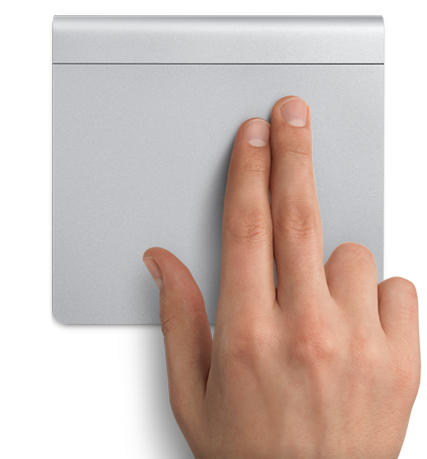
Apple’s Magic Trackpad Now Available For $69

Apple’s Magic Trackpad Now Available For $69

The Apple Store is back up following some downtime this morning and the Magic Trackpad is now available.

At just $69, the Magic Trackpad provides your desktop Mac with all of the multi-touch functionality and gestures you’ll find on your Mac notebook. It looks fantastic and uses the same sculpted aluminum design as Apple’s wireless keyboard, so it will blend in perfectly on your desk.

The main gestures will be very familiar to those of you who have used one of Apple’s recent multi-touch notebooks:

  • Click: Press down on the glass surface to physically click and double-click. Soft “tap-to-click” can be enabled within System Preferences.
  • Scroll: Use two fingers to scroll vertically, horizontally and diagonally, making browsing websites or reading PDFs a breeze.
  • Swipe: Use three fingers to navigate back and forth between websites in your browser or whilst flicking through photos in iPhoto.
  • Rotate: Using your thumb and forefinger to twist clockwise or counter-clockwise, you can rotate images in a flash.

It’s great to see multi-touch functionality finally make it to desktop Macs and it’ll be exciting to see what other exciting functions the Magic Trackpad will throw up over time. It’s worth noting, however, that if you already have a Magic Mouse, many of the multi-touch and swipe gestures above can be used on your desktop already with free third-party software like MagicPrefs.

DON'T MISS
Review: I Want To Love The Magic Mouse, But I Can’t

Magic Trackpad connects to your Mac via bluetooth, so obviously you’ll need a bluetooth enabled Mac and you’ll also need to be running Mac OS X Snow Leopard v10.6.4. It’s shipping now, so for more information and pictures of Apple’s latest creation, check out the Magic Trackpad page of Apple’s website.

About the author

Killian BellKillian Bell is a freelance writer based in the U.K. He has an interest in all things tech and also writes for TechnoBuffalo. You can follow him on Twitter via @killianbell, or through his website.

(sorry, you need Javascript to see this e-mail address)| Read more posts by .

Posted in Apple, Mac, News, Top stories | Tagged: , , |

  • Andrew MacDonald

    Finally a stand-alone trackpad!

    I bought one as soon as I read this article.

  • Maxx Wyler

    Leaving for the Apple store now.

  • Pops

    Well, this is what I’ve been waiting for, but according to the Apple website it requires Snow Leopard, and I’m running Tiger. Crap.

  • thirteen

    The Magic Trackpad is a great, great idea. I ordered two via Apple’s site — one for me and one for my better half, who went Mac just this year. Once upon a time I would have driven 60 miles down to the Apple Store for the trackpads, but I must be getting old because now I’m content to wait for them to come in the mail. Then again, less than a year ago I barrelled down the highway for the iMac I’m writing this on, plus a black MacBook, so maybe I should have gone down to the Apple Store after all. (Darnit.) BTW, props to Cult of Mac for being all over this story. I’m not surprised, just pleased.

  • Killian Bell

    Hi guys. Out of interest, what will you be using the trackpad for? Just a replacement for your mouse, or for tablet-like functions?

    Cheers, Killian.

  • Andrew MacDonald

    Hey Killian,

    Well Im a website designer, so I think for my work in things like Photoshop, Ill continue to use my Magic Mouse. I’ll use the trackpad as my main means of control for general computing, such as reading blogs, browsing the net, writing on my own blogs etc.

    Basically Ill use the trackpad for everything other than my design work.

  • Fin Devious

    A nice a new toy for my iMac. I do like the magic mouse but this will be a great addition for surfing the net.

  • Mezzrow

    Just placed my order. iPad touchscreen has spoiled me, plus my 4-year-old Mighty Mouse (which lots of people slagged, but I always liked) is reaching end of life.

  • IcyFog

    I’d want writing features for it if I were to buy one. For most of anything I’d still rather use a mouse as opposed to a trackpad. The mulit-finger gestures I get, completely understand, but then as a MacBook Pro owner using a Mighty Mouse, I already have the best of both worlds.
    One thing I noticed. At the Apple store when trying to use multi-finger gestures on the Magic Mouse, I couldn’t get them to work. It doesn’t seem to support the four-fingers moves.

  • Greg

    @IcyFrog – The extra gesture support for the Magic Mouse is not native to OSX. You have to install a separate app called ‘Magic Prefs”. After that, you can make the magic mouse do a lot of….dare I say, ‘magic’.

    Magic Prefs is not written by Apple so that’s probably why it wasn’t on the store demo machines.

    Hope this helps.

  • Shayne

    It’s $99.00AU in my apple store, but I gotta have it!

