One of my favorite Mac programs is Garage Band. As a musician and songwriter, I am endlessly impressed with how much creativity and flexibility Apple has built into the program, for my money the star of the iLife bundle.
I learned about a new little trick for creating one-touch sound effects using Garage Band‘s Musical Keyboard, as described by writer Christopher Breen in MacWorld.
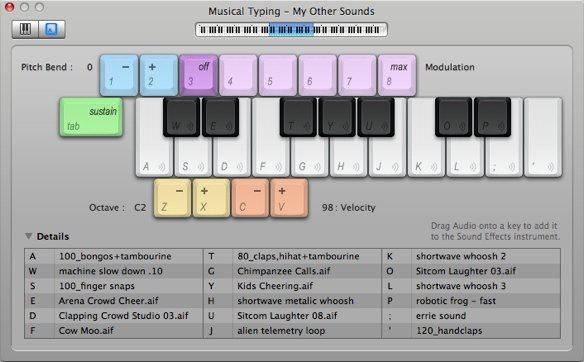
You can map up to 18 of the program’s built-in sound effects (select Sound Effect from the Software Instrument Info pane), or pre-recorded AIFF files dragged from the Finder, to keys on the Mac keyboard (as shown above) and save the whole set as an “Instrument” to be called for use in creating any new podcast or other recording project.
Be sure to see Breen’s article for the step-by-step instructions for utilizing this handy tip.

Lonnie Lazar is a writer-musician-web designer-attorney. He writes about Apple for Cult of Mac and Mac|Life, and about VoIP and telecommunications for Voxilla. Follow Lonnie on Twitter @LonnieLazar, join the Cult of Mac on Facebook, and find Lonnie’s photos on Flickr.

