iOS 4 Task Switching Bug — Apps and Hard Resets

iOS 4 Task Switching Bug — Apps and Hard Resets

I’ve been using my new iPhone 4 for over a week and now that I’ve had some time to explore it I’m learning a lot about the hardware and software that it came with. The iPhone 4 isn’t perfect since I’ve found a few problems with the hardware and iOS 4, but fortunately I’ve got workarounds for some of the bugs plaguing iOS 4.

One of the major new features in iOS 4 is task switching and while it is easy to use it was implemented with two flaws that I don’t think anyone is aware of. I’m going to explain both of them to you and offer workarounds until Apple comes up with a permanent fix.

Task Switching — Negative Impact on Safari Settings Reset

I recently grabbed my iPhone 4, launched Safari, and browsed to http://oo.apple.com to try and opt out of Apple’s iAds. I should note that I’ve been trying to access that site and opt out of Apple advertising since June 21st and I haven’t been successful so I called Applecare today. They were puzzled by this and the fact that the site said that I could not successfully opt out.  Attached to the site was a technical bulletin that basically said come back later and try again. Yeah right I thought! I’ve been trying for over a week!

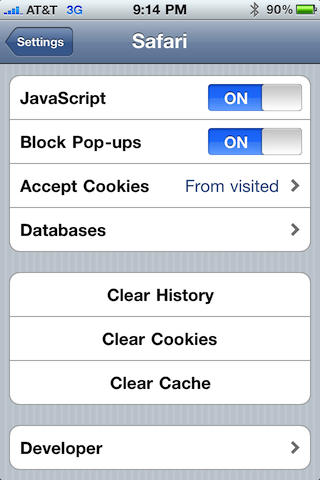
The Applecare representative told me to try resetting Safari on my iPhone 4 and I said ok I’ll try that. I pressed the Home key – sending Safari into task switching holding pattern in the background. I launched the Settings app, tapped Safari, and tapped Clear History, Clear Cookies, and Clear Cache. I answered affirmatively to all three and expected Safari to be reset.

Safari did not reset. How could I tell? That was simple since the pages I had open in it previously were still there. If it had been reset properly Safari would have opened with a blank page and displayed my bookmarks. It didn’t.
iOS 4 Task Switching Bug — Apps and Hard Resets

Safari Settings for Clearing History, Cookies and Cache.

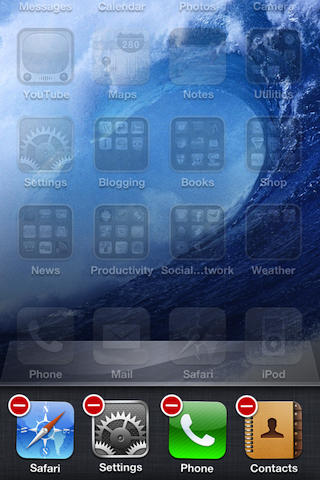
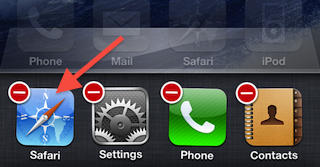
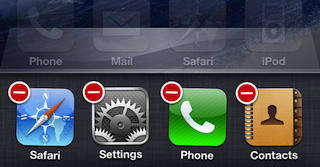
I found out that in order to really reset Safari I had to kill the copy of it suspended in the background. I did this by pressing Home twice, which displayed the the suspended apps in the task switcher. I scrolled through the list and located Safari. I then tapped and held its icon until it began to jiggle and displayed a white minus sign inside of a red circle. I tapped that and and the suspended copy of Safari was closed. I pressed Home twice again to exit and return to the Springboard desktop.
iOS 4 Task Switching Bug — Apps and Hard Resets

Kill Safari in the task switcher (see red arrow).

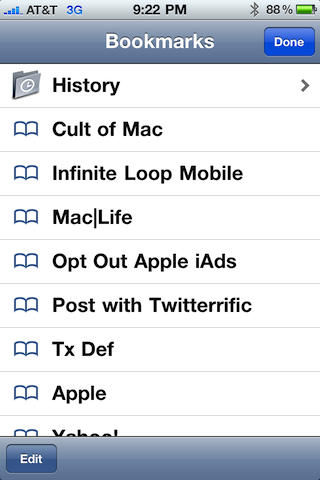
I then re-entered the Settings app and performed the steps above to reset Safari. This time Safari reset as I expected it to just like it did in iOS 3.x. I was presented with a blank page and my bookmarks when Safari opened. I could have either selected one of those or canceled that dialog and manually entered a web address. All evidence of the previously opened pages was gone.
iOS 4 Task Switching Bug — Apps and Hard Resets

This is what you'd expect to see after a proper Safari reset.

Now this might not seem like a big deal, but I think it is since the reset feature for Safari just isn’t working if Safari is suspended by Apple’s implementation of task switching in iOS 4. That is unless you use my work around, which in my opinion you should not have to do.

This issue could also be a problem for other applications. It seems to me that way Apple implemented App suspension makes it so that the app is so frozen you cannot make changes to it while it is in that state. That included resetting Safari’s history, cookies, and cache. So keep this in mind, when you reset other apps or maybe even change their settings in the Settings app, you may want to make sure they are completely closed first.

It’s hard to tell what other problems this may present with other apps on iOS 4. The problem with Safari was noted immediately and I have yet to test other apps to see if they have the same problem. However, I honestly think this is pretty serious bug in iOS 4.

Task Switching & Suspension — Negative Impact on Hard Resets

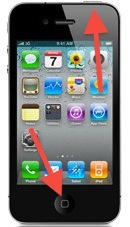
I’ve been writing troubleshooting articles about the iPhone for over two years and one of the most recommended iPhone troubleshooting fixes was a hard reset. You perform a hard reset by pressing and holding the Sleep/Wake and Home buttons at the same time until the Apple logo appears. You would then release the buttons at the same time.
iOS 4 Task Switching Bug — Apps and Hard Resets

Sleep/Wake (top) and Home (bottom) buttons.

The act of doing this was the definitive way for you to reset or restart your iPhone. If some app, hardware, or iOS went into an endless loop, crashed, or  had other problems this is how you would clear it up — most of the time.

Now due to the way Apple has implemented task switching in iOS 4 you can never really reset your iPhone. If you have apps running in the background or suspended on your iPhone when you do the hard reset they are there when the iPhone finished restarting. Now tell me does that sound like the phone really reset and cleared all of its techno-cobwebs?

DON'T MISS
When Things Go Awry Troubleshoot Your iOS Updates [How-To]

No, I don’t think so. My expectation would be that the iPhone would return to the Springboard desktop with no apps suspended or running in the background. The exception might be the Phone app or perhaps some other standard Apple apps that have always run in the background. I would not expect to still have my Facebook, eBay, Echofon, etc. still suspended in the task switcher.

So now a user has to do some extra work to reset their iPhone. Like the Safari example above I think a reset must be completed in several stages. If your phone is frozen you’d have to do the reset once and then after it restarted you would have to tap Home twice and kill any and all apps running or suspended in the background before performing the hard reset again. Finally, after all this extra work your iPhone would be in theory reset like it was under iOS 3.
iOS 4 Task Switching Bug — Apps and Hard Resets

Press the red circle to kill a currently suspended app in the task switcher.

It would be unfortunate if iOS 4 allowed a repeat of the previous problem since it may restore the app that caused the problem if it were brought out of a suspended state after the first rest. Luckily I have not seen that happen and I believe Apple has some safeguards that may prevent this.

So far these are the only big problems I’ve seen with iOS 4. Some of you may think this isn’t a big deal, but when an app or a procedure doesn’t act as you would expect it to then we have a problem. In both of these examples this is exactly what happens.

Updated 07/04/2010 at 7:39 pm CDT: Just an FYI, but if I go into an app like Settings and I push all kinds of buttons to make something happen and the whole time it lets me go on like everything is working and it doesn’t that’s a bug! In this case had the Setting’s app said something about Safari being suspended followed by a please close Safari before continuing or something to that effect I would have gladly complied. It didn’t warn me or display any kind of error about the resets failing while Safari was suspended so that’s a bug. Period!

Consider these circumstances what if I was banking in Safari on my iPhone and a friend said, “Hey can I see your iPhone 4?” You say, “Sure!” But before doing so you try to clear out Safari. Hit Home. Go to the Settings App. Etc. This bug prevents it from working, but since you got no errors you hand the phone to your friend thinking all your browser history is erased. It wasn’t and you don’t know that – no warnings. Subsequently your friend plays with the iPhone accesses Safari and discovers your bank account with a $10 million balance and now follows you around begging for a loan. Or worse you are kidnapped and held for ransom plus your iPhone 4. I could name worse examples of things you might not want people to see in your surfing history, but I’ll leave that your imagination.

Happy 4th of July!

About the author

dwmartin

David W. Martin has more than 20 years of experience in the industry as a programmer, systems and business analyst, author, and consultant. David has written for CNET's iPhoneatlas.com and MacLife.com he currently writes for CultofMac.com and BYTE.com. He comes to Cult of Mac's website with deep knowledge and passion for the all things Apple. Follow David on Twitter @david_w_martin.

(sorry, you need Javascript to see this e-mail address)| Read more posts by .

Posted in iOS, iPhone 4, Tips & Tricks, Troubleshooting | Tagged: , , , , , , |

  • Romeo

    I think the first so called “bug” is not a bug. For me, it’s pretty logic that you have to quit an iPhone app before you make global changes in the settings app, similar to what you would expect to do when installing an update in your desktop app… I think that the general settings in iOS settings app should not be perceived as a regular preference in a desktop application, to make a comparison.
    The hard reset though might be a problem but then again one should check if after the reboot the apps that show running in the bckg are still suspended from the last launch or if the iOS simply relaunch them in the bckg but from scratch (which is most likely once the phone has actually been rebooted…). I think this might be, to make another analogy, similar to what happens when you go out of power and after rebooting your desktop computer it kinda tries to open your last opened folders and stuff…
    What I do think would be nice as a future update in iOS is the ability to quit an app and not just instantly put every app you open in the multitask mode once you click the home button (maybe by double-clicking, who knows…). As for me, I’ve been kinda constantly going through my opened apps and closing them manually just to keep things organized. I like to have my email, twitter, facebook or camera in multitask but most of the apps you open you just want to use them for a one session only (like my bank app or really most of my apps).
    Maybe after the excitement of being able to multitask has passed, Apple- and users in general- will figure that it’s really better to quit an app as a general rule and establish an optional gesture to put an app in multitask if and when you decide to…

  • http://benswoodruff.posterous.com Benjamin Woodruff

    I think iPhone OS and Android both have a few things to learn from each other. Both do certain things really well. For one, some Android apps have settings which can be manipulated by the user to determine future performance. The iPhone, in my opinion, manages battery, processor and RAM much better. However, in Android, if you don’t prefer an app to open automatically when the phone boots, as compared to that app’s original settings, you can sometimes set it up that way. Having recently switched from the iPhone, Android proves to offer greater control to the user. I’d say that if Apple could implement some preferences for multitasking, such as choosing certain apps that should never show up in the app switcher, this would greatly improve the user experience and really make a lot more sense too. Great article.

  • Bill

    Both of your issues with the iPhone iOS4 are also within OS X – There are a number of programs, that if running. will prevent a MAC from doing a restart or a shut down, The difference is that you get a message letting you know that XXX program is preventing the action, and that you should terminate them and do the shutdown/restart again. Likewise many programs won’t don’t like you messing with them in the background if they are still running – the difference again being that in OS X we can go to activity monitor and kill the process there.

    I think some users are expecting far more from the iPhone than is reasonable. I note your ‘importance’ placed on Twitter and Facebook – when I ( and a lot of others ) see that, then it’s our assumption that the user is not really in this world but is just sitting around spinning his wheels looking for other time wasters.

  • http://cultofmac JL

    Thanks for the info… I dislike how all the apps stay at the bottom of the multitask screen. You have to close like 25 in a row in order to do the master reset correctly. I hope we see this changing soon! Also thanks for the link oo.apple.com to opt out I also was unaware of this, I just did it and it worked first time fyi.

  • Jaime

    These aren’t “bugs.” Especially the first one. I would assume that you have to close your browser in order to reset it completely.
    The second flaw sounds more like a bug, but once again, I would classify it as a faulty implementation of a service. To me a bug is more like an error in code that makes an application act up and freeze, quit unexpectedly, or do something crazy. Your “workarounds” are just common sense. Or at least, they should be common sense.

  • Robin

    And how many times do you actually hard reset your phone for it to be such a big problem closing a few “running” apps?

    I’ve owned an iPhone for about a year and I can count on a single hand the times a problem with the phone or an app made me do a hard reset. This is a 3Gs though.

  • CeilingCat

    Your bio says you’ve 20 years of computing experience, yet you think that having to close apps before changing settings or clearing caches is a fault of the software? “Professionals” like you make sites like this into jokes.

  • Tim Rosencrans

    Why would a restart erase documents? Most of the items (if not all) in the task switcher are documents not running programs as they are saved states that are started back up when you select them.

    The Safari thing is a bug as Safari was never shut down before (it always been suspended) when you reset it. They probably missed the fact that the 4.0 multitasking doesn’t work exactly like the multitasking safari had in 3.0.

  • Marian

    There’s a THIRD BUG that bothers me most, though it is related to these and fixing it would solve both of them. Chceck out my thread, suggestions and feel free to comment http://discussions.apple.com/thread.jspa?threadID=2469946

  • John

    My 3G has been a little wierd since the upgrade to iOS4. Today I noticed safari was stuffed, nut not downloading any pages at all. The app was responsive, and other apps could browse OK (Opera, NetNewsWire, emails with HTML content etc were all OK, but if I cliked on a link that launched Safari it jut sat there with a sliver of blue in the progress bar.
    This is where I found ben an Apple App, Safari doesnt have ot behave lie everyone elses app. You cant press and hold home for it to force quit and restart. Opening new pages was no good, closing all open pages was no good.
    Eventually I tried a shutdown and restart. This seems to have fixed it – for now.
    Now the reason I loved my iPhone over my old win mobile was -NOT having to restart it every few days, especially as it takes several minutes to restart, annoying when you just simply wanted to quickly check out a cinema ticket price etc. Thank god for Opera.
    I will buy an iPhone 4 when they get here in NZ in July (according to the WWDC slide) but I’m going to have to downgrade the old 3G back to iPhone OS 3.x before I give this to my wife. Frankly, it SUCKS under iOS4.

  • TheBrew

    The first bug is not with the iOS, it’s a Safari bug. It’s perfectly possible for an app to recheck the settings when it’s brought back out of the carbonite. It’s a .0 release – of course there’ll be little things that have been overlooked. Expect it to be fixed in a later release.

    Regarding hard resets, I think Apple chose between:
    1. Please the techies, who knows how to do this, and dump all states. (and information)
    2. Please the regular Joe and keep his state / unsaved documents.

    It’s a matter of opinion, but I’d personally go with Apple’s choice. And live with pushing those little red badges once a year.

  • http://www.letemsvetemapplem.eu Hoop
  • Mike

    As stated in other comments, the first one is not a bug. The second one is not a bug neither: the multitasking dock lists recently opened apps, not a process list. When you do a hard reset, that list is maintained, but the programs aren’t running (otherwise would make the bootup vastly longer). Try testing a hard reset with an app open and put to the background in a different state that it launches in. If you tap it’s icon on the MT dock and it launches into it’s default state, then you know nothing is running in that list.

  • Jeremy

    Please retract this whole article as this is completely inaccurate. Those issues are not bugs at all.

  • JDS

    I don’t see a bug here. iOS4 saves the state of Safari when it is suspended. So it makes sense that you cannot change the global settings while it is suspended. It needs to “wake up” load the state it was in when it was suspended.

    The hard reset issue certainly sounds like a bug to me. If you do a hard reset, all suspended apps should “die” and the phone should start back up with no apps running in the background.

    The same problem exists when you switch off and restart the phone. The apps don’t die.

  • http://www.isystant.com Scott

    I wrote an app called Tune Chords that, upon launching, checks the Web for an updated database of fiddle tunes and the guitar chords for backing them up. But with multitasking, Tune Chords never closes, thus never reopens to check for a new DB. I hope I can reprogram my app and release a new version that ignores multi-tasking and truly closes each time.

  • Tom

    The second one is not a bug. When an app ‘saves state’ it stays in the RAM – that’s why it’s so quick to load. When you do a hard reset, the RAM is cleared. The multi-tasking bar just shows recently used apps. After a hard reset, tapping on any of those apps in the bar will cause the app to re-open from scratch. Maybe the author should have tested it before writing this article, because I took the 2 minutes to try it and discovered this

  • Alex

    Yet another example of crack journalism where a “blogger” takes no time to research his posts.

    These are not bugs. These are features. Idiot.

    It is meant to work this way. Do your homework and stop causing mass hysteria where every moron who doesn’t have a brain believes your every word. I mean, seriously. Look at the many responses you received so far. Lemmings everywhere I look.

    If you phone froze or crashed, you wouldn’t want to restart your phone and find that if you spent a half hour in imovie or in pages or anywhere else, that you lose all your work or data. This prevents these situations from occurring. I wish Mac OS X had a similar feature.

    You can hard reset an app and you can hard reset the OS. I don’t see why you don’t understand the difference and can’t simply do that for the appropriate situation.

    I alo don’t mean to sound harsh, but the reality is, you have to think about how the population will react to your posts before you make a post.

  • mark

    IMHO author is trying too hard to find something to write about today. Mucking with an apps settings while it is suspended doesn’t make any sense at all.

  • MikeA

    ” for some of the bugs plaguing iOS 4.”

    Plaguing iOS 4? Really?

    You don’t have to write articles on a slow news day you know, you could just have a day off.

  • Bob

    Let me see if I understand this:
    You want to fundamentally reset the application while continuing to have it run in the background?!?
    I think you are the faulty entity here, not the iPhone

  • firesign3000

    Considering that I hard reset my 3G a total of once since it was new, I don’t expect that much difference from the 4. As others have said, I wouldn’t consider having to kill an app to change it’s settings as a bug.It’s expected behavior. Not killing all apps during the shut down for a reset I would consider more of a bug, but one that could be easily fixed in an iOS update.

  • Eric

    Moron. The first one is common sense. The second is after a hard restart the icons on the task switcher shelf aren’t running or in a frozen state. That shelf also holds recent apps. And I for one am glad they’re still there. Very few apps actually are backgrounded or frozen. Most are just simply recents. Wow u really are clueless. I feel bad for the people who think u know what you’re talking about and take you at your word as knowledge.

  • Shayne

    I prefer the moderated comment days. Agree or disagree, it can be done with politeness and by avoiding personally insulting the writers. The comments are really starting to make the site unpleasant and not worth coming to.

  • Lars Pallesen

    I agree with Shayne. You guys could easily have made your comments without abusive namecalling like “idiot” or “moron”. It ads nothing but insults to the debate. Please straighten up your language and manners next time.

  • matt

    this is stupid, that is not a glitch in the hardware, even on pcs and macs if you try to clear the history while the safari or ie or any of the other web browsers are still running u still have that page that it was on when u cleared the history, all this is, is a nerd that is too lazy to push a few buttons, its a phone, not a computer yet it can do damn near everything a computer can do, lets stop talking shit about the iphone and start realizing we’re lucky to be the generation to get it, and to be around while it is perfected…

  • alexis

    omg looks like the consensus is…

    THIS ARTICLE IS RUBBISH

    I’m sorry but you really need to look past some of the name calling in these comments and see them for what they are…FACTS

    you have made this article into something that it isn’t and being called out on it has just made you more bitter than you were…remember you are here to give us facts…and if you had written this article as a “how to…” in regards to the “bugs” as you call them instead of a bashing if the iPhone and of Apple then you would have not received this type of attacks…

    this article is not right and should never have been allowed by your editor…we expect more from Cult of Mac and we expect more from you

    take this as a lesson on how to approach topics that you feel are specific way and get input from your peers as to how they see them…Leander would never have written something like this…learn from the master

  • GERHARD

    Yes slow news day indeed. The author seems not to understand that Apple intended the Phone to work this way. David should just get used to the fact that just because he does not like a a particular methodology in implementing some system tasks, does not constitute them being a bug. A very petty posting.

  • Darcy McGee

    Multitasking = Overrated

    I played an effing game about 10 hours ago and the thing is still running in the background. Stupid. Why is it that all you people whined about this…were you *trying* to screw up my iPhone experience?

    Just to reiterate:

    Multitasking = Overrated

  • iSimon

    Until Apple inpliment a way for a user to chose if they ‘close’ the app or hibernates it, multi-tasking is a pain for MOST apps…

    Things like sms and mail and web it’s good to be able to flit in and out of and be right back where you were, but I’d bet 90% of apps that get used are done with when the user clicks the home button and should be closed.

    How about just holding the home button down for 1 second (instead of a click) to close an app completely, while 1 click hiberates it.

  • Dave Sebring

    Settings / Reset / Reset all settings

    Takes all of several minutes, not a big deal.

