Google Voice Turns Your iPhone Into Free VoIP Phone

Google Voice Turns Your iPhone Into Free VoIP Phone

NOTE: My bad. Apologies for screwing this up. Google Voice is not a VoIP service on the iPad, but a call-forwarding service. It only works as a VoIP app on the iPhone. I got confused with Line2 from Toktumi, which is what I used to make a call this morning, not Google Voice (see below). My memory is totally shot. I was convinced it was Google Voice, until I got a bunch of emails and comments. Again, apologies for being flaky.

Google just opened up Google Voice to the public, the company just announced. You no longer need an invite to use the free VoIP service.

This is very handy for iPad 3G iPhone users. Your iPad iPhone is now a low-cost VoIP phone that works wherever there’s service. It’s also very handy for adding voice call-management features to Wi-Fi-only devices like the iPad and iPod touch.

Google Voice is a free service that offers free calls to the U.S. and Canada and low-cost international calls (and SMS). The Google Voice app also features several advanced call-handling features. For example, when someone rings your Google Voice number, it will ring multiple lines — home, office, cell — until it finds you. It transcribes voicemails and emails or texts messages to you (very handy, but spotty). There’s also conference calls and Web-based voicemail.

Apple and Google got into a fight over the Google Voice app last year; a scrap that attracted the attention of the FTC. Apple refused to add Google’s Voice app the App Store, saying it replicates core iPhone features and may confuse users. Google responded by making a kickass web app that works great on the iPhone and iPad.

DON'T MISS
Google Voice App Coming to iPhone

I’ve been using Google Voice for several months, and it works great on the iPad, even over 3G iPhone. I just used it this morning when I was too lazy to get up and find my phone. (I actually used Toktumi’s Line2 app to make the call on my iPad. Apologies for the mistake).

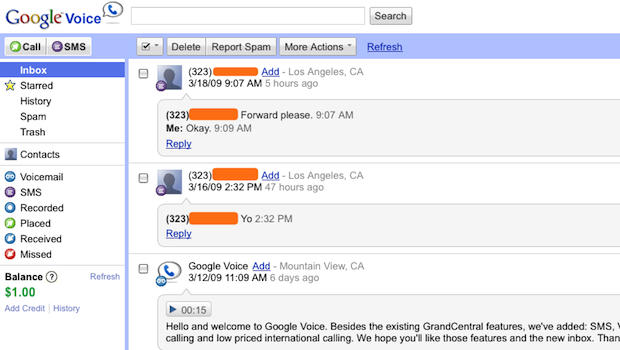
Here’s a quick tour:

About the author

Leander Kahney

is the editor and publisher of Cult of Mac, and author of three books about technology culture: Inside Steve’s Brain, the New York Times bestseller about Steve Jobs; Cult of Mac; and Cult of iPod. Leander has written for Wired, MacWeek, Scientific American, and The Guardian in London. Follow Leander on Twitter @lkahney and Facebook.

(sorry, you need Javascript to see this e-mail address)| Read more posts by .

Posted in iPad, News, Top stories |

  • http://policydiary.com John S. Wilson

    I have Google Voice and I also have an iPad. I don’t understand how you say “Your iPad is now a low-cost VoIP phone that works wherever there’s service. It’s also very handy for adding voice to Wi-Fi-only devices like the iPad and iPod touch.” How are you turning your iPad into a phone? You don’t explain that at all.

  • me

    if you fanboi idiots actuall yknew your shit you’d know this doesnt do shit.

  • Dan

    Google Voice is awesome but it is NOT a VOiP service… yet… It can direct calls to your Google Voice number to any number of phones… including voip numbers but it itself is not a voip app. This is one of the biggest misconceptions regarding Google Voice. It routes calls and transcribes them but it is not a voip service. Google did buy Gizmo5 and will likely roll out their own service but it is not yet active.

  • http://www.geardiary.com Dan

    John-

    Using Skype or Line2 (or one of the other voip apps turns the ipad into an awesome voip phone. What is misleading here is the idea that Google Voice is a phone service. IT IS NOT. But it is def. worth getting. then get line2 or SkypeOut and your calls can be routed to your iPad with ease.

  • http://www.francoisguite.com François Guité

    Google Voice is not yet available in Canada.

  • threeBs

    Has anyone tried activating GV on the billing phone number AT&T gives you when you activate 3G. I imagine it would fail the first step when they (Google) call you to make sure the number is valid when adding a phone to your acct.

  • Chad

    Am I missing something? Can you explain how you made a call from your iPad when you were too lazy to find your phone? Even from the desktop application or the iPhone web app GV simply routes the call through your existing phone. I currenty get an error on the iPad, which is do the mobile code trying to send the call to the phone software on the device which the iPad does not have. So even if you use the desktop site on the iPad, it still would send the call to your phone first, which means would have to actually go get your phone.

    Would love to be wrong on this one, and please let me know if I’m missing something. Otherwise, personally, I think this entire article is complete hogwash and a complete lie.

  • DCJ001

    There might be other options. But, if you’ve already had a Gizmo5 (acquired by Google not long ago) account, you could use the Gizmo5 app to make and receive calls through Google Voice with an iPod Touch or iPad.

    I don’t have an iPad yet. But Google Voice makes calls for free through Gizmo5 on my MacBook just fine. I’m sure that it works equally well through an iPod Touch or iPad.

  • Brian

    How are you making this happen? I have both the iPad and have been using google voice for some time now while in beta! Im still not aware as to how we can make calls with google voice via voip?!?!?

  • Joe

    I won’t be as intense as everyone else here but they’re all correct: Google Voice is not a VoIP service. You cannot make calls on an iPad, wifi or 3G.

  • Jared

    People, you have to set it up with a SIP service as a gateway. I use Gizmo as my SIP and fring ad client on my iPhone to make VoIP calls, see lifehacker.com’s post today explaining the process if you need some advice.

  • James

    Yes google voice is not a VoIP service at all, its a call back service. you tell it to call> it calls your phone> you answer> it calls the other person

  • Powerplaygraphix

    Kahney,
    How the HECK are you using VOIP in a program that has NO VOIP FEATURES. Now if you have GIZMO5 and you have THAT as one of your forward to #’s then that might explain it but it still doesn’t do it THROUGH Voice.

  • Drew Caster

    Leander,

    How do you get it to work as VOIP on the iPad?

  • DCJ001

    I’ve already answered the question that everyone is asking.

  • Bill

    The service is only available in the USA – Articles like yours should check those limitations and make them known.

  • psht

    This article reminds of of the Google free DSL service.

  • BoxMac

    Holy SHIT ….

    Leander’s BLATENTLY & clumsily bullshitting & now he’s scrambling for a way out. lol

    He’ll *say*: “Oh …. well — ah …. I *mean* making VOIPs using Gizmo5 ….”
    but that’s NOT what he says.
    He says he uses — for *awhile(* now — GV as a VOIP ….
    IN AN APP THAT DOESN’T HAVE VOIP.

    Why do you think it’s been several hours now & there’s no reply?
    He’s inventing a new method to lie to BS his way outta *this* one ….

    Tell me: is *this* particular comment of mine *also* being “duely noted” ?

  • Mark

    If you want to make your iPad into a free VoIP phone then check out Whistle Phone by Vail System (you can send and receive calls and you get a US telephone number, it also supports conferencing)

    http://itunes.apple.com/us/app/whistle-phone/id322326573?mt=8

    Google Voice does allow you to send/receive text for free, and you can setup Google Voice to forward the text to your e-mail, so you will get an alert when someone sends you a text message.

    However, if you want to have better text integration/control with your iPhone, you can also check out the Textfree Unlimited iPhone App (by Pinger, Inc.)

    http://itunes.apple.com/us/app/textfree-unlimited-send-text/id305925151?mt=8

  • http://twitter.com/Twit_Sage Twit_Sage

    For those that don’t get a lot of calls, e.g. most ‘kids’ these days just txt, GV’s txt to email (and back) service can be particularly useful. In this case, an iPad 3G + GV can be an effective replacement of your smartphone and your laptop. Your txt and emails show up together in the mail app, a real ‘unified’ inbox. You can reply to the txt and they’ll get sent back via txt to the sender. There’s a few options for when you do get a call…

    - Never take incoming calls, always let it go to voicemail. You’ll get an email transcript of the voicemail and a link to listen to the voicemail (again ‘unified’ inbox) and you can decide whether to call back. Call back can be done via some other VoIP app or whatever phone you can get your hands on (work, friend, Mom, etc.)

    - Get an inbound number via a VoIP service, e.g. iCall. When people call your GV number it will ring the VoIP number and you’ll get a notification on your iDevice. The app switching is clumsy, costs a little for the inbound VoIP number, and the call quality is often poor. iOS 4 should help with the notification/app switching.

    - Get a small, cheap, prepay phone/line that does nothing but make calls and forward the GV line to that. You only have to carry it/leave it on when you’re expecting to receive/make calls, e.g. Mother’s Day.

    Some notes:
    You cannot forward the GV line to the number associated with your AT&T iPad 3G line. There’s no way to complete the verification call.

    You have to associate the GV number to some other line, even if you don’t actually forward the calls. If you don’t another line you can use, e.g. Grandma’s landline (again you don’t have to actually forward anything to it), you might as well go with the prepay option. Its a one time fee of $10-20 and you don’t even have to turn the phone on once its set up.

    You can save a lot on phone service this way (again for those that mostly txt and don’t get a lot of calls). If you’re around WIFI a lot you can even do this with an iTouch/iPad WIFI and have no monthly phone bill. To have your txt on the go, e.g. the daily commute, the $15 iPad 3G plan is plenty of data if you use WIFI at work and home. Versus the iPhone plan, you can recover the cost of the iPad in a few months.

    You can even set GV up in addition to your regular phone or set up multiple GV numbers, to keep the more scandalous parts of your life separate.

    Again, this approach is most useful for the txters that don’t actually make a lot of voice calls.

  • Mr D

    would google voice in the caribbean

  • Anonymous

    I recently replaced my AT&T cell plan with Google Voice, a Verizon 4G LTE MiFi hotspot, and Talkatone.  I wrote an article about it on my blog.

    http://sebetich.com/blog/

