If You’re Having Problems Installing iOS 4, Don’t Update… Restore

If You’re Having Problems Installing iOS 4, Don’t Update… Restore

iPhone 3G owners trying to upgrade to iOS 4 are reporting numerous issues with the update process, including updates that take hours and failed updates resulting in the sinister error 3002. Fortunately, though, there are ways to get around both by restoring your iPhone 3G instead of updating it.

If you are having problems with an iOS 4 update that is taking upwards of two hours to complete, the good news here is that the longest part of the update is actually backing up the existing media… a strange problem, given that you should automatically be backing up your iPhone 3G in iterative updates every time you sync. If you have a recent backup (and you should), a full restore to factory settings will eliminate the need to backup your iPhone 3G first, and should allow iTunes to update your handset to iOS 4.0 speedily.

The same is true if you’re getting error code 3002. Just click on your iPhone 3G under iTunes and click the “Restore” button. After the restore, you may have to reinstall some of your apps, but it should allow you to run iOS 4 on your iPhone 3G without any other problems or lost data.

DON'T MISS

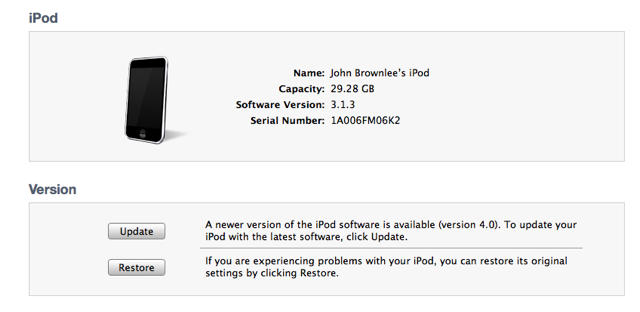
Basically? If you’re having problems updating your iPhone or iPod Touch to iOS 4, do a “Restore” instead of an “Update.” If that doesn’t help, hit the comments, and maybe someone can help you.

About the author

John BrownleeJohn Brownlee is news editor here at Cult of Mac, and has also written about a lot of things for a lot of different places, including Wired, Playboy, Boing Boing, Popular Mechanics, Gizmodo, Kotaku, Lifehacker, AMC, Geek and the Consumerist. He lives in Cambridge with his charming inamorata and a tiny budgerigar punningly christened after Nabokov's most famous pervert. You can follow him here on Twitter.

(sorry, you need Javascript to see this e-mail address)| Read more posts by .

Posted in iPhone, News, Software |

  • supermoy

    I was follow the instruction update & it was complete. But now, I can’t acces anyting in my iphone. You know the information to update carrier in the website?

    Thanks.

  • CSides

    I updated yesterday as well … all my data returned normally … you do have to go to your settings in itunes and “recheck” the sync buttons for music and apps. I am however NOT able to connect to the internet or any of the apps that use the internet when I am away from a Wifi connection. Also, I no longer have the option of texting pictures! There are ways around the picture deal, but no Internet … Who at Apple approved this update?!

  • Garydebs

    I can’t even get iTunes to recognize my 3g!

  • Garydebs

    Time for a droid!

  • Garydebs

    BTW I have the latest safari, latest itunes, latest microsoft updates….

  • Melissa

    So apparently if you have upgraded “successfully” to the software version 4.0 and you are experiencing all of these problems below what then….?
    Here are some common iPhone 3G problems after iOS 4 update according to merinews.com and I concur!!:
    1. The overall performance of the phone is very slow and sluggish.
    2. The iPhone becomes unresponsive if you try to do things fast.
    3. iPhone 3G hangs and the touch screen doesn’t respond for a while.
    4. The selection of contacts or anything even like choosing albums, checking mails, opening SMSes become slow and at times dead.
    5. Folders open but icons won’t work the way they work, the app will be fired but after you have used many buttons. At times it just won’t work.
    6. The device gets hot after you use it for a while.
    7. The iPhone 3G switches off and on on it’s own.
    8. The iPhone 3G apps which worked flawlessly earlier now exit themselves on their wish.
    9. The Wi-Fi reception has also become an issue where the device always prompts for password.
    Users are hoping for a fix from Apple to arrive sometime soon. These problems are really giving a tough time to earlier satisfied users. Some are even asking why there is no downgrading option.
    So by restoring my network to the original settings it will still be version 4.0. Correct?

  • Majo

    Im using a 3G iphone… I agree, downgrading option should be the first thing Apple should consider before they tackle the problem… I experience several issues like; messed up apps that exit anytime, internet just wont work correctly, slow processing, overheating, Wifi/Edge/3G is totally out of control, unresponsive and slow…just to name few… This is a huge faux pas for Applle and they know that… how could iOS4 be approved without proper testing is a mystery to me… it’s like “let’s stick to the schedule n make it quick no matter what”… besides, there should be some compensation for all apple users after they fix it…let’s be fair!

  • Falon

    When you have the 3G, it doesnt do ALL the updates like having the background change..

    Mine is going slower, and my picture messaging doesnt work.

    Now i just need to know how to go back to the regular updated one, because iOS4 sucks.

  • hannah

    i have an iPod touch and I’m updating right now, it’s backing up and taking forever! my friends did this and they said they lost all of their songs from their iPod and are trying to make a folder of all of them but they can’t. They said they lost lots of their media etc. and now nothing is working. I hope my iPod will work – they have PC’s and I have a Mac, but i doubt that’ll change anything. my ipod is full so hopefully this update won’t crash that. crossing my fingers nothing bad happens and that my ipod won’t get ruined!

  • Ryan

    After reading all the posts here is what i did to finally get the version 4 software installed on my ipod 64g.

    i moved my usb cord and plugged it in the BACK of my computer

    i turned my wi-fi off

    I paused Kaspersky internet security.

    I was getting error code 3259 after download.

    This seemed to have worked. hope this helps someone else.

  • Ryan

    This worked w/out a problem. I didn’t lose a thing. finally…. and this was on the update not the restore.

  • Fiona

    Thank you for letting me know about the restore to repair my phone after the upgrade.
    After the upgrade, the only thing available on my phone was emergency calls & iTunes wouldn’t recognise the phone as mine. I turned it on & off a few times & left it disconnected from iTunes for about 15 minutes. When I reconnected it to the USB cable, iTunes asked automatically if I wanted to restore from my back-up. It took close to 45 minutes to restore & sync again. I have the 3GS 16GB, but have only used about 4GB so far, so it would probably take longer if you have used more of your GB’s.
    I seem to have everything still in my apps & my SMS, photos, calendar and ipod all look fine too. Thankfully I ran a full sync & back-up before the upgrade.
    It will be interesting to see what the function is like now. It has removed the plain black wallpaper I had behind the menu functions, as I like to have a plain background behind all of the colours, but I found a new wallpaper that is plain enough.

  • Alex

    Ive just backed up my ipod touch 2nd gen 8gb by right clicking in the ipod in ‘devices’, but when i try to update it warns me that there are purchased items on my ipod that have not been transferred to my itunes library. Help?

  • EbLuver

    Once I downloaded the IOS4 UPDATE on my iPhone 3Gs I lost all of my apps, I can no longer connect to the WEB (safari or APP store) , even the option to send pictures via SMS has disappeared. It just allows me to send pictures via email. But then again that isn’t an option because like I said before the internet on my phone doesn’t work anymore. This is so unreal. This update is the worst ever. Even when I went back to RESTORE my previous settings it wouldn’t allow me to retrieve my old APPS or contacts. I’m 100% sure I backed my phone up before beginning this NEW IOS UPDATE …………..so Now What???

    Apple needs to get their stuff together. This is such an inconvenience :-(

  • bobby

    I restore my ipod touch 2g(MC model) to iOS4 , but it takes so long time , i worry about it , anyone has solution for this ?

  • Julie

    My story is this – upgraded the software for the 3G and now my calendar won’t sync over air – so if I make an appt while out of the office, I don’t see it on outlook until I rmember to manually input it to outlook and worse, if I add an appt using the laptop, the appt doesn’t appear on my phone calendar till I manually sync through itunes. It’s a real pain! I haven’t called anyone about it yet b/c I am hoping Apple will issue a new update that will fix it. I have wasted hours though, trying to fix it myself.

  • Alison

    I tried updating my ipod touch with the new 4.0 software and only about half of the software is on there. The ipod is still fully functional, but I just tried to restore it, still it changed nothing. I’ve done this like 4 or 5 times and it’s still the same. Please someone help me!!

  • Verogvny

    After getting stuck with the &^@@## ios 4 on my iphone 3g, I finally found a solution: downgrade to ios 3.1.3
    http://lifehacker.com/5572003/how-to-downgrade-your-iphone-3g%5Bs%5D-from-ios-4-to-ios-313

  • Verogvny

    forgot to mention: WORKED LIKE A CHARM, exactly as described in the video!!!!!!!!!!!!

  • Alice

    YEs, that was awesome. restored and it updated then put all my apps and that back on. Just one thing let you all know…. BACK UP your photos. thats the only thing I lost… but I saved then month buy month in my PC so i just sync and got all but this month.. so no real dramas.. it a bit of a joke apple has this any problems..

    Thank :O)

  • issy

    thanks man, worked perfectly :)

  • Heather

    So far I’m restoring it and its working like a dream!! *fingers crossed* Mine continued to download the new update but got stuck on the back-up part every time. I really hope this works. Its worth losing all my stuff since I have it all backed up as long as it works!!! But I’m not waiting very patiently

  • Heather

    IT WORKED LIKE A CHARM!!!!!!!!! I just hope it works when I get back on my computer because right now, I’m not on my computer. Fingers crossed!!! Thanks you’re a true miracle worker!!!

  • yourAdumbAss&imNot

    got android solved my problem, dont buy half ass shit, makes life easier, dont support shit wiped companies either, but people these days get fed fish heads and there sheep asses beg for more.

  • Bob

    Keep getting this at the end of the download for iOS4 for my touch:
    there was a problem downloading the software for the iPod. The network connection timed out.

  • http://CultofMac Anne

    Thanks so much for this tip, Restore worked seamlessly. All my apps and data are intact. iPhone 3G and Macmini, now running 4.1 on the phone.

  • Soumitra

    I’ve ipod touch 2nd Gen, while updating iOS 4.1 I got a message “data can’t be restored and some error 37 occurred” and immediately my iPod doesn’t work. If I plug it again show USB device not recognized. I tried all possible ways to figure it out but still no sign of recovery. If someone knows about the solution plz help me.

  • Ginger

    i had the same problem matt it will not sync my music or apps
    Help Please!!!!!!

  • Ginger

    And restore get’s rid off everything on your ipod apart from factory settings

  • Smaranda Voican

    i am experiencing a huge problem now! just updated my iphone (3g) on the ios 4.0 version and back uped it, by mistake 2 times (or so it appears) at the moment the phone was empty (after the update, before the sync). i restored it now, but it appears i only have 2 back ups (the ones from today, while the phone was empty). how can i restore to its original back up (the first i ever made, containing all of my data)?? please help! thanks a lot!

    • Mimii1212

      I am having the same problem ! How do you get to the original back up?

  • Galih Prasetyo

    Galih

  • Galih Prasetyo

    I have a problem, after I update my iphone 3gs..the icon appeared huge as on iPad!
    Weird..does anyone knows why?

    Cheers

  • Avi

    i have a problem i conected my phone to itunes then they ask to update software i clicked yes and now my phone is stuck with itunes on the screen and cant restore

  • owa

    i have the same problem with avi

  • Impurpleann

    my iphone 3 is having an error (continuously) if im trying to update it……………………. and my apps are been lost too. HELPPPPPPPPPPPPPPPPPPP

  • Gregg Butler

    I pushed the reset button in the settings menu that deletes all content and data on my I-Phone 3GS and now my phone jus stays on the start-up screen with the apple in the middle of the screen. How do i fix this to get my phone to work again? 

  • Sigh_haiiiii

    My iTune prompted me newer version 5 is available, update?
    I clicked yes and iTune run the update, install… then it automatically runs backup for my iphone which is plugged in (I was happy), the fear come when I turn my head to see it is running the RESTORE (automatically) after the backup completed. Next it showed “Your iphone is restored to factory default”….  I hope it has not erase my phone list, photos etc 9as it is still RESTORING and I fear unplugin the iphone will crashed the iOS. Keep my fingers crossed!

    Why does this mishap happened???

