iPhone OS 4.0 Adds File Sharing Feature to iTunes

iPhone OS 4.0 Adds File Sharing Feature to iTunes

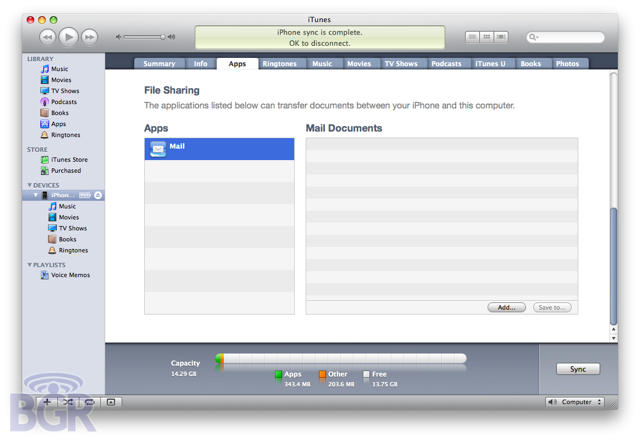
An exciting new feature in the latest iPhone OS 4.0 beta might finally address a long standing complaint of both users and app developers: the inability to easily move non-media files between the iPhone and a computer. According to Boy Genius Report, iPhone OS 4.0’s new File Sharing feature will allow you to transfer and sync files directly between your iPhone and your computer.

All you do is plug your iPhone into iTunes, go to the Apps tab and scroll down. On the left side of the screen, you choose an app from a list of supported programs, while the right side of the screen allows you to copy files into that app’s sandbox or save them from your iPhone onto your computer.

The File Sharing feature doesn’t work yet, but it’s an exciting hint at things to come. It looks like a lot of the office and productivity suites on the iPhone OS are about to get a lot easier to use across multiple platforms.

DON'T MISS
‘OPlayer’ for iOS Supports Impressive List Of Media Formats

About the author

John BrownleeJohn Brownlee is news editor here at Cult of Mac, and has also written about a lot of things for a lot of different places, including Wired, Playboy, Boing Boing, Popular Mechanics, Gizmodo, Kotaku, Lifehacker, AMC, Geek and the Consumerist. He lives in Cambridge with his charming inamorata and a tiny budgerigar punningly christened after Nabokov's most famous pervert. You can follow him here on Twitter.

(sorry, you need Javascript to see this e-mail address)| Read more posts by .

Posted in iPhone, iTunes, News |

  • CallMeDumbButJustWondering

    I know there are advantages to this but what are they?

  • Alexis

    sounds cool…I just want the Apps tab to load with some sort of speed…I always get the beach ball when I click that tab…and so far in iPhoneOS 4 it doesn’t show the items in folders as being in folders so arranging them using iTunes isn’t an option yet…hope they get that fixed

  • Mike

    I very much wish Apple would remove the iPhone sync from iTunes into it’s own program. iTunes has crashed on more than one occasion because I open it to play music, but then it has to load up my phone’s info before I can do anything. Or vice versa, I want to sync, but I have to wait for my entire media library to load. They are disconnected tasks and should not be in the same program.

  • http://ihbs.co.uk Ben

    it doesnt quite look like what I was expecting, which is a pain. What i really want is just a documents app. It can be the same as the photos app, it can even forbid videos and audio files in there, but i just want a place to store them all, rather than on dropbox and then emailing it to myself

  • http://twitter.com/matrocksteady matrocksteady

    I agree with you, Ben. But, at least this is the start. I really just want an app that looks like a folder that lets me drop anything into it I want just like a USB stick. Nothing fancy, but I’d like to carry some of my important documents with me at all time directly on my iPhone- not on dropbox or something of the sort.

  • Gazoobee

    @ Mike: Why do you turn iTunes off in the first place? The slowness on load (because it has to load an entire media library), is a well known thing and has to do with the speed of hard drives and the size of the data to load, it’s not iTunes specific.

    I agree that the iPhone apps page takes forever to load though even if iTunes is open. Not sure what the excuse is for that.

  • MacGoo

    No need for OS integration or even OS 4.0 – Dropbox does this very well, and isn’t limited to JUST iTunes and the iPhone. I can upload a file on my iPod Touch, and I automatically have access to the file on my Mac, my PC, and my Droid as well (as of today anyway, with the release of the Dropbox app for Android. I truly don’t understand the need for an Apple developed, OS-centric function when there’s such a superior, multi-faceted solution out there.

  • Tom

    MacGoo – try editing a file on Dropbox – you can use iWork on an iPad, but then what? There’s not currently an option to shift it back to dropbox.

    And who’s to say this will just be documents – it’d be great if this extended to other file types, allowing for example, music apps to be able ot import export MIDI files and others with this. We’ll see – this is only the start and we’ve got several betas to go before OS 4.0 proper.

  • MacGoo

    Take a look at “Dropbox Anywhere” – it’s Dropbox’s API to allow other apps to do just that, as long as they support the API. I understand the need for more universal support when you edit files though – that is a limitation that would be better addressed at the system level. For my particular workflow, almost all file editing happens on computers, and I just need access to them on my mobile devices, so Dropbox works for me. But this isn’t the case for everyone. I stand somewhat corrected.

  • Alexandre

    I already have that option with m’y iPad and Stanza app for ebooks and pdf. So I beleive that it could work with any app!..

  • http://ekle.us Rick

    This isn’t new. You can do this with the iPad already. New to the iPhone yes, but not new.

  • haymoose

    I’d love to have access from my iPhone or iPad to my current “shared” iTunes library full of all my tunes. When will this ‘feature’ be included in the mobile versions of the ipod/itunes app on the mobile platform? Just by means of the local WiFi LAN. This would be a great feature!

  • Dora

    Try using SafeCopy.Look for it and then try editing any file because you can use iPhone and smartphone.You can access all your files from you iPhone or smartphone.This what i use so it would be a good option too.

  • Peter Bloom

    How about AirTunes support?

  • Gish

    Try file magnet

  • eev

    i just dont see that feature with 4.0gm. Apps tab shows only all apps and option to autosync new apps.

  • Noah

    @eev, same here — this feature isn’t actually in the final version, not as far as I have seen

