Hands On: 17″ i7 MacBook Pro

Hands On: 17’ i7 MacBook Pro

After one of the longest waits in the Intel era, the MacBook Pros were updated Tuesday complete with a migration to the new Intel i5 and i7 architecture. In addition to the CPU update these new top-end notebooks feature better battery life, and the ability to switch from integrated to high performance graphics on the fly. We here at the Cult managed to get our hands on one of the top-dog 17 inch i7 models on Wednesday have have been putting it though it’s paces.

Follow us after the jump for out first impressions and a detailed rundown of the King of the Hill’s real world performance.

First Impressions

This is one beautiful machine. While not cosmetically different than the last model, it’s a substantial upgrade from my Third Generation Core 2 Duo MacBook Pro. The unibody case is solid and doesn’t have the flex of the older models. The LED screen is brighter, the text clearer, and the machine runs noticeably cooler to the touch than my older “lap-warmer” model.

Quirks

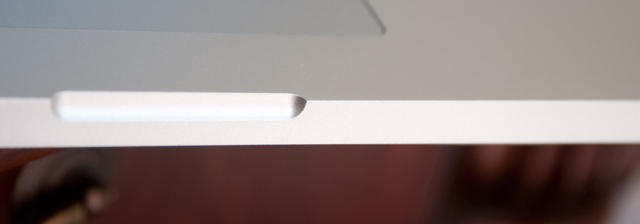
The edges on this thing are sharp, especially around the magnetic latch. Really sharp, I didn’t have it fifteen minutes before it drew first blood on me, I guess we know who is the boss of who here. I’d file the edges but I can’t bring myself to do it.
Hands On: 17’ i7 MacBook Pro

Also querky, is the charging mechanism. While the old style 85 Watt power supplies provided with the legacy MacBook Pros, work, I’ve yet to get one to charge the new notebook to a full 100%. The provided power brick is smaller and easier to travel with and did manage to give the machine a full charge. Who knows why that is.

Now on to what everyone wants to know…

Performance

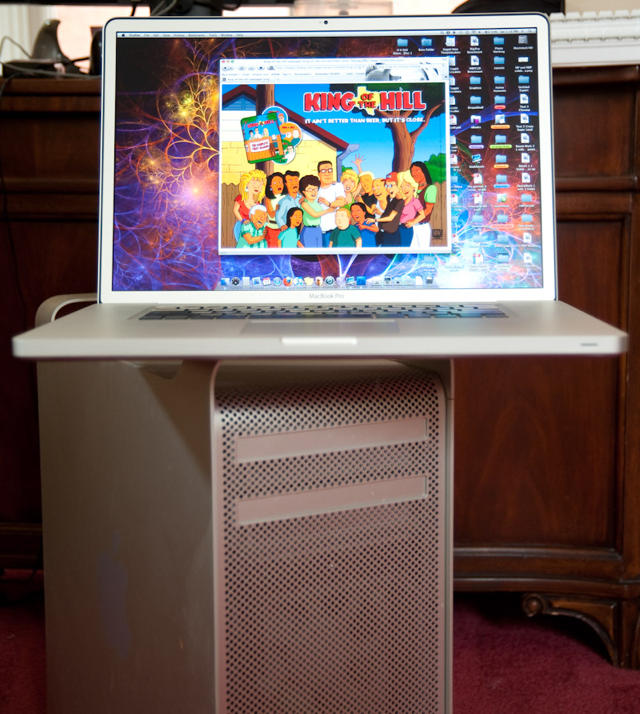
It is fast, fast, and wicked fast. How fast exactly?  Used to be my Generation 1, Mac Pro with four actual processors mounted on 2 dies, and a (then unheard of and crazy expensive) 10 gig of RAM, was king of the hill –the fastest workstation money could buy.Hands On: 17’ i7 MacBook Pro
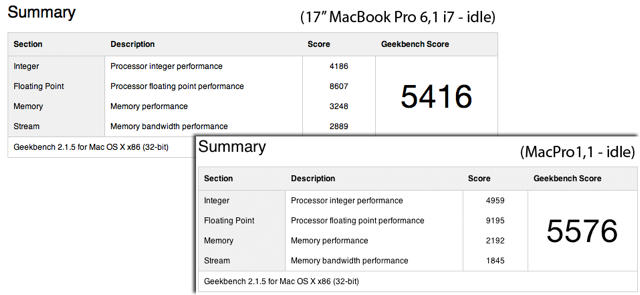
Three years go by and in strolls this svelte beauty (let’s call her Scarlett) with two cores, four threads and a genuinely affordable** 8 gigs of RAM, and like a pretty girl upstaging the burly guy in a buddy cop movie, she keeps pace with him every step of the way.  Sure I understand Moore’s Law, but still that’s freekin’ impressive.

** For the first time in my recollection Apple isn’t gouging customers for memory; the 8 gig RAM upgrade is a reasonable $400 bucks, pretty much what it would cost you aftermarket from a reputable dealer like OWC.

Real world tests

So enough of artificial benchmarks, lets see if we can melt this thing, shall we?

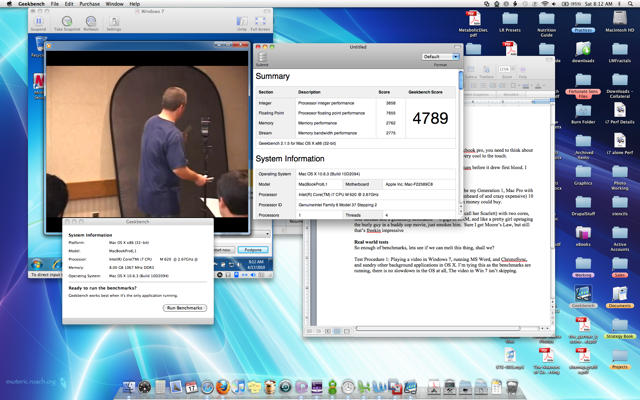
Test Procedure 1: Playing a video in Windows 7, running MS Word, ChronoSync, and sundry other background applications in OS X. I’m typing this as the benchmarks are running, there is no slowdown in the OS at all, The video in Win 7 isn’t skipping.
Hands On: 17’ i7 MacBook Pro

Okay, that’s impressive, but you all pay me to push the limits, lets try that again.

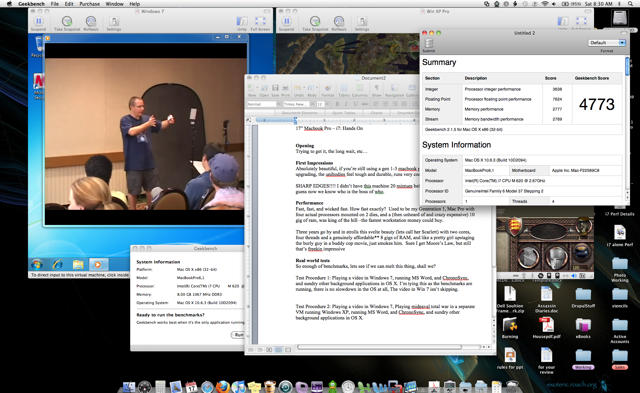
Test Procedure 2: Still playing a video in Windows 7, also playing Medieval Total War in another VM that’s running Windows XP, as well as running MS Word, ChronoSync, and sundry other background applications in OS X.
Hands On: 17’ i7 MacBook Pro

Ooookaaaay. That’s still crazy fast. The video didn’t skip a beat (the game’s graphics were a bit wonkie, but they were that way without any load as well suggesting a graphics driver issue). Regardless, the CPU stress was real as all the thinking and rendering of the game, moving pieces around processed normally and happened smoothly.

I’m getting a little frustrated, I figured that test would push her to the red-line, and adding the new VM caused a statistically null impact to our benchmark. It could be that all we’re proving is that VMWare and OS X are crazy efficient at resource management, which we  already know. Lets go further, shall we, this time in addition to VM’s lets load up the core OS with CPU/GPU and Memory sucking tasks.

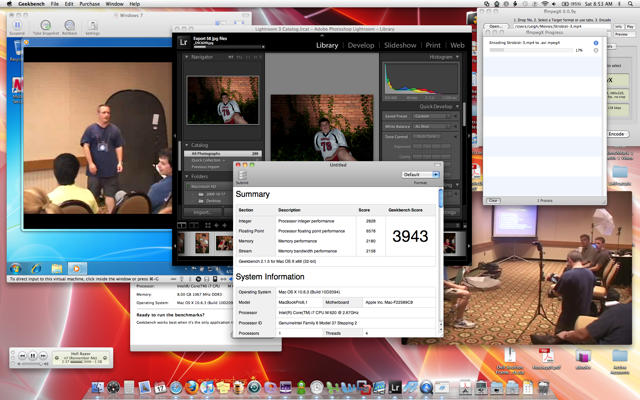
Test Procedure 3: Still playing a video in Windows 7, also converting a video from mpeg to DivX in FFmpegX in OS X, as well as playing music in iTunes, playing a video in QuickTime, rendering JPGs from RAW and exporting photos from Lightroom, and as before typing this & running sundry other background applications.
Hands On: 17’ i7 MacBook Pro

Wow, I finally managed to warm this machine up. Unlike the lap scorching prior generation, these i7s run cool. Very, very cool. Nevertheless, doing all of that, this machine still benchmarks faster than my old C2D 2.4 sitting idle**. The video in Windows 7 did stutter a couple of times (probably from hard-drive bandwidth and not CPU), but nothing running in the core OS missed a beat –literally.

So I’m done trying to break her, you win, Scarlett, you are one fast girl, you took all I got and you didn’t break a sweat.

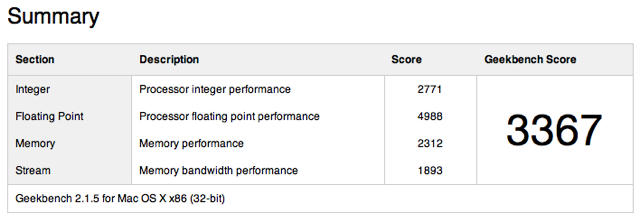
**Just for reference here’s a benchmark from my 17’ Core 2 Duo MacBook Pro sitting idle

Hands On: 17’ i7 MacBook Pro

Note: The videos used for this test are from the Strobist Collection, they are expensive and worth every penny, I converted mine to be able to take with me everywhere I might need inspiration. David Hobby, you’re my Obi Wan.

DON'T MISS
Steve Jobs On Tradeoffs In New 13″ MacBook Pro

So what have we learned here?

  • The i7 MacBook Pros are Crazy Fast: Crazy, insane, unnecessarily fast, and she runs very, very cool even under an extraordinary load.
  • VMWare is very efficient: running multiple VMs each doing pretty CPU/GPU intensive tasks, and VMWare shared the host computer’s resources elegantly. Seldom missing a beat no matter that I threw at it.
  • OS X & Grand Central Dispatch are a wonder of the modern world: No matter what I did, regardless of how intensive, the OS didn’t miss a beat, foreground tasks were snappy and responsive, no beach balls, no stutters, no stops.

I would love to see a Windows machine pull this off. Really, I’m not being snarky. There are Windows 7 powered i7’s out there. I would genuinely like to see what they’re capable of.  If you’ve got one, try to mimic Test 3 and shoot me a screen-shots of your test and Geekbench scores.

Is it too fast?

Sort of a silly question, its like asking ‘is my Aston Martin too fast?’ Short answer: no. The more complicated answer is ‘maybe’. See, the combination of an OS that is continuously optimized to improve performance (rather than add features), with Moore’s Law of CPU horsepower suggest that Macs might be getting to the point of diminishing returns for consumers.

This machine with Apple Care and tax is $3600 bucks, is it worth it? Especially if you’ve already got a very, very fast C2D 2.4 17” MacBook Pro as I do. Maybe Not. Because the user experience isn’t That much different. There’s no, new-super-fast computer feeling you get when you upgrade a Windows machine, because the OS is snappy and fast-feeling on a varriety of different hardware. You really need to stress the machine to get an appreciation for just how fast it is, and most users aren’t going to do that.

Now, I do a LOT of background and foreground tasks, I’m constantly editing documents, producing art, listening to music and working on photographs, so as I use a multi-core tuned Adobe CS 5 my tune might change. But for an average word-processing, email jockey, I don’t know that this upgrade would have been worthwhile.

The good news: it is really, really starting to look like we’re gonna get 5-6 years or more of life out of our Macs and amortizing the investment against that life-cycle ain’t too shabby compared to a PC that needs to be upgraded every 2-3 years to stay in peak performance.

Good News #2: while Apple is getting some static about the 13” model sticking with the Core 2 Duo architecture, don’t look at it as running last year’s tech. Look at it as taking state of the art, and pushing it down to entry-level. Those 13” books are screamers, every bit as fast as my old 17” super-computer and a heck of a lot more portable. Heck, I might have to get one just to travel with.


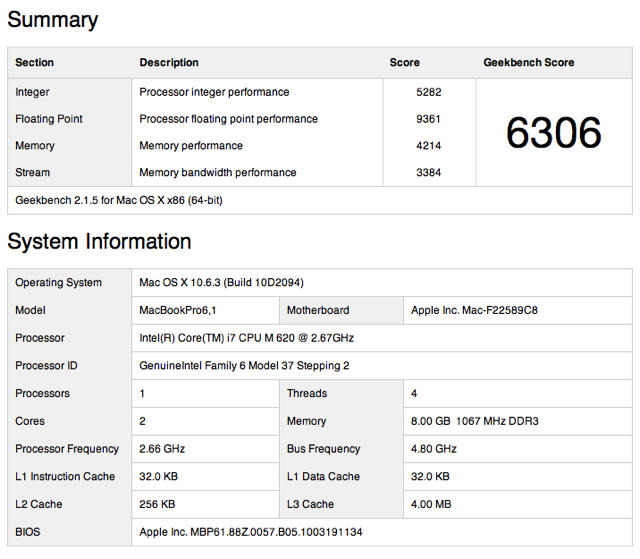
Updates: The geekbench results here were run with the 32 bit version. I’ve managed to run the benchmarks with the 64 bit version of geekbench, and the results are even more impressive.  According to the results browser (which averages all scored by Mac model) it puts this new MacBook pro above all but the 8-core machines. Very impressive, an even greater argument for not wasting money on silly-expensive add-on’s like SSD drives (see comments for more detail)Hands On: 17’ i7 MacBook Pro
On battery life: I got about 5-6 hours on an uncalibrated battery, on a machine that was constantly running a medium intensity process (3d screens aver). I will update further as we get more battery tests done.


About the author

LeighMcMullen

Leigh McMullen leads the Advisory Services & Strategy practices for the professional services arm of one of the Big-Five firms. He has written several books that would cure any insomnia you might have, and is an avid Mac junkie.


(sorry, you need Javascript to see this e-mail address)| Read more posts by .

Posted in Hardware, MacBook Pro, News, Reviews, Top stories |

  • aiiskoplusaiist

    Thank you very much for your test!
    I think I’ll stick to the i5 when I finally get a 17″.

    I currently use a 2.4GHz Core 2 Duo in my black MacBook for 2 years and it has never slowed down enough for me to call it ‘slow’.

    I put an SSD in it so its even faster opening stuff etc. It’ll keep going for years to come so I can’t justify spending £2K on a new one! Only reason I want one is for the display resolution (my MacBook isn’t really big enough for some things like Logic), and the unibody (its impossible to stop fingerprints on my black MacBook, gets really annoying and hard to rub out with the cloth)

  • http://www.arturgasparyan.com Artur Gasparyan

    Hey!

    Are these reflections or why is the screen border grey? I thought they have black borders?

    I’m really interested in Windows machines showing off with comparable Benchmarks…

    Artur

  • Raffi

    Antiglare screen has grey borders.

  • Blütnerd

    So how is the real world battery life on this? Apple were pretty honest with the last batch of unibodys, and downright modest about the iPad. So is 8-9 hours achievable?

  • J Weich

    It’s got the matte screen option.

  • firesign3000

    Querks? Really? Doesn’t anybody use spellcheck anymore?

  • http://www.cultofmac.com Leigh McMullen

    Don’t know the batter life yet… still trying to calibrate the battery, I’ll report when I have good data. The screen boarder is silver as reported due to the anti glare screen.

  • http://www.cultofmac.com Leigh McMullen

    P.S. I guess I’m just Querky…

  • http://trimtab.ca dibs

    Thanks for the article – must have taken a while to write.

  • tgen

    How’s the anti glare screen compare to your screen? Do you think it’s worth it to upgrade the screen?

  • http://www.cultofmac.com Leigh McMullen

    @ tgen:

    the screen is really a choice of preference and profession. (IMHO) To look atthe glossy screen is way, way, way nicer.

    If you’re a photographer or graphic artist, you’re gonna want the the anti-glare screen, so you can achieve truer to print colors.

    if you want to just stroll into an apple store and pick up a 17″ i7… you’re gonna get the anti-glare screen whether you want it or not, cause that’s the standard configuration (true as I write this).

  • Charles

    I didn’t take issue with the lack of processor upgrade (though they did technically make it a touch faster) on the 13″. What I didn’t understand was why they chose not to upgrade the screen to a higher resolution with an antiglare option? Had they put the couple hundred extra into that I would have bought a 13″ last week. Instead, I’m wondering if I will go with a MacBook Pro at all.

  • http://N/A Alex

    Did you move anything over from a Time Machine backup that did’nt install right. I considering buying one with a SSD and wondered if it’s possible to do with all the apps that I have registered. Will everything install without a hassle?

  • http://www.yourmacbook.com Jerry Williams

    The i7 migration should be nice……….and I must say that its such a nice slle looking maching…cant wait to get my hand on one…:)

  • http://www.jqplot.com Chris Leonello

    Thanks for the review!

    What is the processor speed of your 4 core MacPro that you benchmarked?

  • TRRosen

    @ Alex Are you new to Macs? Don’t waste time with time machine when buying a new computer just connect the new with the old via Firewire or ethernet and let migration assistant move everything for you. Its much quicker and I’ve never seen anything not transfer. (try that on a Win7 machine)

  • Linda

    What about SSD & graphics? In particular, WoW and EVE Online and graphics? I know Apple doesn’t use state of the art graphics chips but are these at least decent?

    Any idea on the SSD and performance? One can pay a fortune ($1300) or pay a lot and get a small 250GB disk) or get 500GB HDD; I can argue for any of those.

  • Brandon Chang

    so the new macbooks all come with the silver anti glare screen ? i think they shud it wud differentiate the new macbooks to the old ones , or else its like telling no diff btwn a 3G and a 3Gs iphone , i really thort they mitve gone with the anodized aluminium with colours liek the new ipod nanos that wud be amazing !!!!!

  • ged

    black and grey bessels are different widths, how can that be?

  • http://www.cultofmac.com Leigh McMullen

    @Alex: upgrading from your old mac is easy, just get the new mac, and when you fire it up, select copy applications and settings from my old mac, connect the two with a firewire cable and an an hour you’re in business.

    @Linda / Alex: In regards to SSD, I wouldn’t get an SSD for performance reasons. This machine is so fast, and OS X is so efficient, I just don’t see where an SSD would give you much more than what you’re already getting with the i7. (If you were running data heavy apps like a database server, I might change my tune).

    The reason to get an SSD on one of these macs is battery life. Which is also excellent on the regular drive model. But if you had a need for working disconnected for more than 10 hours… then consider it. But for all consumers, and 99% of pros, the SSD is a waste of money.

  • http://www.cultofmac.com Leigh McMullen

    @Ged. I don’t think the bezels are different sizes… the black just looks thinner…

    @Brandon: No, the standard model 17″ i5 comes with the glossy screen… Apple stores (and other retail outlets) usually only stock 2 models of the 17″ the base, and the ‘Ultimate’ version. The only way to get an i7 from the apple store was to get the top-end model, that by default came with the anti-glare screen.

    @ Chris: my mac pro is 2.66ghz. Per Geekbench, the average for the 3.0 ghz model is still only 5655. The reason why I asserted my 2.66 model was ‘King of the hill’ was because of the RAM, back then 10gig of ram cost nearly as much as the base machine itself, and the RAM (for most applications) made more of a difference in performance than the extra .4 ghz. (as evidenced by my MP’s benchmark against the 3.0 GHZ model).

  • pierre marcar

    Do the speakers sound better or the same as the previous model?

  • Mikofox

    Does the silver bezel sit on top of the matte screen or does the screen go over it?
    If it’s the old style then it will have sharp edges and dust and hair will collect under the edges. Is there a reason why they can’t be build with the screen going all the way to the rubber seal?

  • Simon

    Regarding SSD’s: all good points but my reason for considering getting one in a new MBP is RELIABILITY, – I’m currently on my THIRD conventional hard drive in my white plastic MB (in about as many years) and am thoroughly fed up with their lack of reliability, it isn’t a case of if the current drive will die but just how soon! I am a photographer and reliability matters so if SSD gives me a lot more peace of mind and considering I fully expect to have to buy a couple of replacement HD’s with a new MBP too when they die- it might be more cost effective to start with SSD to begin with!? BTW I backup with SuperDuper like a maniac now!

  • http://www.cultofmac.com Leigh McMullen

    @simon: I hadn’t considered reliability as a factor. I’d argue that for the money you could get a timecapsule, and an off site carbonite /mobileme backup for your photos.

    If you’re planning a retention strategy for your photos, you need to have one copy on a separate drive at all times in your house that you have fast access to (timecapsule or backup drive) in case your laptop gets stolen, and a second offsite in case your house burns down.

    That’s what I do at least.

  • Simon

    Hi Leigh, I think you should factor in reliability! But thanks for the retention strategy – I do all that too. I have backup drives of my archives in two different countries and when I travel into the wilds I always carry a bootable backup of my hard drive on a portable HD as a safety measure. Not explored the cloud computing storage options yet – it worries me to send my copyrighted material off into the ether to a fairly anonymous recipient.

  • http://www.cultofmac.com Leigh McMullen

    @simon… I hate to even say this because I’m afraid I might jinx myself, but in 25+ years of owning computers with hard drives, I’ve never had one fail.

    ((Knock Wood))

    That could be that I upgrade my hardware frequently, or that I’m just fortunate, but you outta get 10 years plus life out of a hard drive. If you’re not, and you’re not being especially hard on your gear (don’t toss your laptop around, etc) then I don’t know what to tell you.

    for maximum reliability in a laptop try the western digital: WD AV-25 it’s designed for 24X7 video streaming and got 1 million hours MTBF (mean time before failure), should be about bullet proof for everything but abuse.

    And they’re about 70 bucks… take the grand I just saved ya, and buy something nice for someone special, okay?

  • .: taya :.

    @mikofox Yes the bezel sits on top of the screen. If you’ve ever been through a Chinese manufacturing plant you’d realize quickly that there’s no such thing as a virgin ‘glossy’ LCD panel. e.g. LCD panels are naturally manufactured with a matte surface to begin with and the glossiness is achieved with the glass ‘protective’ layer that’s sandwiched on top. While an anti-glare film is one thing but slapping ‘matte glass’ of the same thickness as the ‘glossy glass’ onto an already ‘matte’ surface would be like looking through bottle-capped glasses.

    I just take my time to apply anti-glare film in a dust free environment and be done with it. Did it both with my MacBook and 27″ iMac. Take patience but well worth it for me.

  • Marcello Amari

    I’ve never understood why Apple doesn’t use anti-reflective glass to protect their displays. I frame my photos with Perfect View. Schott AG makes Amiran. Their are lots of options available that would be both anti-reflective and scratch-resistant, while still protecting the laptop’s most vulnerable component.

  • Mark Kaye

    Woah there!! SSDs provide an _enormous_ perceived increase in performance. Super low seek times mean that applications launch in under a second. Seriously. If you want your laptop to _feel_ much, much faster, an SSD is one of the best upgrades you can buy.

  • http://www.meenophoto.com Meeno

    Thanks for the great info. I’m hooked, I want one, NOW.

  • Laimonas

    I’ve red here:
    http://www.pcauthority.com.au/News/172791,macbook-pro-helps-core-i7-hit-100-degrees.aspx

    that macbook pro 15′ i7 hits 100 degrees of celsius. Could you please write what is 17′ inch mbp temperature in idle and under high load ?
    Do you keep your mbp on table or maybe you’ve been using some cooler pad for notebook ?

    Thank you for this review.

  • Anomics

    I saw that overheating article as well, but that is the only case of it. No one has been able to reproduce it. They may have some hardware/driver problems. Although, pcauthority are not the most reliable on info.

  • http://www.macreviewz.com Alex Gregory

    the i7 may hold its own against the 4 year old mac pro 1,1 reviewed here, but the 3,1 and 4,1 version mac pros are different animals in processor type (and system architecture in the ladder case).
    even a quad 3,1 mac pro is faster , just in benchmarks – i own one – and pitted it against the i7 17″ – while the i7 doesn’t fall short by that much (3,1 is a2.8 GHZ quad) – it is of course outgunned in terms of memory, HD speeds, bus speeds, heat (32 C vesus an average of 80 to 90, yes teh i7 and all dual coees run too hot in that tiny little casing) .
    hence , like most 17″ers this one too will get the stigma of the “wanna be” pro leaguer computer guy who can’t commit to a full rig – and doesn’t take the computer anywhere either (because of the huge form factor , tiring screen resolution, glaring, heat and weight). for teh same price used monster 3,1 mac pros or even nehalem quads and eights are available – leaving room to buy a little windows netbook, 13″ mac book / pro or ipad wifi for the starbucks work seesion (that never really happens anyways).
    while the i7 stats are good, any mac pro (except for teh first generation 1,1 and g5′s of course) dominates the quad core simulkating laptops. It’s a great idea, but as pros and power users, the desktop “replacement” concept with limited ports, no blu ray, having to buy external screen upgrades, it’s just a concept that never really fully works.

  • GK

    Hi, Leigh,

    I hope you can answer ALL these Qs, and if not, maybe you can offer link for more info… I did try to research some of that stuff, but, given that I’ll be migrating from the older Mac, with 10.4.11, it’s hard to find these answers!

    Qs:

    How long does it take to get to the desktop on a Start Up, assuming that you have to type you password in?

    Would SSD make that faster?

    How big your HD on this MBP 17?

    Is it 7,200 RPM?

    How does one calibrate the battery?

    I’ll be moving my data from Powerbook G4, 1.67, 10.4.11. How long would that take with the Migration Assistant, Firewire 800, PB G4 in Target Mode?

    You mentioned “preserve settings”, which setting are those?

    Would “preserve settings” be wise, given the difference between OS 10.4.11 and the latest Snow Leopard?

    Will Dreamweaver 8, Quicken 2004, Office 2004 Run under this newest OS?

    My other big consideration is: I use Palm Treo 700p with Palm Desktop on my PB G4, 10.4.11. As soon as the New iPhone is out, I want to get this New MBP 17′. Any advice on how I can bring my Palm Desktop Notes onto iPhone?

    Would Palm Desktop even install and run on this New MBP 17′?

  • Scott

    I have ordered my Mac Book Pro this evening and should get it early next week, this is my first ever Mac and have gone for the 17inch i7, with 8GB Ram, 7200rpm HDD. I am heavily into photo editing and would like to get more into my video editing, I have a Hi-Def cam that I am yet to start editing and making movies etc.

    Needless to say I am excited LOL

  • Peter Jarvinen

    Dear Leigh,
    I am contemplating here with my chin on my hand…
    whether I should go for the new Book Pro i7 with 8gb RAM with SSD for the software and FW800 for the material at hand… or to go with a MAC Pro Desk with 8-core.
    My requirement is video editing, full HD on Final Cut Studio.
    What do you think? Am I going to be able to get the required kick from the laptop? It would be truly wonderful to be mobile with the laptop only. Perhaps this is wishful thinking??
    Thanks very much in advance if you can help with this one!

    Cheerio

    Peter

  • Glen

    Any updated battery life tests ?

  • http://BombsightPhotography Mark

    I just ordered the biggest and best 17″ MBP I could get! All upgrades complete with SSD.
    Like using “Dial-up” internet connections in the old days …. life is waaaay too short to be waiting around for what needs to happen…. Time is $$$!

    You have to ask yourselves what your time worth!

    Thanks for this review, Leigh

    A soon-to-be Mac owner – stoked on speed
    Mark

  • Ernst Steinert

    I would tread carefully with anyone’s SSD. The perceived reliability improvement is actually a myth in the real world. These things on average have a much higher failure rate the quality mechanical drives, and without warning. They degrade after frequent overwrites. On top of all this, when a mechanical drive fails, usually professional data recovery is possible. Not so with SSDs.

  • Sarah Dadd

    Hi, just after some advice if anyone is still watching this forum. I am a graphic designer, using primarily InDesign and Photoshop. I do occasionally process up to about 100 photos at a time and do work with RAW files (I very rarely batch process these).

    In a dilemma, not sure whether to purchase 17″ i5 or i7? I do plan on purchasing more RAM in the future, but can’t afford it at the moment due to the large outlay.

    Any help would be much appreciated.

  • Oliver

    You say that there are two cores and four threads. You may just find that this is the wrong way around. The Core i7 has four cores and each core runs two threads. Regards

  • Hikurangi

    you may also notice the date that this was published.. april 2010

  • Nicmee

    Can you run hardware test on your MacBook Pro please? I ordered a customized MacBook Pro 15″ i7 but when i did the hardware test, the profile processor is i5 instead of i7.