iPad Not Charging Over USB? You Need a New Computer

iPad Not Charging Over USB? You Need a New Computer

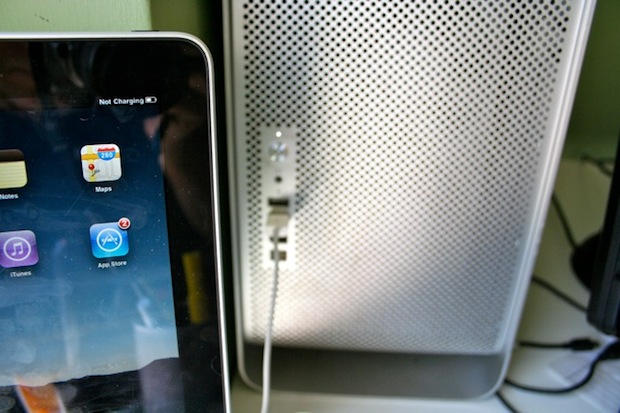
The iPad won't charge using the USB 2.0 ports of some older machines, like my $2,500 Mac Pro from 2006.

Lots of people are complaining that their iPads aren’t charging when plugged into their computer’s USB port. The battery indicator in the upper right corner says “Not Charging.” The iPad still syncs, however.

Don’t worry, it’s not a glitch. The iPad needs a high-power USB 2.0 port to charge, which are less common on older computers. Many USB hubs and keyboards with USB ports won’t work either.

The complaints seem to be coming from users of older Macs and some Windows laptop users. The front-facing USB ports on a 2006 Mac Pro, for example, don’t put out enough power to charge the iPad, but the ports on a 2009 MacBook Pro (13-inch) do.

Apple has published a support document that advises charging the iPad using the included power brick.

Better get a new Mac to work with your new iPad.

DON'T MISS
This Cute Little PlugBug Will Charge Your MacBook And iPad At The Same Time

iPad Not Charging Over USB? You Need a New Computer

About the author

Leander Kahney

is the editor and publisher of Cult of Mac, and author of three books about technology culture: Inside Steve’s Brain, the New York Times bestseller about Steve Jobs; Cult of Mac; and Cult of iPod. Leander has written for Wired, MacWeek, Scientific American, and The Guardian in London. Follow Leander on Twitter @lkahney and Facebook.

(sorry, you need Javascript to see this e-mail address)| Read more posts by .

Posted in Apple, Apple Tablet, iPad, News, Tablet |

  • TRRosen

    Note when its says not charging thats note necessarily true. Many have reported there iPad charging albiet slowly while on lower powered USB even though the panel say not charging.

  • Spen B

    I have a netbook that I bought last year with all USB 2.0 ports, and the iPad says “not charging” on it. It’s an ASUS EeePC 900HD.

  • stuart

    Will there be a CoM iPad app?? I’m loving it and cant wait for the iPad comes over to England. Thanks for all the great articles… just wish i could afford more apple stuff!

  • Phil

    Gr that’s bollocks. I have a 2009 macbook, but all my syncing is done with my 2006 mac pro. Pfff :(

  • http://murci.wordpress.com Asier Murciego

    You could use a double usb cable, the one that comes with many portable harddisks that drain too much power. They use the power from two ports to feed the device. The problem is that these cables use an standard mini-usb port on the device end ;-)

    But you can always buy a new computer. It’s the easiest solution and apple is delighted to offer you a new one instead of a cable! (I hope these kind of cables arouse some time around)

  • http://www.edgarrodriguez.com edgar

    I’m sure you can stick a USB card in a Mac Pro that works with the iPad.

  • Cassidrl

    I have a year old HP which is loaded with the same problem

  • tyler

    USB 3.0 in new macbook pros. Calling it.

  • John

    This isn’t totally accurate. The iPad will charge on older machines, just not while the ipad is on. Put the ipad to sleep and it will charge. However, charging w/ supplied AC adapter is faster.

  • Andre Preijde

    I do not have an iPad yet so I can’t try. i have an external Samsung DVD-writer that comes with a double USB connection on one side. Since the DVD writer consumes also a bit more energy in this way it receives the power of two USB slots. Will this perhaps work with the iPad as well?

  • TRRosen

    Read that Apple technote. The iPad will charge fine on your old Mac. it has standard high power jacks. But those only provide 2.5 watts of power. Thats the same amount the iPad uses while on. Thus if the iPad is on nothing is left for charging. Once it sleeps it will charge, albeit slower than if you used the wall connector.

    Whats interesting is that newer macs seem to have support for the Battery Charging Spec of USB 2.0 that can provide 7.5 watts to spec compliant devices. This seems to be the way the wall adapter works. And is indicated by the fact that Apple states iPads may charge slower while syncing. This is part of the BCS with increases in power matching decreases in bandwidth with no communication at full power.

  • http://thireus.dareyourmind.net/ Thireus

    The iPad is not a phone and need more power than a common iPhone for charging. It’s not that astonishing…

  • MikeFM

    My Macbook is only a year old and it doesn’t have the juice to properly charge my iPad. I wonder if they can’t make a cable that plugs into two usb ports for extra power like my portable hard drives often use. Often an AC outlet just isn’t handy.

  • Kim

    Rubbish, apple is awesome enough to update the mac to charge the ipad even if the mac is an old one!And macs aren’t something u pay 5 bucks for…

  • daniel

    I found that when both my iPad and iPhone are plugged into the USB of my 2009 15-inch MacBook Pro, iPad shows ‘Not Charging.’ When I unplug iPhone, iPad charges regularly.

  • marcswag

    I had the same issue.
    it’s the cable.
    you must use the cable that came with the ipad.

    There must be a new generation of cables.

    I’ve tried various combinations from various ipod cables.

  • Miee

    That’s rubbish Marcswag, its the same with the cable that comes with the ipad

  • AJ

    Well, I got a Macbook Pro 2.4 and yes the iPad would not charge from any port. But allas when I use the USB CORD for my iPHONE it charges from EITHER PORT.

  • John

    It says not charging – but actually (on mine at least) it IS charging – are we all sure that it is really not charging?

  • Jonny

    Correct marcswag it’s the cable.

  • James

    I recently bought an iPad thinking it would be the coolest thing ever right? Well I was partially right because it is an amazing machine. But they needed to make it much more apparent that you needed all the things that you do before buying the iPad. For example A NEW FREAKING MAC!!!

  • http://youtube.com/techeveryday Techeveryday

    umm i have a gamecomputer out of 2010 and it ofc has usb 2.0 but my ipad gives the same error ..

  • Peter Johnson

    Google this program it is free and worked on my windows 7 pc and 2 laptops

    AiCharger_V10006_XpVistaWin7.zip

  • RH

    I have a Macbook Pro 13 inch of the latest release and my iPad won’t charge with it. Seems odd but I assume the power output is too low.

  • Wiuomj

    It is really not good that we can’t charge ipad using normal usb. If I know that advance, I may not buy it.

  • http://www.facebook.com/john.shue2 John Videographer Shue

    If I had known I couldn’t charge my ipad through USB I wouldn’t have bought it either.

    • http://www.facebook.com/people/Joe-Mommie/100001740521325 Joe Mommie

      ah man, shut up..not a big deal…

    • anthony909

      Read my post just above yours. I have found a solution.

      • http://twitter.com/duncancreamer Duncan Creamer

        No, you didn’t. That link is for PCs.

      • anthony909

        If you plug in your iPad to your Mac even though it says not charging it is, but you have to put it to sleep in order for it to charge. It will take twice as long because your older Mac only outputs 5 watts as oppose to the 10 that is needed.

        And as for your comment YES, I did post a solution. He did not clarify that he had a Mac so stop being a smart ass.

  • Marcintosh

    A little clarification: iPads charge through USB on a computer, just not as fast. USB on a computer only has to provide 5 watts of power to meet spec. iPads need 10 watts, provided by the included power adapter. Even though the iPad says “Not Charging” when it’s in use, it will charge slowly if it’s in sleep mode. The power adapter is the best way to charge your iPad.

    • http://thewerewolf.livejournal.com/ The Werewolf

      It’s worse that that, actually.

      USB 2 is 5V @ .5 A = 2.5W

      The fact that the charger is 10W doesn’t actually mean the iPad *needs* 10W – they make these for several different products and it makes sense to overdesign so you can use one for many uses.

  • http://pulse.yahoo.com/_S25QZE7YQ2EVB6BE3M4F3XZ5C4 Christopher

    It wont work with aftermarket USB cards from Belkin either…

  • anthony909

    Install this program to make your computer charge through USB. You’ll thank me later :)

    http://event.asus.com/mb/2010/ai_charger/

    • Kostik

      Thank you!! it’s working with my iPad…of course it’s very slow, but at least it’s working.

      • anthony909

        Yes I know its a bit slower, but its better than nothing. I think it charges at 60% of the speed of plugging it in the power outlet. The motherboard of older computers usually only output about 6 volts.

      • Spartyon2015

        thnx man it works now…using it temporarily till my new charger ships in appriciate it

      • anthony909

        No worries, enjoy!

    • http://www.facebook.com/people/Gregg-Suter/1694826755 Gregg Suter

      Works for me too. My motherboard isn’t even that old (Asus P6TSE). Synched fine but wouldn’t charge. Also had to bypass a usb 2.0 hub (powered); iPad2 wouldn’t charge through it either until I installed that program, but then still had to bypass the hub. iTunes hung when the ipad was docked with it plugged into the hub.

      • anthony909

        Yea I have had issues using a hub as well, even when its powered.

      • anthony909

        Yea I have had issues using a hub as well, even when its powered.

      • anthony909

        Yea I have had issues using a hub as well, even when its powered.

    • Michael McDonald

      This worked for me.  Thank you :)

      • anthony909

        Not a problem glad I could help out a fellow iPader. :)

      • anthony909

        Not a problem glad I could help out a fellow iPader. :)

      • anthony909

        Not a problem glad I could help out a fellow iPader. :)

  • Rainbowaphrodite2000

    thanks so much for posting that link :-)

    • anthony909

      No problem :)

  • Cliffbarbara

    do NOT use the program in the next post-it messed up my ipad really badly, and the ipad people won’t help u bc it’s not their program-which u can’t blame them.

    • anthony909

      Are you referring to the link that I posted??? That is straight gibberish, the program installs on your computer so how can it affect your iPad?

      • Roentgenster

        Obviously it tweaks the firmware settings on the PC so that it puts out more power on its USB.

      • anthony909

        Not true, the iPad regulates the voltage before it is charged.

        Im not sure how Cliffbarbara’s iPad became damaged.  
        He did not have to tell the Apple reps how it was damaged, he just had to say that the iPad is not charging.  Mine is working just fine thank you.

      • Roentgenster

        If the particular PC ends up putting too much power through its USB, that will damage the iPad.

      • http://thewerewolf.livejournal.com/ The Werewolf

        That’s not how electricity works, amigo.

        If you provide more current source at the same voltage, the device still only takes what it needs. If it didn’t work that way, everything you plugged into a wall socket (which typically provides 15A) would fry instantly if it used less than 15A.

        It’s the *voltage* that’s relevent here - if that’s different (say 12V vs 5V) – THAT would fry your device (but only when MORE – less, it just won’t work). All USB ports provide 5V – it’s the standard for USB.

        Now.. forcing your motherboard to provide an amp on its USB ports could damage the motherboard – or the USB controller at the very least – because the device will try to draw more current than the hardware is designed to handle, but USB has overpower protection… which is probably what this software is shutting down.

        So this patch cannot damage your iPad – but it might damage your motherboard. I’m assuming not, though, since Asus is a major company who makes motherboards and they’d be kind of suicidal to release a utility that’s going to fry motherboards….

      • anthony909

        Thank you for that coherent response :)

  • Ellen C Wild

    I have a brand new laptop with USB 3.0, is this too advanced for the iPad, because it is not charging

    • anthony909

      Try installing the program I linked up above.

  • http://thewerewolf.livejournal.com/ The Werewolf

    My Mac mini can’t charge the iPad either. To be fair, my Viewpad 7 Android tablet can’t be charged by my Mac or my PCs for much the same reason. I’m going to give the app Anthony999 points to a try – but another solution is to use a dual USB cable which essentially uses two USB ports to double the available power… alas, these typically only come in mini-B USB which works for the Viewpad (since it uses a standard connector) but not the iPad (which uses a proprietary connector). There might be a similar cable, or a dual B to USB A cable that can be used with the iPad’s cable.

  • http://thewerewolf.livejournal.com/ The Werewolf

    You need one of these: http://www.amazon.com/Apricorn-Power-Adapter-Cable-AUSB-Y/dp/B000JIOHDE

    It will let you use two USB ports for power and lets you plug your iPad cable into it.

  • Chas Briggs

    wont charge on the usb port of my 2011 KIA Soul or my Toshiba laptop

