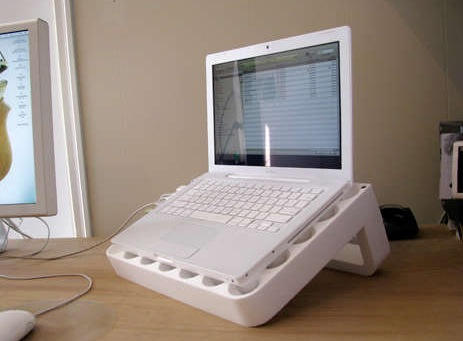
Turn Your MacBook Packaging Into A MacBook Stand

20100303-instructables.jpg

The best ideas are always the simplest. This is a fantastic tip from one of the team at Massive Studios, who needed a stand to rest a MacBook on.

Why bother spending money on something made of metal or plastic, when everything you need came in the box, wrapped around the MacBook?

Some Instructables are complicated but this one’s dead simple. All you need provide is a couple of screws – yep, screw them right into the styrofoam, apparently it works just fine – and a blade to slice the foam in the first place, and that’s it.

And if you’re wondering whether someone’s thought of turning an iPhone box into an iPhone dock, the answer is most certainly yes.

DON'T MISS
Airbag Smashes MacBook Into Man’s Chest, Leaves MacBook-Shaped Bruise

About the author

gilest

Giles Turnbull is a freelance writer in England. He writes for the Press Association and The Morning News. He has a website you can ignore and a Twitter account you needn't follow.

(sorry, you need Javascript to see this e-mail address)| Read more posts by .

Posted in Hardware Hacks, Macbook, News, Quickies, Top stories |

  • http://classiccaseof.blogspot.com/ ZJH90

    Haha, I have been doing this same thing for a few months now. Really works!

  • http://www.datamobilitygroup.com josephmartins

    Now that’s an ergonomic nightmare. Creative, but not good for you, especially if you’re sitting in a relatively low seat. As it is the large screen displays (like the one next to the Macbook in the photo) already force users to sit in a manner that is not good for their necks and backs.

    The top edge of monitors should always be placed at, or slightly below, the horizontal line of sight to take stress off the neck and spine.

  • Eric

    I think the point was to make it level with the other display for extending your desktop across the two screens. I’ve done the same thing in the past with a regular LCD monitor on the desktop, and then you put your laptop on the monitor stand to raise the height and make it level with the LCD monitor.

    It’s a much nicer way to work since you’re not hunching forward to look the laptop screen than looking up to see the LCD monitor (which is way uncomfortable IMHO.)

    Not sure where you get the business about the “ergonomic nightmare” from. Talk about over dramatizing things.

  • Cowicide

    Unless you have an SSD, I can’t imagine prolonged usage at that angle is good for the life of your spinning hard drive?

    Just sayin….

