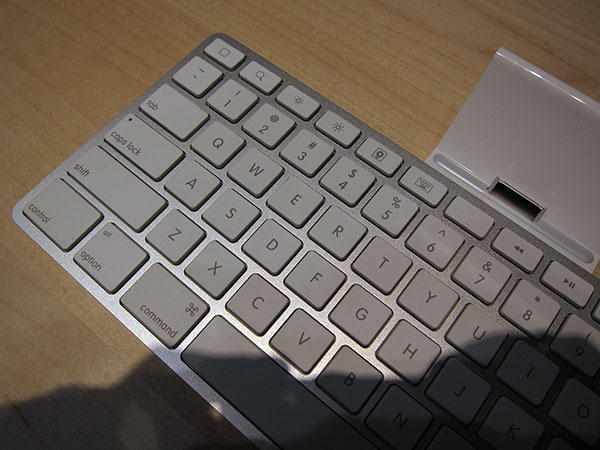
What is the iPad keyboard’s blank function key for?

What is the iPad keyboard’s blank function key for?

The iPad’s hardware keyboard dock is the best hope for users looking to do serious writing on Apple’s latest device, but if a picture posted by MacRumors forum-goer macduke is anything to go by, it might also reveal some of the tablet’s still unannounced software capabilities.

Although the iPad keyboard dock is mostly similar to the Apple aluminum keyboard, the function keys have been replaced by various shortcut buttons. From left to right, these keys are: Home, Search, Brightness Down, Brightness Up, Photo Album, Keyboard Toggle, Blank, Skip Back, Play / Pause, Skip Forward, Mute, Volume Up, Volume Down and Lock Screen.

That all seems straight-forward enough, but it’s that Blank key above the 6 that is causing a flurry of speculation. Apple doesn’t leave blank function keys on its laptop keyboards, which the iPad’s keyboard dock is most similar to. Therefore, it seems hard to believe that Apple couldn’t think of a perfectly good use for that key.

Now, the image itself was initially posted over at iLounge, snapped at the January 27th iPad announcement. Is it possible that key is blank so as not to leak some yet-announced feature of the iPad? Say, a dashboard, or perhaps (even better) a multitasking app switch screen? No word from Apple yet… but we should know within a month.

DON'T MISS
For Writing and Real Work, iPad Needs a Keyboard Dock [Review]

Update: Reader Seth points out that there’s a lot of commentary on this exact same issue over at 9to5Mac.

About the author

John BrownleeJohn Brownlee is news editor here at Cult of Mac, and has also written about a lot of things for a lot of different places, including Wired, Playboy, Boing Boing, Popular Mechanics, Gizmodo, Kotaku, Lifehacker, AMC, Geek and the Consumerist. He lives in Cambridge with his charming inamorata and a tiny budgerigar punningly christened after Nabokov's most famous pervert. You can follow him here on Twitter.

(sorry, you need Javascript to see this e-mail address)| Read more posts by .

Posted in Hardware, iPad, News |

  • http://9to5mac.com LLSETHJ
  • Giraldo

    It is probably nothing and will stay blank. I have an Apple bluetooth keyboard and there are actually two blank keys in that area (F5 and F6).

  • Bill

    It’s the Home button? You know, the little round button with a square in it on your iPhone….

  • Bill

    Meh… Never mind what I said… -_-

  • http://ihbs.co.uk Ben

    i have a blank key on my wired apple keyboard with my mac mini. you can set it to do different things if memory serves. Perhaps its to perform a similar function to what pressing the iphone button twice does?

  • joh

    I would say dashboard. The iPad as shown had none of the small iPhone apps like weather, alarm clock or calculator, you remember? All of these just are perfect as dashboard widgets. And this could also solve most of the multitasking problems — you could easily have music streaming widgets or IM clients as widgets, available at any time without leaving the app you’re using.

    Well, we will see. Maybe later, in 4.0 or so.

  • http://www.toxicspark.com Andrew Macdonald

    I know its highly unlikely, but lets hope Apple puts a camera into the device at the last minute.

    That blank key could be used for video messaging maybe? Like i said. HIGHLY UNLIKELY, but we can dream, cant we?

  • gav

    im thinking camera!!

  • Jean Claude

    My MacBook also has blank F5 and F6 keys. I agree that it will be nothing.

  • kookoo
  • steven

    C’mon people…its a portal to Andromedsq

  • Dai Jones

    The mac keyboards don’t have “blank” function keys, as such – they are still function keys, and can be used as such by applications or assigned functions by the user. F5 and F6 don’t have functions predefined by Apple as part of the alternate use case for the row of function keys. As far as I can tell though, on the iPad keyboard there’s no standard function key use case for these keys, and their only functions are those defined by Apple. As such it would be quite unapple like to have a useless key sitting there. Could be intended for use by an as yet unrevealed function; or it could be that some feature had to be pulled and they haven’t yet gotten around to finding a new use for that key

  • Alex

    Has no one noticed it’s the same symbol that’s on the home key on the iPhone? You wouldn’t want to press the home key while the iPad was in the doc, as the pressure could knock it over, where as lighter touches can be used on the touch screen.

    So you need a home button on the keyboard, so this would be it.

    That’s my bet anyhow. Do I win an iPad if I’m right?

  • robinson

    Alex, your logic is impeccable and you would win one except that they said that the first key is the Home key!

    I like the idea that it’s for an iPad Switcher. Automatically moves to last app run.

    Or, it was supposed to be the Video Conferencing, iChat icon, but as the camera didn’t make into the first iteration, they rubbed out the symbol on all the keyboards! :)

  • Matt

    As many people have pointed out, Apple does this all the time. All of their keyboards use the same basic frame for the qwerty portion. For their wired/bluetooth keyboards, the f5 and f6 keys, which usually control backlighting, are instead left black, only active as function keys. This is exactly what is happening here. You will likely be able to change it, or add functionality, but by default the key will remain blank. I feel however like this is a missed opportunity for a “deck o’ cards” button for multitasking.

  • http://ObamaPacman.com ObamaPacman

    Sharks with laser beams!!!

  • ged

    why can’t I re-programme my function keys as Apple says I can in help?

