Downgrade iPhone with SHSHs Stored on Cydia [Jailbreak Superguide]

Downgrade iPhone with SHSHs Stored on Cydia [Jailbreak Superguide]

If you accidentally updated your jailbroken iPhone 3GS, you cannot simply downgrade it by restoring to an older version of the firmware (even in DFU mode) because of an added layer of security by Apple.

However, if you have a previously jailbroken iPhone 3GS, there’s a possibility that Cydia saved some files called SHSHs to help you bypass this added security. Cult of Mac’s how-to guide will help you do it.

What you’ll need:

  • a Mac
  • iPhone 3GS
  • Older Firmware

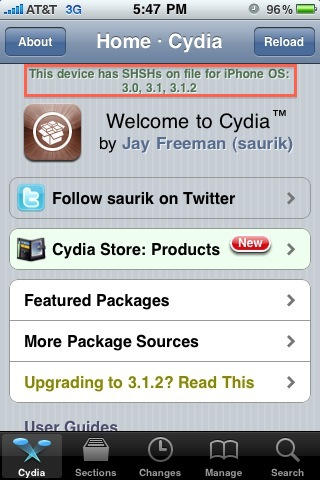
1. Make sure you had your SHSH stored on Cydia before you updated (it should’ve displayed a message like the below screenshot for the firmware version that you want to restore to, before you upgraded).

Downgrade iPhone with SHSHs Stored on Cydia [Jailbreak Superguide]

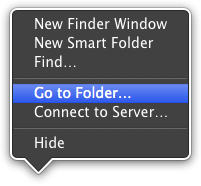
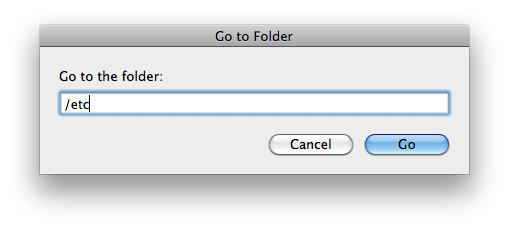
2.Right click the Finder icon in your Dock and click ‘Go to Folder.’ Type in ‘/etc’ as the path and press the return key on your keyboard.
Downgrade iPhone with SHSHs Stored on Cydia [Jailbreak Superguide]

Downgrade iPhone with SHSHs Stored on Cydia [Jailbreak Superguide]

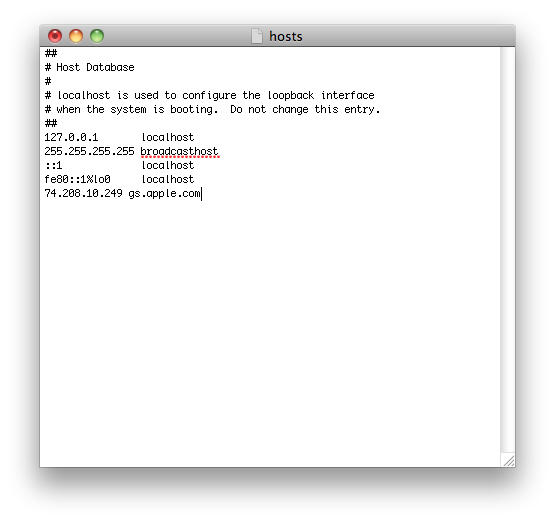
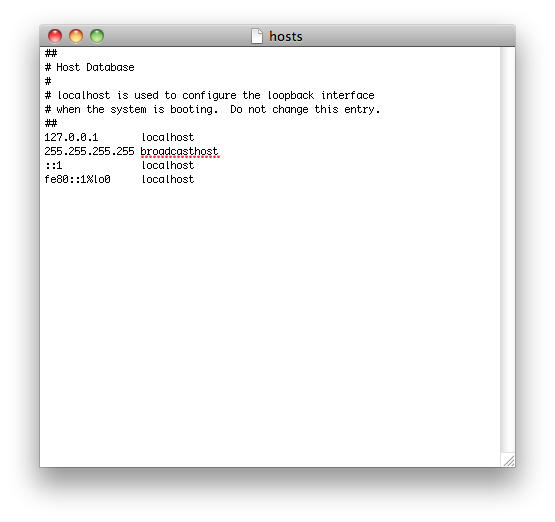
3. Find the ‘hosts’ file and double-click to open. Add the following code to the end of the file:

74.208.10.249 gs.apple.com
Downgrade iPhone with SHSHs Stored on Cydia [Jailbreak Superguide]

Downgrade iPhone with SHSHs Stored on Cydia [Jailbreak Superguide]

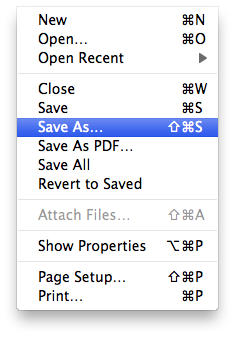
4. Click the ‘File’ button in menu bar and select ‘Save As…’.

Downgrade iPhone with SHSHs Stored on Cydia [Jailbreak Superguide]

Downgrade iPhone with SHSHs Stored on Cydia [Jailbreak Superguide]

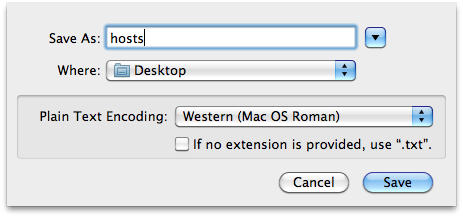
5. Use ‘hosts’ as the filename and change the save location to ‘Desktop’. Also, uncheck the checkbox before if no extension is provided, use “.txt.” and click ‘Save.’

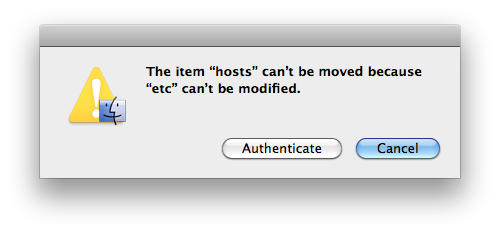
6. Now, move the ‘hosts’ file from your desktop to the ‘/etc’ folder. When asked, click the ‘Authenticate’ button.
Downgrade iPhone with SHSHs Stored on Cydia [Jailbreak Superguide]

DON'T MISS
How To: Jailbreak iPhone 3G/3GS and iPod Touch G2 Using Pwnage Tool for Mac [Jailbreak Superguide]

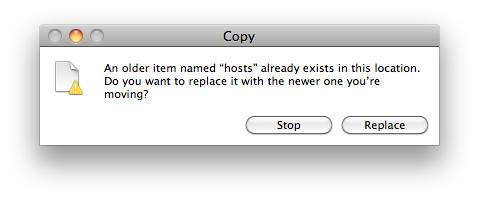
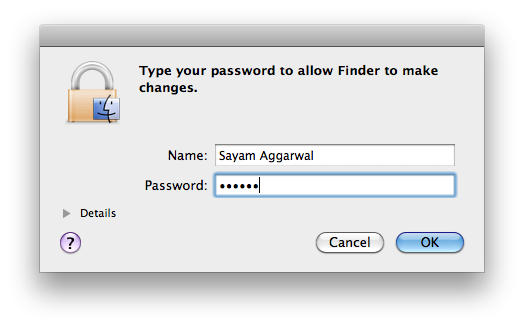
7. Next, click the ‘Replace’ button and type in your user password when asked and click ‘OK.’
Downgrade iPhone with SHSHs Stored on Cydia [Jailbreak Superguide]

Downgrade iPhone with SHSHs Stored on Cydia [Jailbreak Superguide]

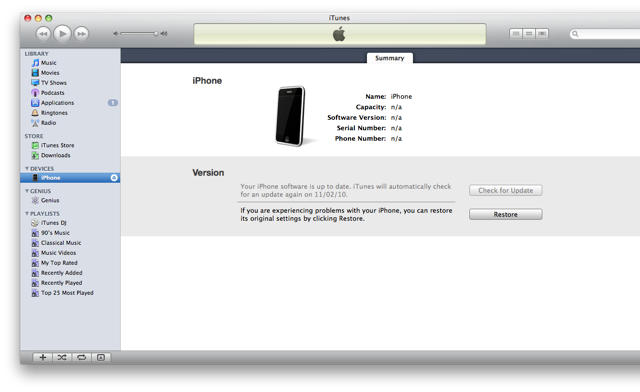
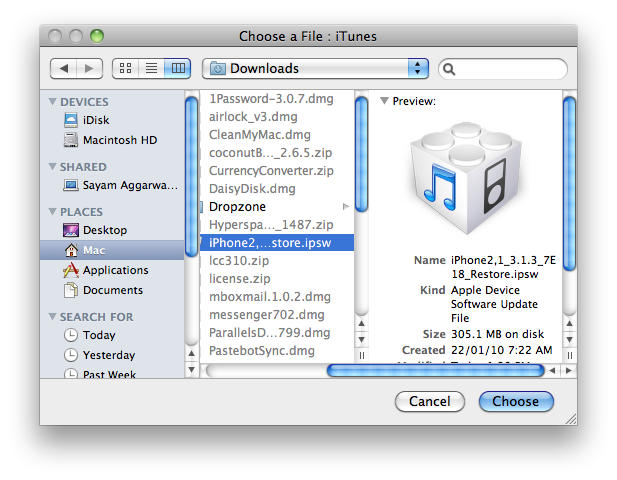
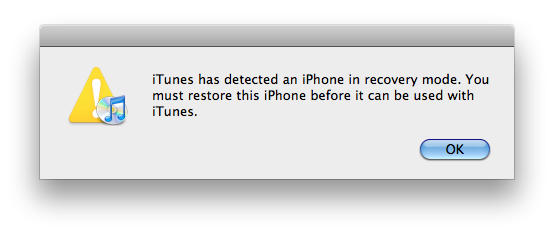
8. Put the iPhone in DFU mode with your phone connected to the Mac – turn it off, hold both home and power button for exactly 10 seconds, let go of the power button and keep holding home button until the iTunes prompts opens telling you it has “detected an iPhone in recovery mode.” At this point, your iPhone display should be blank. Click ‘OK’ and then while holding the ‘Option’ key on the keyboard, click the ‘Restore’ button. A window will pop-up asking for the location of the firmware file, select it and click ‘Choose.’
Downgrade iPhone with SHSHs Stored on Cydia [Jailbreak Superguide]

Downgrade iPhone with SHSHs Stored on Cydia [Jailbreak Superguide]

Downgrade iPhone with SHSHs Stored on Cydia [Jailbreak Superguide]

Downgrade iPhone with SHSHs Stored on Cydia [Jailbreak Superguide]

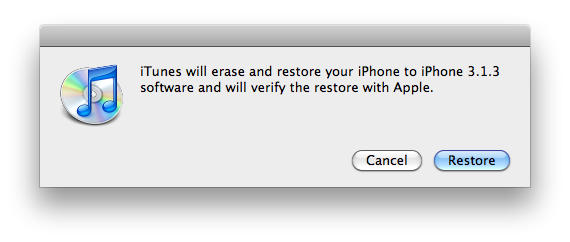
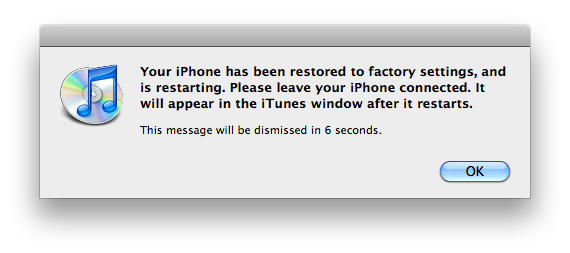
9. Click ‘Restore’ when prompted. After iTunes is finished restoring, click ‘OK’ and then you should be back on familiar ground — with the old firmware.
Downgrade iPhone with SHSHs Stored on Cydia [Jailbreak Superguide]

Downgrade iPhone with SHSHs Stored on Cydia [Jailbreak Superguide]

About the author

Sayam Aggarwal

Sayam Aggarwal is a 18-year-old student living in India who has been an Apple fan for almost 5 years. He has worked with ModMyi, one of the leading iPhone communities, as an author for more than a year. He spends most of his free time on the Internet fetching the latest news regarding Apple and its entire product range. Follow him on Twitter!


(sorry, you need Javascript to see this e-mail address)| Read more posts by .

Posted in How-To, iPhone 3G S, iTunes | Tagged: |

  • Herman

    ehrm… dude… that’s 3.1.3 in the screenshots… :P

  • Herman

    Also, you start out the article with “accidentally upgraded to 3.1.2″, don’t you mean “accidentally upgraded to 3.1.3″? And what version do you want us, your readers, to end up at, anyway? :)

  • Sayam Aggarwal

    Screenshots are for illustration purposes only as I couldn’t downgrade my latest bootrom 3GS cos I had no SHSHs stored…

    Also, thanks for pointing the other thingy out :)

  • Herman

    no worries :) I just wanted it right because I want to save this article for future reference – having my 3.1 hashes on file ‘n all ;)

  • Jaxel

    I think that this would work on a windows OS machine, simply by using the c:\windows\system32\drivers\etc\hosts file instead of the host file explained before.

    But im not sure =)

  • Jaxel

    Confirming it works on a Win Machine, but also noticed that i needed to ask the following ip on the hosts file:

    74.208.10.249 gs.apple.com
    74.208.105.171 gs.apple.com

  • Mustafa

    Wat do u mean ?
    which ip should we put then?
    74.208.10.249 gs.apple.com / or
    74.208.105.171 gs.apple.com

  • cy

    What if I buy a 3GS iPhone that comes with 3.1.3. Can I downgrade it to 3.1.2 so I can unlock my iPhone? If so, can you tell me the best way of going about it?

  • Jp

    @cy

    You cannot downgrade because you did not save the shsh files. Sorry, but you have to wait for the next jailbreak/unlock program.

  • M@x

    What if my Cydia screen reads:

    This device has SHSHs on file for iPhone OS: 4.0

    Does this mean i can upgrade to OS4 and still have my phone
    jailbroken?, or that if I accidentally upgrade I can downgrade to 3.1.3?

  • Smalls

    Good question M@X, I’ve been wondering that myself.

    Sayam, can this process still be done directly on the iPhone using ifile?

  • jesse

    wondering the same thing! it’s reads my 4.0 SHSHs are saved but I’m running 3.1.3 on a 3gs.does that mean I can’t downgrade to 3.1.3 if I upgrade to 4.0?

  • Nicki

    I also have “this device has SHSHs on file for iPhone OS:4.0. I’m wondering if I can upgrade as well without losing my unlock, since there are quite a few apps that will only run if you have 4.0. I have 3.1.2 now.

  • mindas

    hi guys i’ve got the same problem! there is anythink that we can do? help someone please!!! ”my device has shshs on file for iphone os/ios:4.0” i have 3.1.2

  • Imr

    heyy guys my cydia screen shows that ”This device has shshs on file for iphone os/ios:4.0” and I am runnng on a 3GS 3.1.3.

    So what does this mean??? Can I upgrade to iOS 4.0 or 4.0.1 and still be able to downgrade to 3.1.3 if necessary???

    Thnx

  • wedge

    i have no /ect folder on my mac is there anything i need to do for it to apper

  • wedge

    sorry i ment /etc

  • Claude

    Is there anyway of doing this with an iphone 4, since I have my SHSH blob saved on Cydia? Would it be the same procedure?

  • Torpedo

    I’m trying to upgrade my jb 3.1.2 3Gs to 4.0.1

    So if I have 4.0.1 SHSH on file with Cydia can I use 74.208.10.249 gs.apple.com to upgrade from 3.1.2 to 4.0.1 ?

    I have seen this question many places but seen no answers.

    Or is there an other way to do this upgrade (to avoid upgrading to 4.0.2)

  • HeckFire!

    I down graded to 3.1.3, then noticed I can’t jb 3.1.3. I backed up with cydia when I had 4.0.2, but I wiped the phone during my downgrade. Now I’m s.o.l., I don’t have a signed anything and can no longer upgrade. No access to cydia without a JB phone. Any answers?

  • DM

    Thanks 4 nice instrucs.

    I have an iphone 4 (US bought) that I use in Sweden with Swedish Operator SIM card. It is previosuly jailbroken and unlocked (CYDIA) that my trigger happy finger took from 4.0.1 to 4.0.2 ( I know = stupid) and now I can’t use it.

    I got to the last part and APPLE wouldn’t allow for the restore. How come? more importantly – what to do?

  • DM

    PS

    After my upgrade to 4.0.2 I no longer have any CYDIA on the phone…

  • @pozzdonnz

    i need shsh back 3.1.3 original shsh pls for good guy or hacker pls make downgrader For Us Pls kind us Now i has shsh but 4.0/4.0.1
    accurelly 4.0.1 it not bad but i need 3.1.3 original shsh now i have to wait for Good Hacker For Your kind Please Make Downgrader and put in cydia Like Fuzzy brand But it for ios4 Anyway Thank you very much For @Comex Team For
    jailbreakme.com Thank

  • Umi

    Hey I can’t find any hosts in etc can u help pls I got my iPhone 4 unlocked it’s giving me this msg pls help

  • Owelle

    Can’t get the downgrade thing to work. Have followed all instructions. Saved the shsh blobs for the Iphone 3Gs to Cydia, before upgrading, but need to downgrade now. Nothing is working! Any suggestions?

  • Scott Deville

    I have not had much luck restoring my phone back to 4.0, but thanks to your instructions, i’m back jailbreaked, and rockin again.

    Thank you……
    Regards
    Scott

  • Xeric

    Hi. i added the cydia to the hosts but whenever i tried restoring with itunes, it extracts the software but says my device isn’t eligible for the request build. does that mean that i don’t have my shshs backupped in cydia (though i remember i did too)? btw I have 3.1.2 on ipod touch MC model with 8gb, jailbroken before but cannot reboot with blackra1n (it freezes). Thanks!

  • shokka9

    Well, been trying to restore my iphone 4 for the last 2 nites…Obviously its JBd, i backed up my shsh long time ago, before 4.0.1 even came out. On my About screen on iphone it still reads ios 4.0 8A293. I have NEVER updated any firmware, i know what i am doing……..anyways issues with my current setup blah blah blah….so i wanna restore….i noticed some while back that Cydia said i had 4.0.2 shsh saved and 4.0.1 (even the umbrella backup was 4.0.1). I have never updated, Umbrella tells me i have a 4.0 8A293 device, the device says the same thing. But i cannot restore back, as somehow Cydia doesnt have 4.0 blobs? but it has 4.0.1 & 4.0.2?? WTF?? If i could update to 4.0.1 then it would probably work as in restore, after the update….but i dont get it at all. If anyone figures this out, be interesting to find out….

  • jose

    i have a ? i had the iphone 3gs with shsh saved for 3.1.2 and 4.0 firmware through cydia…i now own an iphone 4 with 4.0.2…would it be possible for me to restore back to 4.0 in someway?

  • Andy

    For those having problems saving the host file: http://discussions.apple.com/thread.jspa?threadID=2559311&tstart=0 This worked for me (hurray for using apple’s support forums to get around them!)

    Also, you can find the /etc folder by going to FINDER, GO (top menu) GO TO FOLDER then type in /etc

    I followed this process but it didn’t work for me (phone was previously jailbroken). Are you supposed to keep a SIM in there while you restore it? Does the version of iTunes you’re running affect this? Recently I upgraded to iTunes 10 and I fear this may have wrecked my chances?

  • tamo

    Thanx, man!
    It works!

  • Micky

    WARNING:

    These “instructions” NO LONGER will work for ANY iPHone OR iPad running 4.01 or 3.2.2 (iPad), since Apple Servers won’t even recognize your that the machine’s in DFU mode in iTunes (9.2 – 10)

    DON’T BOTHER wasting your time changing Host file; etc….

  • Kurt

    These instructions were helpful but not sufficient. TinyUmbrella was needed to take the phone out of the restore loop.
    Regards
    Kurt

  • Bokababa

    What if you want to Jailbreak your Itouch for the first time and its already on the newest software? Basically How do you jailbreak a brand new itouch?

  • Cmescott

    help! everytime i try to replace the hosts file in the etc folder it will ask to authenticate, then ask to replace it, but when i click replace another window pops up after i enter the password saying “The operation can’t be completed because a required item is in use.” 
    i don’t know what i’m doing wrong?

  • J Poop

    thanks, it worked!!