Sync iTunes with Mobile Devices from Sony, Nokia, Sony Ericsson

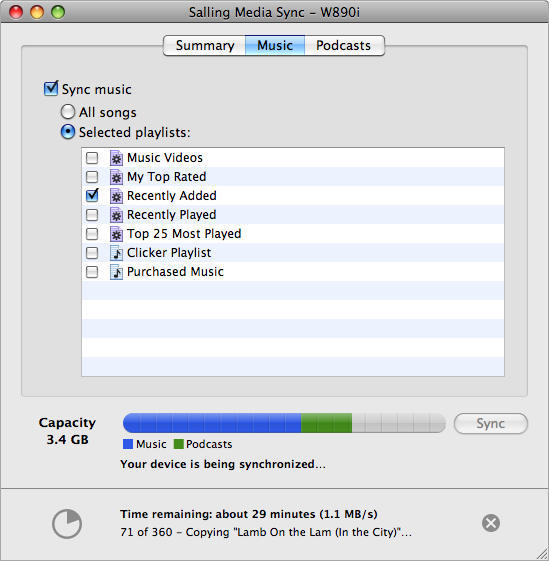
Salling Software’s MediaSync is a brand new application that synchronizes playlists, music, and podcasts in iTunes onto mobile devices from Sony, Nokia and Sony Ericsson. President of the Swedish software maker, Jonas Salling, says “There are a lot of frustrated phone owners out there who love iTunes, but can’t easily get their tracks onto their non-Apple device.” His application works with iTunes 7.6.x and 7.7.x, is compatible with many popular phone models, and requires Mac OS X 10.4.11 or 10.5.x. A Windows version is also available for Windows XP SP2 and Vista with Windows Media Player 11.
The basic installation is free, though the paid app features “smart” sync, allowing you to sync faster by minimizing the amount of data transferred in incremental syncs.
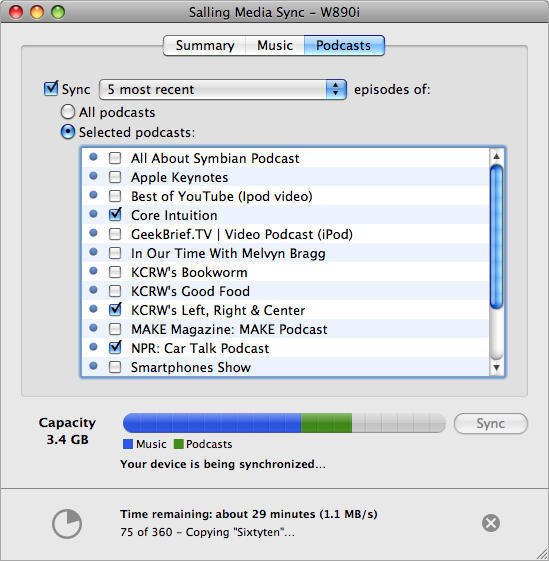
With a compatible phone connected to a USB port, you simply select the playlists and podcasts you want on your device. Media Sync not only uploads the music tracks and podcast episodes, but also replicates each actual playlist on your device and–on devices that support it–transfers play count metadata for each item, reinforcing the sense of having a piece of iTunes in your pocket. Although Media Sync works with most media in iTunes, it will not transfer DRM-protected content.
Comments Off
More from Cult of Mac
- Like A Donkey Coupling With A Unicorn, Connect Your Windows Phone 7 Handset With Your Mac
- Microsoft Pushes First App To The Mac App Store
- Spotify Is Everything That iTunes In The Cloud Should Be [Review]
- Google Music Beats Apple In Bringing iTunes To The Cloud… In Flash
- Report: Apple ‘DRM-Free’ iTunes Not A Windows Media Fan

![Read "How The iPad Is Revolutionizing Branding [Exclusive Book Excerpt]" Read "How The iPad Is Revolutionizing Branding [Exclusive Book Excerpt]"](http://cultofmac.cultofmaccom.netdna-cdn.com/wp-content/uploads/2012/02/marcolina-250x150.jpg)


![Read "EA Sports Gearing Up For The Super Bowl, Discounts MADDEN NFL 12 To $0.99 [Deal Alert]" Read "EA Sports Gearing Up For The Super Bowl, Discounts MADDEN NFL 12 To $0.99 [Deal Alert]"](http://cultofmac.cultofmaccom.netdna-cdn.com/wp-content/uploads/2012/02/maddennfl12-640x313-250x150.jpg)

![Read "ZAGGFolio Keyboard Case Is Tough, Stylish And A Delight To Use [Review]" Read "ZAGGFolio Keyboard Case Is Tough, Stylish And A Delight To Use [Review]"](http://cultofmac.cultofmaccom.netdna-cdn.com/wp-content/uploads/2012/02/P1020394-250x150.jpg)
![Read "If iBooks Author Is Overkill For Your Simple eBook Project, Try Book Creator For iOS Instead [Review]" Read "If iBooks Author Is Overkill For Your Simple eBook Project, Try Book Creator For iOS Instead [Review]"](http://cultofmac.cultofmaccom.netdna-cdn.com/wp-content/uploads/2012/02/bookcreator-250x150.jpg)
![Read "Stuck On Earth, Perhaps, But Not Stuck For Lovely Photos To Look At [Review]" Read "Stuck On Earth, Perhaps, But Not Stuck For Lovely Photos To Look At [Review]"](http://cultofmac.cultofmaccom.netdna-cdn.com/wp-content/uploads/2012/02/stuckonearth-250x150.jpg)
![Read "How To Type Like A Hacker On Your iPad [Review]" Read "How To Type Like A Hacker On Your iPad [Review]"](http://cultofmac.cultofmaccom.netdna-cdn.com/wp-content/uploads/2012/02/hackertyper-250x150.jpg)

![Read "Use A Screensaver As Your Desktop Wallpaper [Video How-To]" Read "Use A Screensaver As Your Desktop Wallpaper [Video How-To]"](http://cultofmac.cultofmaccom.netdna-cdn.com/wp-content/uploads/2012/01/033-250x150.jpg)
![Read "I Can’t Reinstall Snow Leopard After Installing Lion [Ask MacRx]" Read "I Can’t Reinstall Snow Leopard After Installing Lion [Ask MacRx]"](http://cultofmac.cultofmaccom.netdna-cdn.com/wp-content/uploads/2012/01/mac_os_x_lion_install-250x150.jpg)
![Read "Customize Notification Center To Fit Your Every Need [Video How-To]" Read "Customize Notification Center To Fit Your Every Need [Video How-To]"](http://cultofmac.cultofmaccom.netdna-cdn.com/wp-content/uploads/2012/01/Notification-250x150.jpg)


