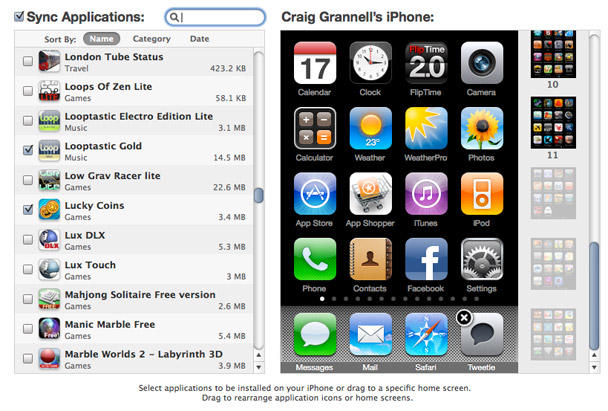
A couple of weeks back, I wrote Temporarily Get More iPhone Home Screens Via Cunning Bug Exploit, but had heard staying away from the iTunes Applications tab within my iPhone was probably a Very Good Idea. Reader Larry Pressnell noted that since the most recent iTunes update, his extra screens have been accessible in iTunes.
Since I needed to add some apps to my device, I decided to take the plunge earlier and, sure enough, my experience mirrored Larry’s: 11 home screens were shown, and extra ones were dimmed—see the grab above. Interestingly, items could be dragged from these ‘extra’ screens to the standard ones, with no problems, and a full sync didn’t find my extra pages vanishing into the ether. Whether this has anything to do with Voice Memos (the app used to get extra screens in the first place) being the last app on my final page, or the fact I’ve yet to update my iPhone OS to the latest point release, I’ve no idea.
Are you having fun with extra pages and managing to successfully rearrange your apps in iTunes? If so, let us know in the comments!

Craig Grannell was once Cult of Mac’s designer and an occasional contributor. Find out whatever he’s doing now on Twitter @CraigGrannell or his website, craiggrannell.com.

