Some readers might remember the fuss a few weeks ago, when Snow Leopard came out and people noticed that it did something screwy to the way files behave.
By removing support for Creator Codes in 10.6, Apple also removed the system’s hitherto built-in ability to distinguish which application created a file, and re-open it in that application every time it’s double-clicked in future.
For a lot of people this is no big deal, but for some it matters a lot. For example, someone who builds web sites for a living will probably want HTML files they’ve created in a text editor to re-open in that same editor, and HTML files they’ve saved from the web to open in Safari.
The big change in 10.6 is that, as far as the system was concerned, there is no longer any difference. Every HTML file will open in a browser when double-clicked, be it created or downloaded or anything else. And that annoys a handful of people who used to depend on the old behavior to, you know, get shit done. (For lots more technical detail plus all the ins-and-outs and possible workarounds and arguments about how annoying it all is, see these posts by John Gruber, Chris Suter and Matt Neuberg.)
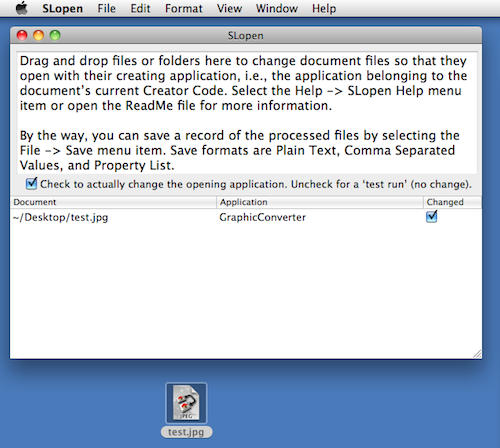
Australian developer Vincent Tan decided to do something about this, and has created a simple app called SL Open.
Using it is simple: drag a document into the SL Open window, and it’s metadata will be changed so that henceforth, it always opens in the app that created it. All the app is doing is changing the file’s “Open With…” criteria; the main benefit is that SL Open makes it possible to amend a large number of files very quickly, and much faster than you or I could manage using the Finder and Get Info.
As Vincent makes clear in the release notes, this is really just another work-around, not a fix. He strongly urges users to backup any documents before changing their metadata with SL Open, and to do a trial run with some test documents first, just to be sure.

Giles Turnbull is a freelance writer in England. He also writes for the Press Association and The Morning News. You can find out more at his website, and follow him on Twitter @gilest.

