Doubtless by now, you’ve seen a few notifications on your Mac when there are software updates to be applied. They’re easy to temporarily get rid of, either by clicking ont he Close button, swiping them to the right, or disabling notifications for the rest of the day. This allows you to update your software when you want to, on your own schedule, with a lot less nagging.
But what if you want to not be bugged at all about a specific software update? With the first solution above, the notification comes back in a little while. If you turn notifications off for the day, they’re back at nagging you tomorrow. If there’s a particular bit of software you’d like to not update, or just are tired of being bugged, here’s how to keep it from re-occuring.
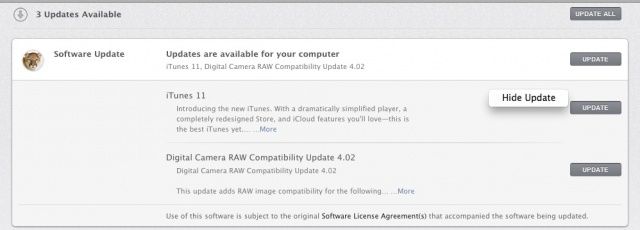
Head into the Mac App Store by launching the app, which is found in your Applications folder, Dock, or Apple menu. Once launched, click on the Updates tab at the top. Once the Software Update app has finished checking for updates, you can right-click on (most) apps in the list to be updated, and then select, “Hide Update.” Then Notification Center will stop bugging you with that particular update.
If you want it to come back, select “Show All Software Updates” from the Store menu in the Software Update app.
You can also turn off all Software Update checking activity in the Software Update pane of the System Preferences, but that’s really not a good idea. Some updates are really important, like Security and OS X updates.
Via: OS X Daily


