iPhone Wish-List: Display All Installed iPhone Apps Via Spotlight, and More Springboard Home Screens

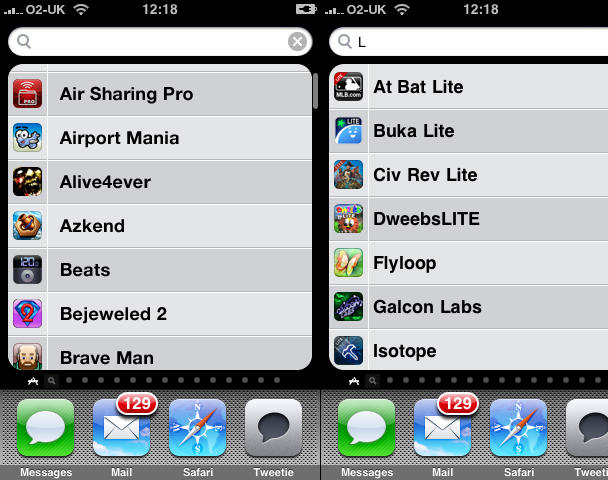
A list of all installed apps, which can be filtered, like in Finder on Mac OS X. C'mon, Apple - how about it?

A list of all installed apps, which can be filtered, like in Finder on Mac OS X. C'mon, Apple - how about it?

Since getting my iPhone, I’ve become a certified app junkie, justified somewhat by the fact I review apps for various publications on- and offline, and for my own website, iPhoneTiny.com. Despite regular clearouts, my home screens often end up full, not least because many games remain on the device, to avoid my losing my progress. (Apple, in its infinite wisdom, still doesn’t provide any means of backing-up progress and optionally reinstating it when you reinstall an app. It’s like Apple saw the cheapskate end of the DS market—carts without battery back-up—and went “we’d like a piece of that pie!”)

Having been commissioned to write some group reviews recently, I’m now at the stage where I have eleven full home screens and dozens of apps in ‘the void’—that place apps go when they aren’t allowed to sit on a home screen. Apple’s suggestion: use Spotlight, and that’s fine if you can remember every app you have installed. If not, tough. (And rearranging them in iTunes to get the most ‘important’ ones on the 11 visible home screens isn’t a great tip, given that iTunes appears prone to crashing in a nasty fashion when rearranging apps—usually after you’ve spent an irritating 15 minutes doing so.)

Various people have tried designing an improved springboard for non-jailbroken devices, most recently including Bruce Tognazzini, but these tend to lack the elegance of Apple’s existing solution. Tognazzini offers labels and vertical scrolling in pages, but Lukas Mathis argues that this is too complex, and I agree. (Hat tip for these links: Daring Fireball.) The springboard Exposé concept also appears awkward and fiddly.

I wonder whether a simpler solution would assist anyone with lots of apps installed. Along with upping the number of home screens to 14—the most that could be displayed using the current UI before things start looking iffy—Spotlight could have a separate apps list page. This could be accessed by a swipe on entering Spotlight (as in, it would spatially live to the left of the standard Spotlight screen). By default, this screen would display an alphabetised list of your apps, and typing in the Spotlight field would filter them, just like the Applications folder in Mac OS X’s Finder in combination with a Finder window Spotlight-driven search field.

DON'T MISS
Temporarily Get More iPhone Home Screens Via Cunning Bug Exploit

About the author

Craig Grannell

Craig Grannell is Cult of Mac's designer and an occasional contributor. He also runs iPhoneTiny.com, a Twitter-driven reviews site for iPhone apps and games. Follow Craig on Twitter @CraigGrannell and visit his website, Snub Communications.

(sorry, you need Javascript to see this e-mail address)| Read more posts by .

Posted in iPhone 3G S, iPhone Apps, Opinions, Top stories |

  • Bob

    You know what else needs to change? When I’m downloading something from the app store on my phone, it kicks me out of the store when the download starts. What if I’m a compulsive buyer and want to buy more? Why kick me out?

  • http://www.you.com me

    Just hit the menu button and type the name of the app you want. It’ll be there in the first few characters you lazy fart!!! :)

  • http://www.snubcommunications.com Craig Grannell

    @me: That’s all very well IF you know what you’re looking for.

  • ty

    iWant

  • Matthias

    Easy solution for the home screen dilemma:
    Allow scrolling of homescreens in *all* directions, not just left/right and arrange screens concentrically around the primary home screen.
    This would allow for a total of 8 screens to be accessed with just *one* swipe and a total of 24 in a mere two swipes from the primary. For whoever needs even more than that (I’ve never used more than six myself…), you might possibly consider adding a third circle for a whoopin’ grand total of 49 homescreens, each accessable in a maximum of 3 swipes from the primary one. But seriously, who needs that…
    For an idea of how this might look in practice, check out the index view of the “Daijirin” (大辞林) application, a Japanese-Japanese dictionary ported to the iphone and the single most elegant dictionary I have ever used on any electronic device.

    Also, allow for the creation of app aliases, for those of us who would like to keep related apps together for quick switching, but have some apps that are often used in conjunction with vastly different apps…

  • jim

    you want MORE home screens?! that’s going to be terrible to screen through. if you consider jailbreaking. there are a slew of options you can try. springjumps, categories, stacks, orbit, spotbright and many more options just a few clicks away ^_~

  • http://www.snubcommunications.com Craig Grannell

    I want some means of being able to see what I’ve got installed. More home screens could do this, but so could the list I mocked up. As for jailbreaking the device, I’m not going to do that because it’s work-critical.

  • yksi

    I really agree with you here.. I wish they would do this and have been hoping for this for a long time now.
    Even if an app could be downloaded that could do this i would do it (yes even if it required payment) though I think this should be a feature that should already be there.

  • http://www.inkatechnology.co.uk iphone applications

    It would be nice to turn the phone horizontal and have the keyboard with bigger letters.

    To have Zoom in the camera and video capability.

    Higher volume for music and the ring tones.

  • Paul

    I want the same thing. Since we can install so many apps, why we are limited in no. of screens? Better yet : give us an application who can list and manage all the apps on the iPhone. Now, this would be awesome.

