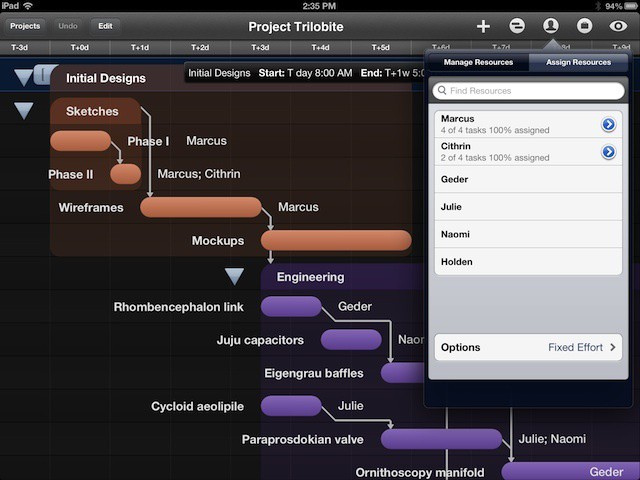
Resources are important to any project. They are the people, equipment, and materials necessary to complete a project. Even you’re just building a treehouse for the kids in the backyard, you still need to track the lumber, nails and screws, types of tools you’ll need (like a saw, hammer, etc.), and the people you’ll rope into helping you.
OmniPlan for iPad can help track the resources for projects that are smaller or larger. Let’s look at how.
Launch OmniPlan on your iPad, and launch a project that you’ve created, a template, or create a new project. Tap the icon that looks like a person silhouette to manage the resources for that project.
Tap the green plus button next to New Resource to add another one. To add a human resource, type in their name, email and their work hours (if applicable). You can also use the plus or minus buttons to adjust their Units, Efficiency, and Cost per Use and Cost per hour, if that matters to your project.
Equipment and Material resources are added and managed the same way, though Materials do not have a Unit or Efficiency measure. You can also group Resources together and manage them all in one fell swoop/tap.
When it’s time to assign tasks, simply select the task or group of tasks in the main OmniPlan window and then tap on the Resources button again. This time, though, tap on the Assign Resources tab at the top, choose a Resource to assign, and se their percentage of assignment. If you have two people equally assigned to the same task, you can choose 50% assigned to each of them.
OmniPlan for iPad allows you to balance the load of resources automatically every time you make a change to the people or things that are needed for your project. In addition, you can set options to have OmniPlan adjust the duration or the effort numbers depending on the kind of project you’re managing.
Got an iOS tip of your own? Need help troubleshooting your iPhone, iPod touch or iPad? Drop me a line or leave a comment below.

Rob LeFebvre is an Anchorage, Alaska-based writer and editor who has contributed to various tech, gaming and iOS sites, including 148Apps, Creative Screenwriting, Shelf-Awareness, VentureBeat, and Paste Magazine. Feel free to find Rob on Twitter @roblef, and send him a cookie once in a while; he’ll really appreciate it.

