MMS For iPhone Is Finally Here

MMS_update

AT&T’s long-awaited MMS update for the iPhone is finally ready. Just plug your iPhone into iTunes and hit the “Check for Update” button.

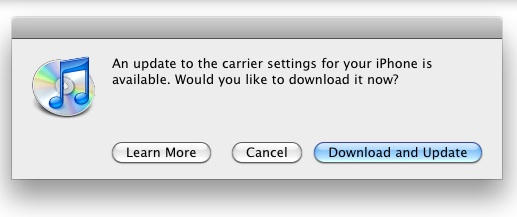
You should get the dialog message above, saying: “An update to your carrier settings for your iPhone is available. Would you like to download it now?”

Hit “Download and Update” and wait a few seconds. The update is done is a jiffy. Then go to your iPhone and launch the Messages app. There should be a little camera icon to the left of the text input box at the bottom. Hit it, and you’ll be able to send pictures or video with your text messages. Try it: it’s a lot of fun.

DON'T MISS
How-To: Get MMS On Your iPhone Right Now

PS: Some users are reporting they have to manually reboot their iPhone after installing the carrier update.

About the author

Leander Kahney

is the editor and publisher of Cult of Mac, and author of three books about technology culture: Inside Steve’s Brain, the New York Times bestseller about Steve Jobs; Cult of Mac; and Cult of iPod. Leander has written for Wired, MacWeek, Scientific American, and The Guardian in London. Follow Leander on Twitter @lkahney and Facebook.

(sorry, you need Javascript to see this e-mail address)| Read more posts by .

Posted in iPhone, iPhone Apps, News |

  • Stiv

    I’m one of those who had to reboot. But it’s there now.

  • Ryan

    Will this new carrier file disable any tethering hack? The 3.1 OS did, and I downgraded back to 3.0.1 and was able to keep tethering. I will download the new carrier file to get MMS (as long as it does not disable tethering) while still holding off on the 3.1 update if possible. Does anyone know details about this?

  • kim

    i had to manually reboot, now it works

  • ryan

    thanks for the reboot info! I was wondering why i couldn’t mms!!

  • Jeff

    Love it!!!! Finally!!!!

  • Josh

    Got the update. downloaded and re-synced. No camera icon in the message function area anywhere.

  • http://www.lith.com Jason Byfield

    Yep, had to reboot for it to show up. Sent out a MMS to a friend but he didn’t even get notification that I had sent him one. Heard rumors that AT&T will be sending texts when it’s been activated. I wonder if they still have the “opt out” setting turned on and MMS wont work until they turn it off.

    Anybody successfully send an MMS yet using the NEW carrier settings?

  • Sam

    I’m up and running (NYC)…works like a charm!

  • Matt

    I had to reboot as well before it would show up. I’ve sent two MMS messages so far. Both went “out” slowly, which I guess can be expected. I’ve not gotten confirmation of either of those messages being received as of yet.

  • rab

    incoming is not workng for me….when outgoing is???
    how do i fix this?

  • http://www.onsmash.com relly

    i have a jailbroken 3gs on 3.0 firmware…is 3.1 required for this carrier update? or not

  • Kyle

    had to do a hard reboot before I even had the camera icon, but after that I successfully sent a picture message to my wife. She got it with no problems so it is certainly working.

  • rab

    i can send out massages…but am not reciving them!
    what a pain…atnt needs to figure this stuff out!

  • shawn

    do u need to updated to 3.1 or can u use 3.o

  • Tom

    Im going to lose tethering, arent i? I hope somebody is already working around this to get both working. Thanks!

  • rab

    guys help pls!

  • Justin

    Sent a message to my girlfriend and it worked great but when she tried sending me one it didn’t work so maybe there are still sone kinks being worked out right now.

  • megan

    just been told that a picture I sent has been received! Still waiting to see if I get one back

  • Tom

    Update went fine, but now I can’t open any of my third party apps…? WTF?

  • Rava

    Orange county Ca; got it, iPhone rebooted, sent a picture MMS to my sis (verizon carrier) and she received the picture after 2 minutes (kinda’ slow) but is working good so far! I’ll try to send a video (I forgot that before post here sorry) and i’ll keep you posted (11:42am)

  • Tom

    For anyone that has that problem, I fixed it by installing a new app. Now I can open them all again. :?:

  • WadeHM

    Got the update, rebooted, got the camera icon, now I can’t send any messages at all! Just says message not sent.

  • john

    I did the hack MMS a few days ago, without it working, and still with this update my messages are not transmitted… any thoughts?

  • Rava

    … VIDEO TOO! video was received at my sis phone (verizon carrier) almos instantlly!… Here as I promised I’ve posted.

  • Michael

    I’m assuming this will disable tethering for those of us who enabled it.. I’m not exchanging MMS for free tethering.

  • http://akilahsakai.blogspot.com Akilah Sakai

    I powered down and powered up to get the little camera icon. No need to reboot by doing the whole 10 second hold on the HOME and HOLD buttons thing. Koolio!! Haven’t tried it on outside carrier yet, but did with another iPhone and it went in seconds.

    Enjoy! I like MMS ‘cos there are so many kids in my fam and someone’s always sending a cute pic.

  • Rava

    Is working great I’ve received photos and VIDEOS! and I’m able to save either one or all to my photo library!….

  • Christina

    I was forced to restore my iPhone and now lost all my music & contacts. but i do have mms now. yay?

  • MrJones

    Seems everyone doing this has now killed the service in Southeastern Michigan. Worked well earlier, now everyone is home and doing it, and neither mine or my wifes is sending or receiving now. Frinkin AT&T

  • Allan

    Shut down and restarted, texted a photo to my daughter, she got it and texted back. All apps working OK. Cool.

  • http://listentoandre.tumbler.com Andre

    Worked perfect after the re-boot.

    Finally.

  • Rava

    I received this from AT&T (kinda late don’t U think?)

    “AT&T Free Msg: Picture and video messaging (MMS) is now available for iPhone. Your existing messaging plan includes unlimited send and receipt of text, picture & video messages. To enable MMS, connect your iPhone to your computer and click “Check for Update” in iTunes, then restart your iPhone.”

    So far so good.

  • Erica

    Checked for update but “iphone configuration utility” won’t install. Keeps showing an exclaimation mark. Any reason for this?

  • jasmin

    i downloaded the update and it works fine. i just received a text msg from att saying that the update is available and blah blah blah… but i have a question. it says receipt for text message, i cant seem to find this. does anyone know how to work this?

    if so, please email me at (sorry, you need Javascript to see this e-mail address)

  • Molly

    <<>>

    ^^^Same here.
    I dont have a “MAC” i’m not that cool, i’m 16, and clearly dont have the money to buy one yet. (but i’m saving up for one)
    Anyway, I have a window’s vista PC.
    And I have the iphone 3G. It said “An update to your carrier settings for your iPhone is available. Would you like to download it now?” I clicked dowload.
    and it immediatly said “you’re update is ready” or something like that, then my phone immediatly then started to Sync.
    See, this happened YESTERDAY.
    I tried YESTERDAY and i even RESTORED my phone, and i STILL didnt’ get the “camera on my messages app”.
    I’m upset, can some one PLEASE help??

