So, you may be thinking of traveling to far off places this summer, blithely jetting off to other countries, bringing your iPhone hither and yon to take pictures, check email, call your friends to brag about the nice weather, and play some Angry Birds while on the long plane rides. Unfortunately, using that beautiful iPhone in other countries could see you coming home with more that just a sunburn and jet lag.
If you use your iPhone and access its network capabilities, you could be seeing a bill of hundreds, even thousands, of dollars. Here’s how to avoid having to take out a second mortgage to pay your bill.
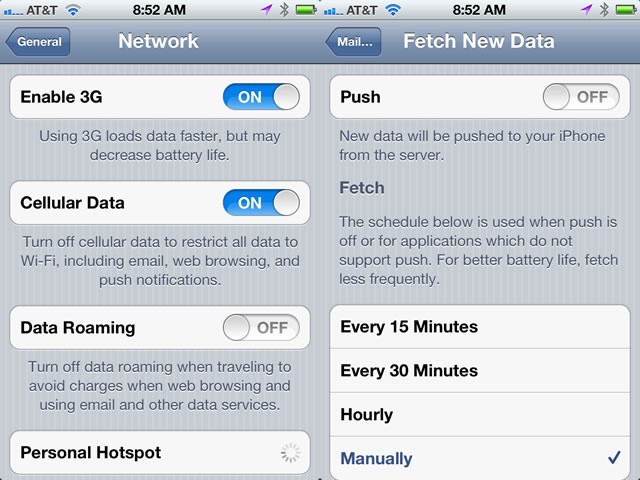
Apparently it’s the data roaming that adds the most extra dollars to your bottom line. First up, head into the Settings app. Tap on General, and then Network. Make sure Data Roaming is set to OFF. This will still let you make phone calls (more on that in a minute), but won’t allow you to accidentally run up a huge bill while surfing the web.
If you need data while traveling, be sure to turn off push email. Hop into Settings, then tap on Mail, Contacts and Calendars. Tap on Fetch New Data, and set Push to OFF. Now your iPHone won’t constantly access the network to pull down all those spam emails you get. You will still be able to check your accounts manually, of course. While you’re on that screen, you should also check off the Manually setting below that to be sure that any other rogue apps won’t try and access your data.
If you’re going to need a lot of data while travelling internationally, you might want to check out your carrier’s international data plans. AT&T has a variety of Global add on data plans, starting at $25 for 50 MB of roaming Data. They also have Global messaging plans as well. Be sure to call your carrier to check the specific features you can use and any restrictions on them before you travel.
While actual voice calls are the least expensive roaming charge, they can still add up. Be sure to add an international roaming calling plan, so that calls can cost less per minute while traveling. AT&T has a World Traveler add-on, starting at $6 per month, that allows you to make and receive calls in over 225 countries. Again, your mileage may vary, so be sure to call your carrier. We may be able to tip you off to the potential pitfalls of international iPhone use, but we can’t pay your phone bill.
Source: Knox News / AP

Rob LeFebvre is an Anchorage, Alaska-based writer and editor who has contributed to various tech, gaming and iOS sites, including 148Apps, Creative Screenwriting, Shelf-Awareness, VentureBeat, and Paste Magazine. Feel free to find Rob on Twitter @roblef, and send him a cookie once in a while; he’ll really appreciate it.

