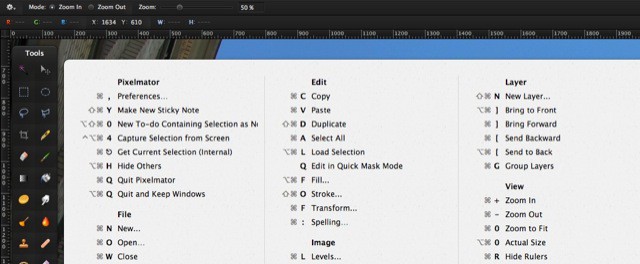
You know how in many Google web apps you can just press CMD-? to bring up an overlay containing all the keyboard shortcuts available? (you did know that, right?) Well, now you can do the same with any app on your Mac using the sweet and simple CheatSheet, a free app with this one single purpose.
Once installed, you can forget about CheatSheet until you have forgotten the keyboard command you want. Then, just hold down the Command key for a couple seconds and a bezel-type overlay will pop up and list all the currently available shortcuts of the frontmost application. That’s it.
I’m totally installing this when I get back to my Mac (currently I’m in some awful noisy bar with my iPad, but the Scotch is good here). Usually when I forget a shortcut I hit the "help" menu and do a quick search for the menu item I need. Then I curse when I realize that, in this view, the shortcuts don;t show up next to the menu items, and I then need to take note of which menu and submenu the command is under, and then go hunt them down, and then try to remember the shortcut. Rather inefficient, I think you’ll agree.
Better to use CheatSheet, hold the Command key down, then tap out the shortcut right there. Neat.
Source: CheatSheet
Via: Mac Stories


