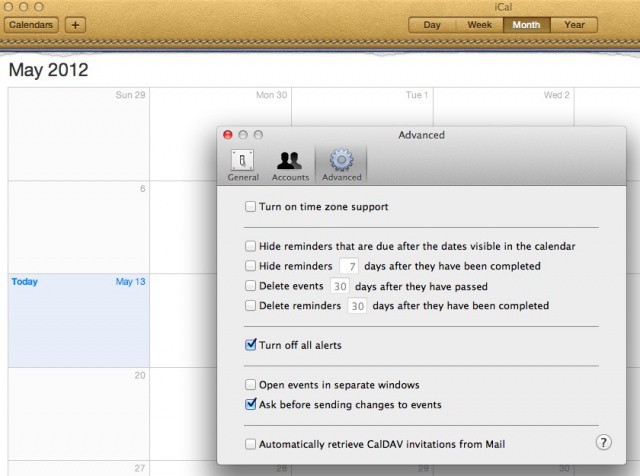
Now here’s a tip that should save me a bit of sanity. I hope it does for you, too. I use Google calendar for much of my scheduling needs, but nothing beats iCal for a quick, offline calendar that runs on my computer. With the calendar info coming in from Google, though, I get reminders on my iPhone, my iPad, and my Mac via iCal. I really don’t need iCal to remind me about things, since I mainly use it as a quick calendar I can launch on my Mac and be done with it. Sometimes, I’ll open my Mac at home only to find a bunch of old reminders on it from iCal. I wish I’d known today’s tip sooner.
Here’s how to get rid of those alerts.
Launch iCal, and thrill to the beautiful faux-leather and paper graphic presentation. Once done, click on the iCal menu and select the Preferences item (or hit Command-comma on your keyboard). Click on the Advanced tab at the top, and then click the “Turn off all alerts” checkbox. Voilà! No more annoying popups on the Mac via iCal.
You’ll still get your reminders on the other devices you’ve set them up for, so there shouldn’t be any missed appointments. You can do this on all the Macs you use, work, home, friend’s machine, without affecting any of the others or the alerts you get on your iOS devices.
Source: OSX Daily
Got an OS X tip? Need help troubleshooting OS X? Drop me a line or leave a comment below.

Rob LeFebvre is an Anchorage, Alaska-based writer and editor who has contributed to various tech, gaming and iOS sites, including 148Apps, Creative Screenwriting, Shelf-Awareness, VentureBeat, and Paste Magazine. Feel free to find Rob on Twitter @roblef, and send him a cookie once in a while; he’ll really appreciate it.

