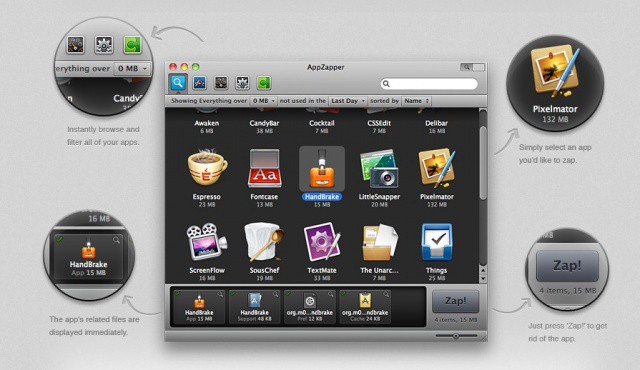
Deleting apps on the Mac has always been an easy affair, with a drag and a drop and a whistle on the wind. Compared to Window’s uninstaller process, Mac users have had it pretty darn easy. These days, however, some apps like to clutter your hard drive up with a bunch of wacky preference and configuration files. What’s an OCD mac user to do? We’ve got one potential answer in today’s tip.
AppZapper is an app by Austin Sarner and Brian Ball that helps delete apps (and all the files associated with those apps) from your Mac. Once you download the DMG file from the developer’s website, drag the resulting icon into the Applications folder, and then launch AppZapper. You’ll initially see a Drop zone window into which you can drag any number of apps you want to delete. Doing so will show you the app name and its size, with the option to zap them. If there are associated files, it will show those, too. When you zap your apps, you’ll be treated to a nice little ray-gun sound effect. Sweet.
If you don’t know which specific apps you want to delete, you can use the Hit List, a visual way to browse through your apps, widgets, preference panes and plugins. Simply click on the little button in the upper right of the AppZapper drop zone window to get a pretty icon-based list of all your stuff. Click on an icon, and all the associated files show up in a tray at the bottom of the window. Pretty slick, right?
FInally, AppZapper goes beyond mere deletion utility and lets you keep track of the apps you decide to keep on your mac, along with their license and registration information.
The demo includes up to five zaps, after which you’ll be asked to pay the $12.95 ownership fee. AppZapper is compatible with Macs running 10.6.2 or later.

Rob LeFebvre is an Anchorage, Alaska-based writer and editor who has contributed to various tech, gaming and iOS sites, including 148Apps, Creative Screenwriting, Shelf-Awareness, VentureBeat, and Paste Magazine. Feel free to find Rob on Twitter @roblef, and send him a cookie once in a while; he’ll really appreciate it.

