
Top 10 Tips and Tricks For Snow Leopard

Auto Time Zone

time_zone

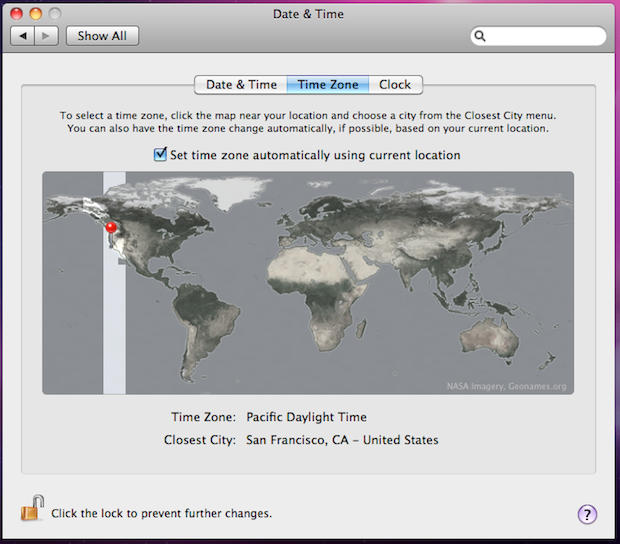
If you travel a lot, your Mac can now detect what time zone you’re in and automatically reset the time in the menu bar.

Go to System Preferences>Date & Time and select the Time Zone tab. Hit the “Set time zone automatically using current location” box.

DON'T MISS
Run The Gimp (Or Other X11 Apps) Full Screen [OS X Tips]

Pages: 1 2 3 4 5 6 7 8 9 10 11

About the author

Leander Kahney

is the editor and publisher of Cult of Mac, and author of three books about technology culture: Inside Steve’s Brain, the New York Times bestseller about Steve Jobs; Cult of Mac; and Cult of iPod. Leander has written for Wired, MacWeek, Scientific American, and The Guardian in London. Follow Leander on Twitter @lkahney and Facebook.

(sorry, you need Javascript to see this e-mail address)| Read more posts by .

Posted in OS X, Tips & Tricks, Top stories |

  • http://guinilingonline.com Brian

    Thanks. I like the applications now hiding behind their icon in the dock, but it took me a few minutes to figure how to maximize the window once it had minimized (via Exposé)

  • Doc Izzy

    The force quit in the dock via Option+holding cursor over the icon has been there at least since Tiger. I first learned about it from David Pogue’s “Missing Manual” book.

  • sooper8

    Why do you have the 10 tips spread across 10 pages? They ain’t very long and could all fit on 1 page- what is the purpose of splitting them in such a way?

  • http://videocwk.blogspot.com/ thumbtack

    I’ve been doing this since Leopard, the only difference now is that you can scroll. I even made a folder of shortcuts that I have set to a grid. The shortcuts are all to programs that I use somewhat often, but not often enough to be right in the dock.

  • http://videocwk.blogspot.com/ thumbtack

    Oh, I thought comments went onto individual pages. This is in regards to my last one.

  • yougene

    About Stacks as Quick Launcher…
    Just hit “cmd+space” (starts spotlight) and beginn typing the apps name > hit enter & you’re done!

    i almost can’t remember when i started an app by clicking its icon…

  • Ben

    @sooper8 Its all about the money. Ad impressions. As a result our reading experience suffers. I hate articles being spread put in so many pages too.

  • obii

    @Ben What do you mean, “Ad impressions”? I can’t see one ad on this site!

  • Frantisek

    @sooper8 You can not see adds poping from header to right column? Weird :-)

    Does stact open when I will drag file on it? It could then replace my #1 utility DragThing for openin files in diferent Apps and Launching. Spotlight is not so fast on core solo mini and I still riding on Tiger :-)

  • Patrick

    Great article. Snow Leopard is loaded with little refinements and time savers. It’s good that the word is getting out about it.

  • http://www.toxicspark.com Andrew Macdonald

    I really appreciate number 8. The minimising to the right side of the dock really annoyed me, and you have just fixed that annoyance. thanks!!

  • Frantisek

    Is there any short cut for zooming in Finder? I mean changing icon/thumbnails size.

  • sooper8

    @Ben- thanks for explanation.

  • http://tmattson.com tony

    @ Frantisek – In Finder, type Command-J to bring up some desktop options.

  • AKcrab

    Why did I have to click 10 links for 10 tips? Stupid.

  • Brian

    I can’t believe this article was separated into 10 pages… Just plain silly.

  • Perry Fjellman

    Stop splitting these small articles up into ten pages. I’m deleting this website from my bookmarks bar and recommending others to do the same. It’s too annoying!!!

  • http://DickRaman.com Dick Raman

    How come I have a completely different picture for my time zone?
    I do not have the option to set the time zone based on my location either…

  • Peter Blair

    how do you have 9×9 apps in your grid? Mine only has 6×4 and i would like to have more apps on display

  • Trygve Norman

    Since I downloaded Snow Leopard I have had problems with a few of my subscriptions like Sirius Radio, The Met Player and Live365. I have changed from Safari to Flock, Firefox and Chrome. Some reacts better than others but there are still some glitches.

  • Ron Clement

    Scrolling a long page versus clicking through pages — not much difference, folks. Certainly not something to get angry about.

    The tips are very helpful and appreciated, even if you texted each one to me individually.

  • Tmlcky

    I have not installed Snow Leopard yet. However I read that it can record what happens on Mac screen. I nornally do it using Screenflick app.
    Did you miss this interesting new feature of Snow Leopard?
    Tmlcky

  • Frantisek

    @ tony – I mean to be able to change icon size on the fly in Finder window via keyboard shortcut. I guess it will be guite difficult to hack Finder to allow that for anybody outside Apple. Or is there Menu command for zooming in Finder?

    @ everybody – This sily splitiong of artickles became more and more common. See Computerworld, eWeek and probably some others. It does not mean that it it is less sily, even more.

  • Nirina

    How do you put the applications folder in the Dock?

  • http://www.snubcommunications.com Craig Grannell

    @Nirina—Open a new Finder window, select your Mac’s HD icon from the sidebar, drag the Applications folder to the right-hand side of the Dock. Control-click the Dock icon and you get view options. For apps, Sort by Name, Display as Folder and View as Grid works nicely. View as List also works well.

  • salsa

    Splitting these tips into individual pages is OBNOXIOUS.

    Cut it out.

  • Daniel

    … I couldn’t believe that you’ve put 10 tips on 10 different pages :(

    btw. – the “force quit” option is there since tiger, so you got 9 “Snow Leopard” Tips here, not 10..

  • Renegade

    Hint 2 and 5 have been there for I don’t know how long.

  • Jam Mo

    Spreading such near useless tips and tricks over 10 pages to make us see if any of them couldn’t have been found in the enclosed 10.6 book is a bloody waste. Poor marks.

  • http://None Mark Siano

    Thanks! I now use this, and it’s really helpful!

  • nomad

    Who do you people think you are ? Whining about split pages, boo hoo you have to read 10 pages too f’n bad. Don’t like it get the f out. Oh cry baby is going to remove his bookmarks lmao.

