
Top 10 Tips and Tricks For Snow Leopard

Easy Convert Movie for iPhones and iPods
convert_video_for_ipod

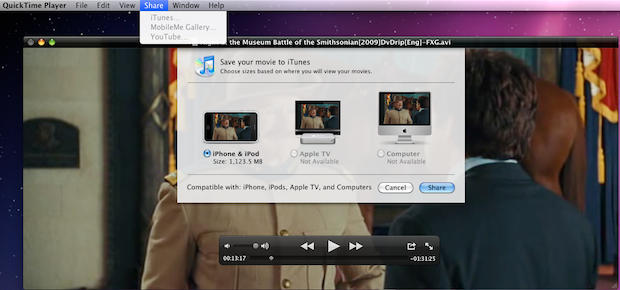
Movies downloaded from the Internet are always a pain to get on your iPod or iPhone. Not in Snow Leopard.

In QuickTime X, go to the Share Menu and Select iTunes.

In the dialog box, just choose the device you want – iPod, AppleTV or Computer. Be sure to download and install Perian for maximum file compatibility.

DON'T MISS
Run The Gimp (Or Other X11 Apps) Full Screen [OS X Tips]

Pages: 1 2 3 4 5 6 7 8 9 10 11

About the author

Leander Kahney

is the editor and publisher of Cult of Mac, and author of three books about technology culture: Inside Steve’s Brain, the New York Times bestseller about Steve Jobs; Cult of Mac; and Cult of iPod. Leander has written for Wired, MacWeek, Scientific American, and The Guardian in London. Follow Leander on Twitter @lkahney and Facebook.

(sorry, you need Javascript to see this e-mail address)| Read more posts by .

Posted in OS X, Tips & Tricks, Top stories |

  • http://guinilingonline.com Brian

    Thanks. I like the applications now hiding behind their icon in the dock, but it took me a few minutes to figure how to maximize the window once it had minimized (via Exposé)

  • Doc Izzy

    The force quit in the dock via Option+holding cursor over the icon has been there at least since Tiger. I first learned about it from David Pogue’s “Missing Manual” book.

  • sooper8

    Why do you have the 10 tips spread across 10 pages? They ain’t very long and could all fit on 1 page- what is the purpose of splitting them in such a way?

  • http://videocwk.blogspot.com/ thumbtack

    I’ve been doing this since Leopard, the only difference now is that you can scroll. I even made a folder of shortcuts that I have set to a grid. The shortcuts are all to programs that I use somewhat often, but not often enough to be right in the dock.

  • http://videocwk.blogspot.com/ thumbtack

    Oh, I thought comments went onto individual pages. This is in regards to my last one.

  • yougene

    About Stacks as Quick Launcher…
    Just hit “cmd+space” (starts spotlight) and beginn typing the apps name > hit enter & you’re done!

    i almost can’t remember when i started an app by clicking its icon…

  • Ben

    @sooper8 Its all about the money. Ad impressions. As a result our reading experience suffers. I hate articles being spread put in so many pages too.

  • obii

    @Ben What do you mean, “Ad impressions”? I can’t see one ad on this site!

  • Frantisek

    @sooper8 You can not see adds poping from header to right column? Weird :-)

    Does stact open when I will drag file on it? It could then replace my #1 utility DragThing for openin files in diferent Apps and Launching. Spotlight is not so fast on core solo mini and I still riding on Tiger :-)

  • Patrick

    Great article. Snow Leopard is loaded with little refinements and time savers. It’s good that the word is getting out about it.

  • http://www.toxicspark.com Andrew Macdonald

    I really appreciate number 8. The minimising to the right side of the dock really annoyed me, and you have just fixed that annoyance. thanks!!

  • Frantisek

    Is there any short cut for zooming in Finder? I mean changing icon/thumbnails size.

  • sooper8

    @Ben- thanks for explanation.

  • http://tmattson.com tony

    @ Frantisek – In Finder, type Command-J to bring up some desktop options.

  • AKcrab

    Why did I have to click 10 links for 10 tips? Stupid.

  • Brian

    I can’t believe this article was separated into 10 pages… Just plain silly.

  • Perry Fjellman

    Stop splitting these small articles up into ten pages. I’m deleting this website from my bookmarks bar and recommending others to do the same. It’s too annoying!!!

  • http://DickRaman.com Dick Raman

    How come I have a completely different picture for my time zone?
    I do not have the option to set the time zone based on my location either…

  • Peter Blair

    how do you have 9×9 apps in your grid? Mine only has 6×4 and i would like to have more apps on display

  • Trygve Norman

    Since I downloaded Snow Leopard I have had problems with a few of my subscriptions like Sirius Radio, The Met Player and Live365. I have changed from Safari to Flock, Firefox and Chrome. Some reacts better than others but there are still some glitches.

  • Ron Clement

    Scrolling a long page versus clicking through pages — not much difference, folks. Certainly not something to get angry about.

    The tips are very helpful and appreciated, even if you texted each one to me individually.

  • Tmlcky

    I have not installed Snow Leopard yet. However I read that it can record what happens on Mac screen. I nornally do it using Screenflick app.
    Did you miss this interesting new feature of Snow Leopard?
    Tmlcky

  • Frantisek

    @ tony – I mean to be able to change icon size on the fly in Finder window via keyboard shortcut. I guess it will be guite difficult to hack Finder to allow that for anybody outside Apple. Or is there Menu command for zooming in Finder?

    @ everybody – This sily splitiong of artickles became more and more common. See Computerworld, eWeek and probably some others. It does not mean that it it is less sily, even more.

  • Nirina

    How do you put the applications folder in the Dock?

  • http://www.snubcommunications.com Craig Grannell

    @Nirina—Open a new Finder window, select your Mac’s HD icon from the sidebar, drag the Applications folder to the right-hand side of the Dock. Control-click the Dock icon and you get view options. For apps, Sort by Name, Display as Folder and View as Grid works nicely. View as List also works well.

  • salsa

    Splitting these tips into individual pages is OBNOXIOUS.

    Cut it out.

  • Daniel

    … I couldn’t believe that you’ve put 10 tips on 10 different pages :(

    btw. – the “force quit” option is there since tiger, so you got 9 “Snow Leopard” Tips here, not 10..

  • Renegade

    Hint 2 and 5 have been there for I don’t know how long.

  • Jam Mo

    Spreading such near useless tips and tricks over 10 pages to make us see if any of them couldn’t have been found in the enclosed 10.6 book is a bloody waste. Poor marks.

  • http://None Mark Siano

    Thanks! I now use this, and it’s really helpful!

  • nomad

    Who do you people think you are ? Whining about split pages, boo hoo you have to read 10 pages too f’n bad. Don’t like it get the f out. Oh cry baby is going to remove his bookmarks lmao.

