

Never Wait For A Genius Bar Appointment Again Using The Apple Store App [iOS Tip]
Outstanding reliability is just one of the reasons why we fall in love with our Apple products. But unfortunately, everything goes wrong from time to time. That’s why we have the Genius Bar.
Did you know it’s incredibly easy to book Genius Bar appointments on an iOS device using the official Apple Store app? Here’s how to do it.
First, ensure you have the Apple Store app installed on your device. It’s a free download from the App Store. Once installed, open it up and tap on the ‘Stores’ tab along the bottom. You can now search for a store or select one nearby.
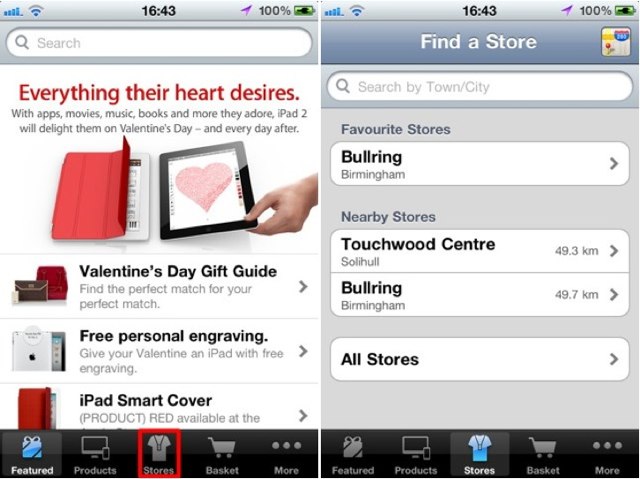
After selecting the store you’d like to visit, tap the ‘Genius Bar’ tab, then select the device you’d like to see a Genius about.
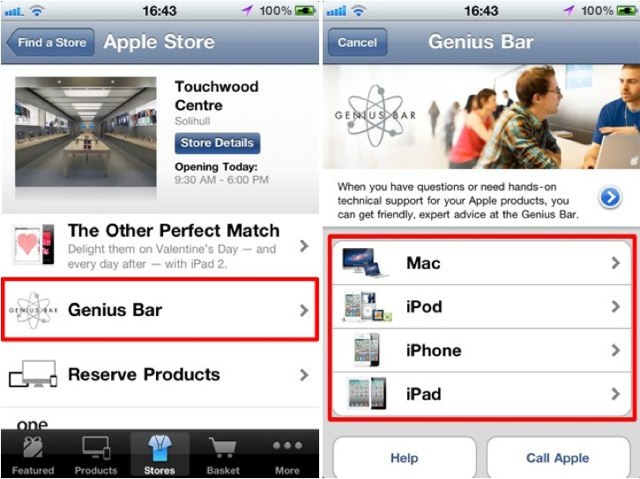
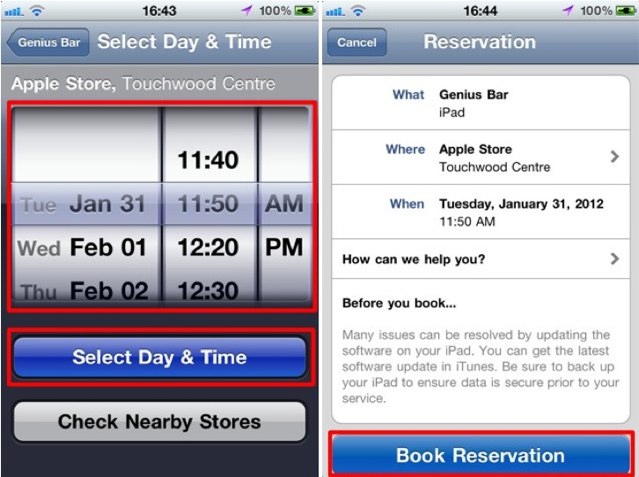
You can now select a date and time for your appointment. What’s great about this is that it only displays appointments that are currently available, and once you book, the appointment is yours. You don’t need to wait for it to be authorized by the Apple store, though you will get a confirmation email.
Once you’re happy with the appointment you’ve chosen, simply tap the ‘Select Date & Time’ button, then ‘Book Reservation’. You’ll need to sign in with your Apple ID to confirm your reservation, which you can then add to your calendar.
Once your appointment is made, you can also see it within the ‘My Reservations’ section of the app.


![Genius-Bar-appt-iOS Never Wait For A Genius Bar Appointment Again Using The Apple Store App [iOS Tip]](http://cultofmac.cultofmaccom.netdna-cdn.com/wp-content/uploads/2012/01/IMG_0775-1.jpg)
![ios5hintstips Never Wait For A Genius Bar Appointment Again Using The Apple Store App [iOS Tip]](http://cultofmac.cultofmaccom.netdna-cdn.com/wp-content/uploads/2011/08/ios5hintstips.jpg)

![Genius-bar-store-ios Never Wait For A Genius Bar Appointment Again Using The Apple Store App [iOS Tip]](http://cultofmac.cultofmaccom.netdna-cdn.com/wp-content/uploads/2012/01/Screen-Shot-2012-01-30-at-17.22.04.jpg)
![Genius-bar-devices Never Wait For A Genius Bar Appointment Again Using The Apple Store App [iOS Tip]](http://cultofmac.cultofmaccom.netdna-cdn.com/wp-content/uploads/2012/01/Screen-Shot-2012-01-30-at-17.23.23.jpg)
![appt-iPhone Never Wait For A Genius Bar Appointment Again Using The Apple Store App [iOS Tip]](http://cultofmac.cultofmaccom.netdna-cdn.com/wp-content/uploads/2012/01/Screen-Shot-2012-01-30-at-17.24.19.jpg)
Killian Bell is a freelance writer based in the UK. He has an interest in all things tech and also writes for TechnoBuffalo. You can follow him on Twitter via ![Read "Drugs, Cops & Dismemberment: The Crazy Adventures Of A Vintage Mac Collector [Interview]" Read "Drugs, Cops & Dismemberment: The Crazy Adventures Of A Vintage Mac Collector [Interview]"](http://cultofmac.cultofmaccom.netdna-cdn.com/wp-content/uploads/2012/05/Wozniac-Wall-Of-Lisas-300x250.jpg)
![Read "What Will The 4-Inch iPhone 5 Look Like? Here Are 12 Possible Designs [Gallery]" Read "What Will The 4-Inch iPhone 5 Look Like? Here Are 12 Possible Designs [Gallery]"](http://cultofmac.cultofmaccom.netdna-cdn.com/wp-content/uploads/2012/05/iPhone5mockup-300x250.jpg)
![Read "Ditch Those Crappy Video Subscription Services And Grab Yourself A Slingbox SOLO [Review] at Cult of Android" Read "Ditch Those Crappy Video Subscription Services And Grab Yourself A Slingbox SOLO [Review] at Cult of Android"](http://cultofmac.cultofmaccom.netdna-cdn.com/wp-content/uploads/2012/05/slingboxr-300x250.jpg)


