(sorry, you need Javascript to see this e-mail address)

Top stories

Filter posts by: Mac iOS Hardware Software

Windows 7 Upgrades Chart Makes Brain Hurt; We Offer the Mac Equivalent

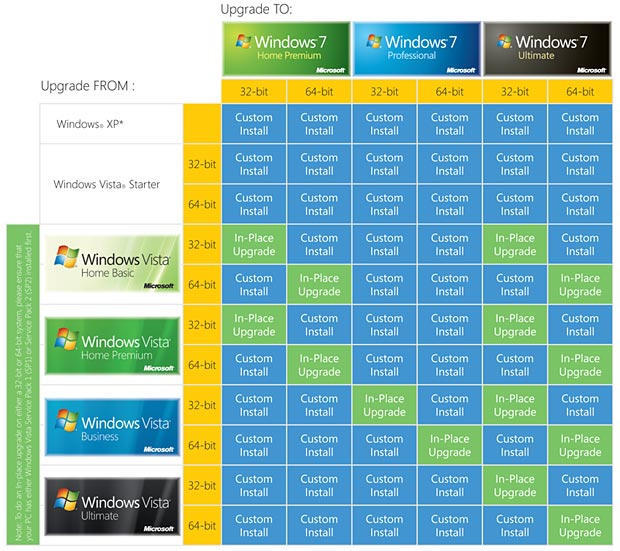
Walt Mossberg yesterday revealed Microsoft’s official chart that explains how you can upgrade your version of Windows. And I use the word ‘explains’ in its loosest possible sense, since Microsoft’s chart looks like this:

win-upgrade-1

Clearly, this is a great example of how extra choice doesn’t always benefit the consumer. And for what it’s worth, all those blue boxes are boxes of doom—‘in-place upgrades’ (green) means the install will keep your files, settings and programs intact, but the more common custom install (blue) refers to a clean install, which will force a user to move their files, install the OS, replace their files and reinstall their apps. (And then, presumably, curl up into a ball in the corner of the room and weep uncontrollably.)

I thought it’d be useful to create a Mac equivalent for Snow Leopard. If you’ve got an Intel Mac, the upgrade path regarding installation is certainly a lot simpler:
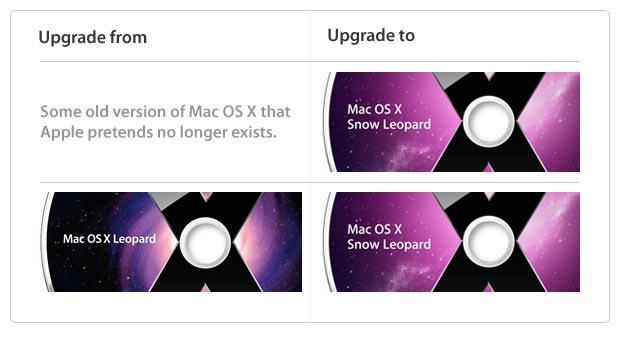
win-upgrade-2

And this is simplified even further if you’ve got a PowerPC Mac:
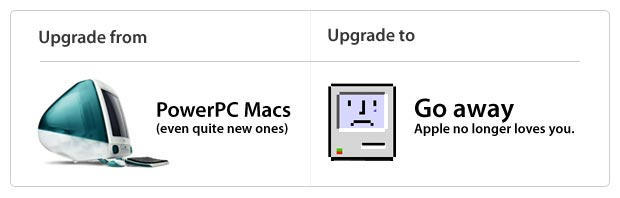
win-upgrade-3

About the author

Craig Grannell

Craig Grannell is Cult of Mac's designer and an occasional contributor. He also runs iPhoneTiny.com, a Twitter-driven reviews site for iPhone apps and games. Follow Craig on Twitter @CraigGrannell and visit his website, Snub Communications.

(sorry, you need Javascript to see this e-mail address)| Read more posts by .

Posted in News, Top stories |

  • Ziggits

    It’s really not that complicated. If you’re upgrading from anything older than Vista, wipe & reinstall. If you’re migrating from Vista, whether or not you can do an in-place upgrade to 7 depends on which version if Vista you were running. Vista Basic & Premium ->7 Premium. Vista Business -> 7 Professional. Vista Ultimate -> 7 Ultimate. And you can’t “cross boundaries” between 32/64 bit versions without a W&R. That’s really all there is to it.

    It’s only complicated because Microsoft divides the OS feature sets into three versions and continues to provide a 32-bit OS for folks with PC’s that can’t run a 64 bit version. Had Apple made the same decision regarding people who run old PowerPC’s, there’d be another version of Snow Leopard too.

    But as anyone who’s ever upgraded from one version of Windows to another knows, it’s really a whole lot better to just wipe & reinstall anyway. Upgrades rarely go as smoothly as a full W&R.

    Full disclosure: 20+ year PC user & Microsoft .Net developer who, after seeing how wonderful Windows 7 was going to be from the RC, ditched his Dell, bought a Macbook Pro and has subsequently never been happier with his computing environment. :-)

  • shawn

    ha…the last one is great.

    the first hurts my soul.

  • Fred

    Unfortunately I have a quad G5 (4×2.5Ghz PowerPC) the last non Intel desktop made and still a pretty damn nice computer – that I will not be able to upgrade. Damn.

  • http://arcane.org Mystech

    Borrow a Vista CD, upgrade your XP machine but do not register/activate. While on the 30-Day trial of Vista, upgrade with your shiny, new copy of Windows 7 and register/activate.

    Seriously though, MS is copping out here. If they can support an upgrade path from XP to Vista, they sure has heck can support an XP to 7 upgrade path. I sense sour grapes at XP users for shunning Vista.

  • http://www.mr2.org.nz John

    In one way I think the move to ditch PPC macs is poor. A great platform that people paid serious money for, end of life – just like that.

    However for me that means I might see lots of recent PPC Mac pros come on the second hand market really cheap, so I can move my OS X server off my old mini onto a cheaper PPC Mac Pro, get large fast drives, @ lots more CPU grunt.
    Briliant home server, and as long as apple keep patching OS X 10.5 for a while, will still have a good shelf life. The other option is PPC linux install. Buy an old Pro, and keep it rocking with Ubuntu or OpenSuSE PPC version.

  • NYSpursFan

    No thanks. I’ll keep Vista on my wife’s Dell. I have no compelling reason to upgrade it. As for me, I’ll sit here quietly grinning from ear to ear as I muscle through work on my 13′ MBP. Looking forward to Snow Leopard!

  • timeless

    To be fair, XP is 2001, Vista was 2006. Tiger was 2005. Let’s ignore XP it’s out of range.

    OS X comes in two flavors not one, OS X and OS X server.

    The difference between 3 and 2 isn’t anywhere near as dramatic as 3 and 1 :).

    Next, pretend that Vista Starter is closer to an iPod touch, and cross it off the picture :).

    Note that while it is possible to transition from 32 to 64 or vice versa w/ windows, it’s unlikely that people will do it. Further, if you actually had a 64bit app installed on 64bit windows, and tried to install a 32bit version of windows, obviously your 64bit program wouldn’t work. I’m uncertain about the OS X OS X Server transition.

    I’m not certain, but it /sounds/ like Rosetta will not be part of the default 10.6 install. Let’s call that a “custom install” option. If you have a PPC app that you used in 10.4/10.5, then your upgrade will require a blue box, because otherwise you’ll have a bunch of apps that won’t work (just like the strange 64bit/32bit windows example above).

    with those changes, the windows grid is 4×3 (+ 32/64), and the OS X grid is really: 4×2 (+ no-rosetta/custom install with rosetta).

    As for the PPC picture, it’s much more fun to show a chart of all the apple hardware models and a graph of possible replacement hardware :). But yeah, the picture you have is cute. (Sadly, my G5 won’t upgrade from 10.5.)

  • Alfred

    As has been said, the Win7 upgrade path just looks more complicated than it is. It’s quite simple really:

    From your edition of Vista to the same edition of Win 7 (e.g. Home Vista to Home Win 7) = simple upgrade

    XP to Win 7 = fresh install
    Switching between 32 and 64 bit versions = fresh install
    Switching between editions (e.g. home to pro) = fresh install

    It’s not terribly complicated, they just did their absolute best to make it *look* as complicated as they possibly could.

    Of course, the most complicated bit is not this chart, but the hell millions of people will go through who wish to go from XP to Windows 7. Considering the millions upon millions of hours millions of people will waste learning how to transfer their music, family photos, bookmarks, home movies, etc, I would have thought MS could have put in the extra work to allow an upgrade from XP to Win 7.

    But no.

    They do not treat their customers well at all. But that’s what happens when one giant company has 95% of the global market and 90% of the market in it’s own country.

    Why bother.

  • nthn

    LOL! I absolutely LOVE this blog post. It made me giggle.

  • Andi

    I only ever upgrade the os on my macs by 1 major step 7 to 8, 9 to osx etc, the needs of the os out stripping the power of the machine. What happens is you end up trying to get more from the original mac than it can ever handle, then you stick in a processor upgrade, faster hard disk etc but you’ll still have a bottle neck somewhere on the board.

    Other thing to consider, the osx version you are running right now is still 100 times better than anything that will ever come out of redmond.

    full disclosure: 450, 950, 4400, g4, emac, ibook, g5, powerbook, imac and i break out in a rash when i’ve had to use a pc

  • http://toomuchgreen.eu Richard

    Anyone running MS should wipe and install Ubuntu anyway :-)

    I run (need) both, Mac for fun/life, Ubuntu for dev/work. Great combo…!

    (BTW – Thanks for the best Mac site on the Web, keep it up)

  • Andrea

    Ziggit: “But as anyone who’s ever upgraded from one version of Windows to another knows, it’s really a whole lot better to just wipe & reinstall anyway. Upgrades rarely go as smoothly as a full W&R.”

    Well, you could say something similar for OS X: Major updates on the mac rarely *DO NOT* go as smoothly as a full W&R

    And although I agree You are not reinstalling your all system every month (not on the mac, at least -_^) this difference says a lot on how the two operative system works…

    Finally, the fact that this is accepted from Windows user as “normal” is really the worst part: how users bend to their OS need instead of the opposite…

    Peace.

  • Garrett

    It’s worth noting that while it is still just snow leopard, tiger users will have to buy the box set in order to upgrade.

  • Don Pope

    To me, it looks like MS is punishing “disloyal” customers who didn’t embrace Vista.

  • Gordon

    I bought a new 13″ MacBook about 15 months ago. Since then, I have been APPALLED at how badly Leopard installs updates. First, I was surprised when the Mac asked me if I really wanted to update without the mains plugged in. Why, I thought, surely this will take just a couple of minutes?

    Well when I updated, I found out. It took FOREVER to install the updates (we’re talking, say, a simple 20 megs’ worth here, not War and peace). Then the Mac would freeze rebooting. I’d have to unplug the mains and take the battery out to get it to boot up. And many of the updates didn’t install, necessitating further downloading… folllowed by more crashing. It took a complete wipe and re-install to fix the re-boot problem. The ridiculous update timelag remains.

    At work I’ve got a battered old Vaio, using Windows XP. My personal observation is that the Vaio and XP combo is MORE stable than the Mac. Both occasionally will crash a program but system crashes are more frequent on the Mac. It’s also more erratic. Sometimes booting up is very fast on the Mac. Other times it’s a lot slower. The Vaio is slower yet, but it’s a) older anyway and b) less consistent.

    The Leopard’s interface is lovely, though. But as much as it’s slick, XP’s geeky, boxy interface isn’t so much harder to use. In fact in several ways I find it easier.

    Overall, Leopard beats XP in day-to-day living, and overall cuteness. But not by all that much, and sorry Andi, certainly not 100 times more. Factor in the price premium the Apple proposition demands, however, and it stops making any sense. Bottom line; I’ll use the Mac for a couple more years but I’ll eventually sell it and go back to a Microsoft-based PC.

  • Rick Ford

    @Gordon

    I’m with you. I am a web developer and IT administrator, and I convinced my company to get me a Mac Mini so that I could use Parallells for web testing in multiple versions of Windows, multiple versions of browsers, as well as Mac OS.

    This thing is terrible.

    It’s been very erratic. Some days it’s fine, and other days it’s slow. Sometimes it doesn’t come out of sleep. Sometimes it doesn’t go into sleep. The 10.5.6 update STILL won’t install. I’ve tried multiple times. I gave up. Also, I fail to see why an update for iMovie (which, by the way, it wouldn’t leave me the hell alone about, regardless of how little intent I have of using iMovie for anything. Ever.) requires a system restart. Seriously. Isn’t this what you guys bash Microsoft for?

    Just a note: When I’m done doing things on a computer, whether Mac or PC, I close the damned programs. There is no need to be running shit that you’re not using. This being said, Windows (XP, Vista, 7) clears out that memory far more efficiently than the Mac Mini with Leopard does. I restart my Vista laptop about once a week, and my Windows 7 RC laptop slightly less frequently. I restart the Mac about every other day, and it’s not generally graceful. The Mac Mini is a 2009 model. Both of my laptops are from 2007 (Dell XPS m1710, and HP Pavilion dv9230us).

    When you break down this upgrade thing, guys, it’s really quite simple and it makes a lot of sense. If you can’t figure out a simple chart and are too blindingly stupid to operate a computer, maybe you shouldn’t be performing OS upgrades without some assistance.

    Can you change the oil in your car? Some of us can, some of us can’t. This is the equivalent to upgrading a piece of software.

    Now, can you change the goddamned engine in your car? Most of us can’t. This is the equivalent to upgrading your OS.

    If you can’t do it, then find someone that can. They generally charge (but not always). This is how the world works.

    Oh, and if you bought a PowerPC Mac in 2006 (you poor bastard), I would strongly suggest inventing a time machine to go back and tell yourself to wait a few months for the Intel Mac.

  • FreeRange

    Well the MS trolls are out. Anyone claiming that installing MS OS “is not the complicated” is an idiot, or an MS troll posting here. How can you say that a wipe and clean install is easy? When you have to transfer all your data files and reload later, and then reinstall all your programs once/if you can find all the original disks? And then once you reinstall the programs, you need to go out and find all their updates, download and reinstall them. Yeh – that’s simple and a days worth of wasted time.

    As to the two tools (Gordon & Rick) above claiming to have problems doing OS updates for your macs, what a bunch of B.S. – you have some other problem with your system. Mac upgrades ALWAYS go seamlessly. Or you are MS stooges!

  • Anon

    Disclosure: I use both systems, and like them equally. Honestly, I can’t pick which I like better. Snow Leopard excites me more than 7 only because of Grand Central. (Programmer here).

    FreeRange, I definitely have to tell you: grow the hell up. Just because someone expresses a minority opinion doesn’t mean they’re wrong. You’re the one using absolute terms – they’re stating experience. I’ve had Mac updates and upgrades go badly. They dont’ ALWAYS go smoothly.

    Fucking stooge.

  • firesign

    wipe and install has always been the best option for me. anytime i’ve tried an in place upgrade has been a disaster. 98 to xp? a total mess. xp to vista? another mess. os 10.4 to 10.5? a complete disaster. these were all on systems that before the upgrade were running just fine.
    freerange – i have been working on PCs and macs since the 1980s. i can tell you that mac upgrades (and even os updates) do not always go smoothly, anymore than they do on any other system. you, my friend, are the tool/troll.

  • http://www.lockergnome.com/marcerickson/ Marc Erickson

    @ Andrea: I guess it’s been a while since you had a Windows box – reinstall every month went out with Windows Mistake Edition. Personally I stopped doing that with Windows 98 SE. There are two versions of Windows since Windows 3.1 that I refused to have on any of my computers (because of performance issues) – first was Windows ME and second was Windows Vista.

    <break>

    Upgrading an OS is like taking the chassis out from under a car and sliding in a whole new one – it’s amazing that it works at all. I’ve never been a MS apologist (it’s more a love/hate relationship), but XP was coded when the security environment was *much* more benign. The technicians’ mailing list I’m on reports a rootkit infection *every day* that the tech is having trouble removing – and our list isn’t a high volume one. When XP was conceived the only people who had thought about rootkits were computer scientists (mostly in academia) in the lab. They didn’t exist in the wild.

    And if you’re running XP, are you sure you want to put Win7 on that box? Computers do best with software created about the same time that they were. I’m writing this on a basic Dell Inspiron 1501 with an Athlon 64 dual core TK-55 processor and 1 GB of RAM. They offered either Vista or XP on it – I chose XP for performance. I now have it dual-booting XP and Windows 7 Ultimate gold (gold = production code) and, although I use Win7 mostly, it’s a bit slower than XP is on it and I wouldn’t mind to try it with some more RAM. The Windows Experience index has me at 2.9 (3.0 minimum recommended for using the Aero overlay) due to the video card but I think it’s integral to the motherboard… :-(

    Does forcing a clean install for XP users increase Microsoft’s profits? Yes, by reducing their expenses. Is it the best practice? YES. Any tech will agree with me. If you really want Win7, do yourself a favour and buy a new machine with enough RAM and a decent video card for it – and give the old computer to your kids, make it into a media server, or donate it to charity – *after* a format, fresh install, and updates.

    Or buy the new machine and put Windows Home Server on the former XP box. This is a cool product – it’s inexpensive, makes a great media server, PLUS it backs up any XP or newer computer to it (you have to install software on the client machine) and it makes running a home network almost painless. You’ll need to buy an OEM version for installation on an existing computer – Newegg.com (among others) sells it that way. Of course you can also buy it on a new computer (HP, Acer, others, and at Best Buy, Newegg, Fry’s, Amazon, Staples, Tiger Direct, and others). I’m so stoked on WHS than I’m studying it for a certification and I want to offer it as one of my specialties.

    And finally, for all of the Windows slaggers: I can buy a new computer for $300 with decent performance (if I want good to excellent performance I’d probably spend $600 – $1000) and never have to pay anything for software ever again (unless I’m doing something very unusual. You cannot do that with a Mac. I love the UI, but I refuse to pay the Apple tax.

    WHS info:
    http://www.google.ca/#hl=en&q=Windows+home+server+&meta=&fp=58658b2190507a24

    120 day evaluation version:
    http://www.microsoft.com/windows/products/winfamily/windowshomeserver/eval.mspx

    Buy it where?
    http://www.microsoft.com/windows/products/winfamily/windowshomeserver/buy.mspx

    Best regards,
    Marc Erickson

  • Dr. Corndog

    Complicated, all right. Every bit as complicated as a two-button mouse.

