How To: Fix Visual Voicemail After AT&T Tethering Hack

tethering

Over the weekend, writer MG Siegler of TechCrunch opened a can of online worms with a furious rant entitled AT&T Is A Big, Steaming Heap Of Failure.

Complaining he hasn’t received Visual Voicemail on his iPhone for weeks, Siegler joins a growing chorus of pundits dissatisfied with AT&T, including Gizmodo, Wired and GigaOm.

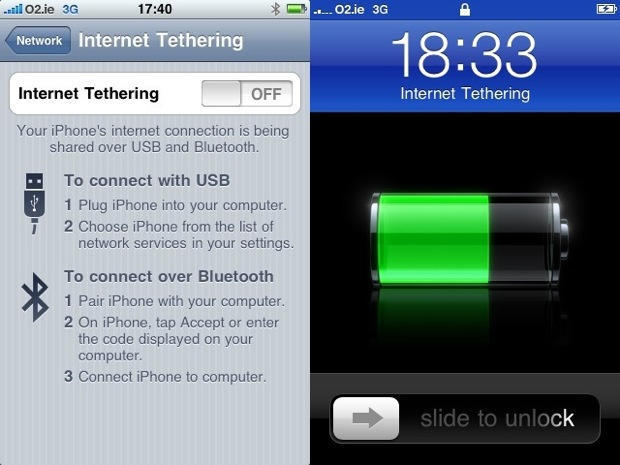
But as some Techcrunch commenters point out, Visual Voicemail is bolloxed by a popular tethering hack, which allows the iPhone to share its internet connection with a tethered computer.

“I enabled the tethering hack weeks ago when it came out,” says one commenter. “It broke visual voicemail, so I reverted it. One heck of a coincidence if everyone’s voicemail spontaneously broke the same week that a tethering hack came out that breaks visual voicemail.”

Siegler didn’t respond to a query asking if he had tried the tethering hack, and he makes no mention of it in the comments to his post, where he engages in some back and forth with TC readers.

Either way, here’s a very simple fix to get Visual Voicemail back, while still enabling the tethering hack.
fix_tethering_hack

The popular AT&T tethering hack is easily enabled by visiting sites like BenM.at using mobile Safari. Trouble is, it changes the iPhone’s .ipcc carrier settings file and frequently disables Visual Voicemail, but not always.

DON'T MISS
Restore Visual Voicemail in iPhone 3.1 Post-Tethering

To check if you’ve been affected, call your own number to access your voicemail box. If you have messages waiting, Visual Voicemail is bolloxed.

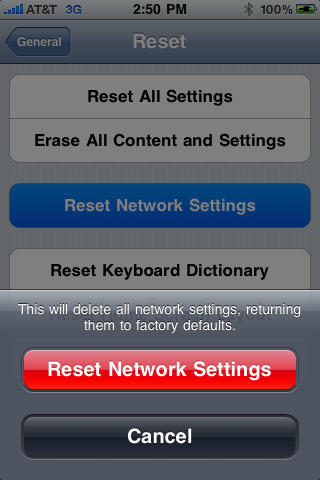
But it’s easily fixed. On the iPhone, go to: Settings > General > Reset and hit the Reset Network Settings button.

When the iPhone reboots, VVM is working again and the tethering hack still works.

Thanks Alex.

About the author

Leander Kahney

is the editor and publisher of Cult of Mac, and author of three books about technology culture: Inside Steve’s Brain, the New York Times bestseller about Steve Jobs; Cult of Mac; and Cult of iPod. Leander has written for Wired, MacWeek, Scientific American, and The Guardian in London. Follow Leander on Twitter @lkahney and Facebook.

(sorry, you need Javascript to see this e-mail address)| Read more posts by .

Posted in How-To, iPhone, News |

  • http://www.tristanpipo.com Tristan Pipo

    Thanks for that information. That resolved my problem. =)

  • Neuromancer 61

    It could be very well true that Mr. Siegler hacked his phone to enable tethering.

    But, he couldn’t buy tethering from at&t!

    Which, i am sure he would have at a reasonable price. So, either way, it is still at&t failing to meet the needs of the customers, with no reasonable explanation.

    I think his article is more an indictment of the communication carriers and their oligopolistic and subtle collusive practices, with at&t (and Verizon) being some of the most egregious of carriers.

    The wireless and cable carriers main and only focus should be to have usable fast, reliable networks. NOT phones, Ring Tones, Music Stores, Movies, Shows or any other content. They seem to do nothing well and everything they offer is below average or worse!

    Maybe if they just concentrate on one item (THE NETWORK) they can get that right!

  • Neuromancer 61

    P.S.

    Thanks for the fix

  • Skeeter

    WRONG! That “simple” fix does not fix voice mail! Sorry try again!

  • http://seanreynoldscs.com Sean Reynolds

    It worked for me,
    Skeeter sucks.

    Actually Ive been jacking with my phone for 2 days now.

    I found out that its not just Tethering, this morning I restored my iPhone, got the Benm.at Hack and tethering was working with visual voicemail when using USB.

    It was actually setting up bluetooth tethering which broke visual voicemail.

    Either way
    General> Network> Reset> Reset Network Settings
    Did the trick!!

    Thanks for the fix. I spent hours on the phone with att and apple before I started googling the changes which I did over the last month.

    Lesson: ALWAYS start with google!

  • http://chrislawson.net/ Chris

    I tried a number of different methods in an attempt to enable both tethering and VVM, including this one, a few weeks ago. None of it worked. If this works for you, great, but it probably won’t work for everybody.

    cl

  • Tony

    Quick google search found this and voila, it worked. Had to reboot twice though as I got Searching… in top left where ATT bars usually is. Thanks.

  • punkrockmillionaire

    The fix worked perfect. You did in minutes what too afternoon to the bleeding hours of night. Either way I git $50.00 credit from AT&T deducted immediately from bill. This is what should be done by all that have been effected. Call and state that it was part of our plan.
    Please spend only a short time on phone ask for a fix and then a credit. You don’t even have to cry though I had my kid step up. I pay for her drama class. Paid back.

  • Tim

    This didn’t work for me. tried it twice. Anyone found another solution?

  • piedra_de_locura

    Boo hiss. Doesn’t work.

  • Ken

    Thank you, you are the man!

  • DC

    The fix that restored my VVM: On your iPhone, go to Settings > General > Network > Cellular Data Network. Under “Visual Voicemail,” there’s a field called APN. Enter this text in that field: acds.voicemail

    Good luck :)

  • MH

    DC’c fix worked for me.

    Thanks.

  • AJ

    Worked for me but I had to do it twice. Will up if it stops working again. I wonder what will happen if I try to create a tethering connection again.

  • LS

    It didnt to the trick on my phone, i’ve rest about five straight and still nothing.. and since it updated the carrier file i dont have the option of “Settings > General > Network > Cellular Data Network..” Some one pls help!!!

  • TH

    Yeah, My Iphone 3g with the 3.0 software update and the installed benm.at tethering option doesn’t have the “Settings > General > Network > Cellular Data Network..” either!!! I’ve tried restoring the whole phone, resetting network settings and everything else and nothing seems to work!

    I Just want the whole option OFF of the phone!!! I dont care about tethering anymore after this voicemail headache!

  • TeQ

    To remove the IPCC profile go to Settings/General and you’ll see Profiles: AT&T, select that and you can then remove the profile. Your phone will start working again and Tethering will dissappear if you ‘click’ it. Your voicemail will all come pouring in.

    I do not believe there is a working file for VVM and Tethering for not jailbroken phones. I also have never seen this elusive edit carrier settings from my phone (non jailbroken). AT&T 3gs

  • TeQ

    Here is the TRUE FIX for AT&T, Visual Voicemail and Tethering without jailbreaking. I finally tried it enough times and it works in this scenario:

    Install the “pre-configured” AT&T Profile from the Ben.M site using mobile safari from your iphone.

    MOST IMPORTANT PART!
    DO NOT REBOOT YOUR PHONE UNTIL YOU MANUAL RESET NETWORK SETTINGS – SETTINGS -> GENERAL -> RESET -> RESET NETWORK SETTINGS.

    If you reboot the phone before doing this, it seems to permanently save the wrong VMM settings. If you reset the network settings before rebooting, it reverts back to the old APN config but leaves the Tethering app installed.

    I’ve tested this 10 times now and it seems to be the right steps. It did not work for me until I followed these steps exactly.

    Good luck!

  • TeQ
  • Chris B

    DC’s fix worked for me. Showed all the voicemails that I haven’t been able to receive and also was able to use tethering for my laptop. Thank you DC!

    I have the iPhone 3G with 3.0 OS.

  • Buckshot

    This worked very well for me and fixed VVM.

  • Dave

    Remove the tethering hack then try resetting network settings.

  • AnthonyB

    Updating to 3.1 takes away the VMM APN setting and doing the Network reset doesn’t work either. Even full restore doesn’t work for everyone.

    Anyone have any other ideas for turning VMM back on under 3.1?

    Btw, I used the hack that mounts as a disc image, not the BenM hack for tethering.

  • JD

    The reset worked for me, I did one of those hacks to enable MMS early and didn’t even realize my VM was disabled until someone mentioned it. When I reset my settings I had 14 new messages waiting.

    THANKS

  • SD

    I have the latest Iphone with 3.1 installed. I suppose the only option I have to get VVM back is to do a complete restore. However before i do that i wanted to see what will happen if i remove that US ATT- BenM.at profile? Will i lose any info?

    ATT itself told me the only way is a complete restore. Dont really do that just yet

    thanks
    sascha

  • GM

    Sascha,
    Just remove the profile. This is the only way to get this off your phone. No restore needed…tested on 2 different phones. After no profile and no problems.

  • Greg

    I had the same issues above – v3.1.x, no menu for “Settings > General > Network > Cellular Data Network..”, and the RESET NETWORK SETTINGS did not work either.

    However, once I removed the profile it immediately fixed VVM.

  • http://www.hoperadio.us HRO

    actually the unsigned profile that is loaded as a hack to enable tethering is the problem. Long talk with a good friend of mine at AT&T support name not displayed told me that any unsigned profile will cause visual vitrual voicemail to stop working…. the key would be to figure out how to sign the new profile so everything will work. I removed the profile and hard reset my phone today home plus the power button and VVM returned upon rebooting. reinstalled the profile for tethering and VVM stopped the profiles must be signed that is the key to success here.

  • http://www.hoperadio.us HRO

    and Oh how to remove the profile is settings, general, profile,
    If the profile is signed it will not appear if it is unsigned it appears here just below the International submenu.

  • TRavis

    This effin sucks, I’ve been doing everything listed on the web to fix the problem and I still have no connection between VVM and my regular VM box. right now AT&T is erasing my voicemail completely to try to restore the link.(and now I’ve lost all my saved messages) People beware of this problem you might have to get a new phone.

  • david

    mine didnt work is either i get VVM or Tethering
    im gonna stick to VVM and when i need to tether ill download it from BenM.at

  • Ric in Tx

    Thanks DC!!!!

  • SJ

    I have iPhone 3G with 3.1.2. Several days after I enabled tethering from BenM.at, I realized that VVM was not working. ‘Reset network settings’ did not help in my case. I had to remove the tethering profile to get VMM to work again. It looks like I have the same problem as david… I wish I could have both VMM and tethering at the same time…

  • br8thw8

    I have tried everything and nothing seems to work for me. And for all those people that keep saying to remove the Profile, well for some of us we don’t even have the Profile option anymore to remove. Still waiting for a true fix!

    I went to benm.at again to try to install the hack again and that doesn’t even work. All I get is a “Invalid Profile – Profile format not recognized” message. Guess I’m stuck with no VVM.

    One more thing, even resetting the phone completely doesn’t work either!

  • chris

    fixed another one with the simple fix

  • ME

    oh thank god. I have been without visual voicemail for months and months now. I was able to fix the problem by doing the settings-general-profiles-remove profile fix. thank you thank you thank you!

  • lehal

    I had the same issues above – v3.1.x, no menu for “Settings > General > Network > Cellular Data Network..”, and the RESET NETWORK SETTINGS did not work either.
    I tried the above around 20 times on different days but no result.
    The only thing that worked was :
    To remove the IPCC profile go to Settings/General and you’ll see Profiles: AT&T, select that and you can then remove the profile. Your phone will start working again and Tethering will dissappear if you ‘click’ it. Your voicemail will all come pouring in.
    Thanks Guys.

  • http://NA RT

    Profile was removed, but when trying to install the profile again through help.benm.at, it does not download AT&T profile. Keeps on giving me “profile not recognized” error.
    Any clue?

    Is it because that benm changed their patch? It worked several times before for firmware 3.0. Also worked on several iphones I tried on 3.0. Why not anymore since year 2010?

    Is it benm’s patch issue or should I reinstall the firmware 3.0?

    Any help is appreciated!

  • Lazydel

    visual voicemail apn add: Acds.voicemail is the fix thans DC

  • http://none sendiman

    Hey guys – I GO IT WORKING
    ihave 3gs iphone jailbroken and after manny attempts i found how to fix the Visual Voice Mail..

    Simple go to settings – look in general for a profile if you have it – at atnt shuld be “US AT&T” – go in – delete the profile.

    then go and reset your network settings. reboot.

    and bam, one attempt for the VVM and it working in a sec!!!

    Good luck

  • fozo

    Thanks everyone for the contribution on this fix.

    Sendiman steps worked perfectly!

    Kudo you for that.

  • maggie

    I found that the key to getting both tethering and VVM working on a jailbroken 3G iphone had to do with bluetooth.

    Initially, I downloaded the tethering hack, rebooted the iphone and tried to turn on tethering with Bluetooth. That’s when I lost VVM. After removing the tethering profile and resetting the Network settings, VVM came back.

    I was successful at installing tethering and keeping VVM when I did the following:
    I got the tethering hack from peacefulinsanity.com. Rebooted my iphone after the install. VVM was still in tact at that point. I went to turn on tethering and this time, I selected “Tethering by USB only” (NO BLUETOOTH). VVM and tethering now both working fine.

  • wk

    For those people that lost their VVM before ever installing the tethering software (like me) what worked for me was to go to the benm.at site, install the profile, hard reset my phone, then go back into network settings, profile (option only showed up after i installed the profile of course), and remove that profile. then i reset network settings and my voice mails were there.

    thanks for the help guys.

  • SMS

    I got both tethering and VVM working fine on an ATT iPhone 3g by using the profile named ‘US AT&T Tethering’ from
    http://appadvice.com/appnn/2009/10/31-tethering-visual-voicemail-fixing-the-benm-mobileconfig-file/
    I did not restart or reset and Network settings and just removed the profile from BenM.at and installed the above using the iphone Safari app. I am using my Bluetooth connection between the iphone and the Powerbook to send this note.
    I have looked high and low. This seems to be the answer.

