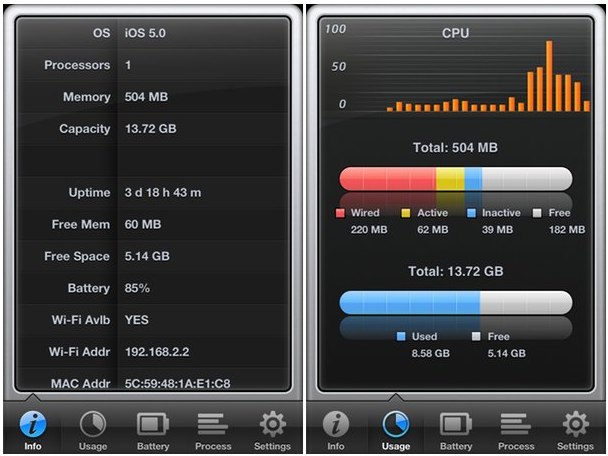
You know about Activity Monitor for your Mac, right? How would you like to have an Activity Monitor for your iPhone too? Something like Activity Monitor Touch might do the trick.
Inside it, you’ll find smart-looking charts and graphs for your device’s processor and memory usage, battery level and uptime, and a list of running processes.
One fun trick is to quit some background apps while viewing the memory usage page – you’ll see the used memory bar shrinking down as you tap wiggling app icons in the running-apps tray at the bottom of the screen. (To get to it, double-tap your device’s home button, then tap-and-hold on any of the icons you see.)
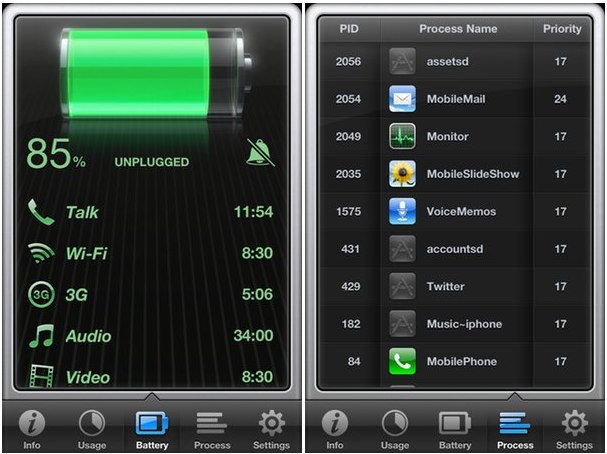
There are two versions of the app: the paid version, currently $2, and a free version that offers just general info and battery usage.
On the battery page, there’s an alarm icon – tap this, and your device will alert you when it’s fully charged.
Unlike the desktop app, this doesn’t let you meddle with running apps directly. You can’t quit processes from the list of what’s running, for example. But you can see that list in full, including all the internals and system processes that are usually kept hidden from view.
[xrr rating=80%]


