
Apple has added a feature to iOS 5 that will allow you to check the storage apps use on your iPhone, iPad, or iPod touch. It’s an important feature to know if you are using any of these devices without a computer and syncing straight to iCloud.
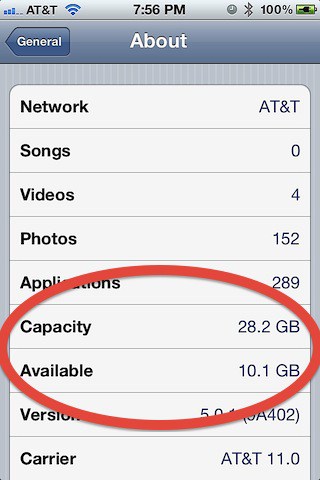
Checking Used and Free Storage
- Launch the Settings app.
- Tab General.
- Tap About.
Look for Capacity and Available. These will tell you the total amount of storage and available storage.
Checking Storage Apps Use
- Launch the Settings app.
- Tap General.
- Tap Usage.
You will see a screen that looks like this:
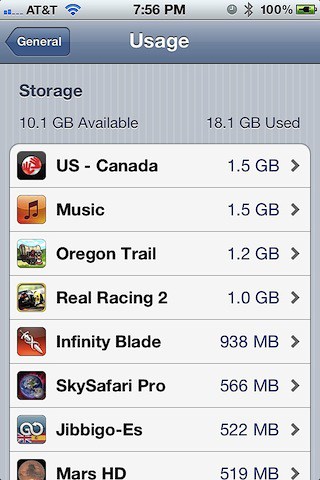
Now tap any app to see more details about it. You’ll see the amount of storage space used for each apps document and data files.
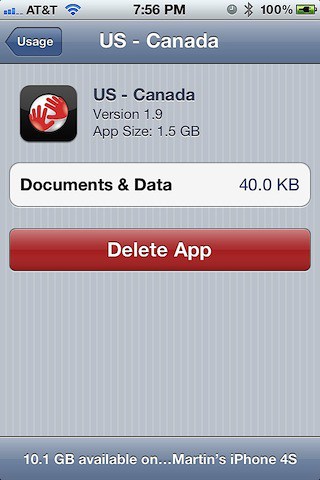
You’ll even see a button that will allow you to delete the app and all of its content. You can use this button to help manage what apps you have on your iOS device. Deleting an app will increase the amount of free storage space on your device.
This is the information I saw for the Tom Tom navigation app loaded on my iPhone 4S:
Using this tip will help you to manage your storage space better, especially if you are using iCloud.

David W. Martin has more than 20 years of experience in the industry as a programmer, systems and business analyst, author, and consultant. David has written for CNET’s iPhoneatlas.com, MacLife.com, CultofMac.com, BYTE.com and recently for aNewDoman.net. He comes to Cult of Mac’s website with deep knowledge and passion for the all things Apple. Follow David on Twitter @david_w_martin or see what he’s up to now at davidwmartin.com.

