
Shake Things Up By Making Your Own Custom Vibration Alerts in iOS 5 [iOS Tips]
![vibleader Shake Things Up By Making Your Own Custom Vibration Alerts in iOS 5 [iOS Tips]](http://cultofmac.cultofmaccom.netdna-cdn.com/wp-content/uploads/2011/10/vibleader.jpg)
![ios5hintstips Shake Things Up By Making Your Own Custom Vibration Alerts in iOS 5 [iOS Tips]](http://cultofmac.cultofmaccom.netdna-cdn.com/wp-content/uploads/2011/08/ios5hintstips.jpg)
If you find yourself in a quiet environment like a meeting or at the doctor’s office you’ll usually silence the ringer on your iPhone. The iPhone will then vibrate when you get incoming calls.
Although that sounds great, the iPhone will vibrate the same way for every caller. But it doesn’t have to do that. You can actually create a customized vibration pattern for every contact in your address book.
Access to creating customizable vibration alerts isn’t available by default. First you have to turn it on following these steps:
- Launch the Settings App.
- Tap General.
- Tap Accessibility.
- Locate Custom Vibrations and tap to turn it On.
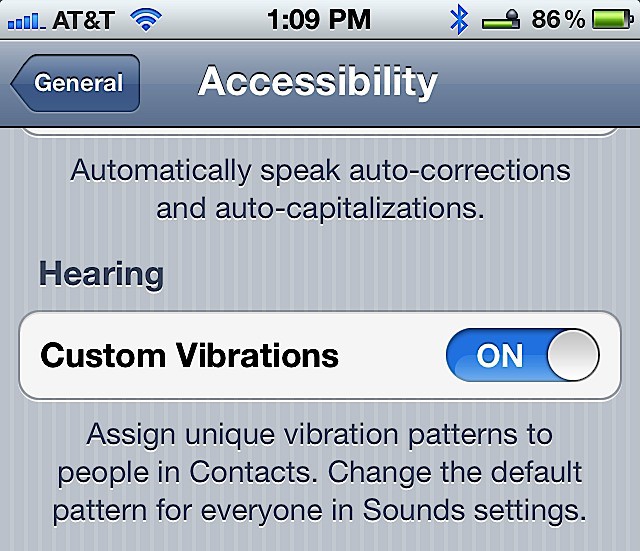
Once it is on you can customize the vibration alert for every contact in your address book using the following steps:
- Launch the Contacts app.
- Tap a Contact to select it.
- Tap Edit.
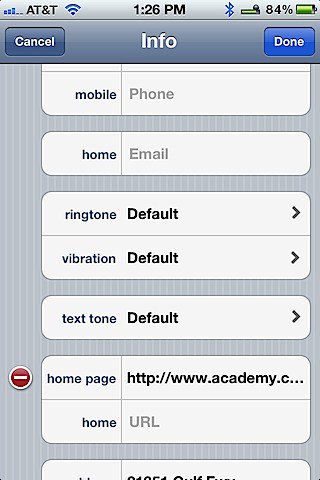
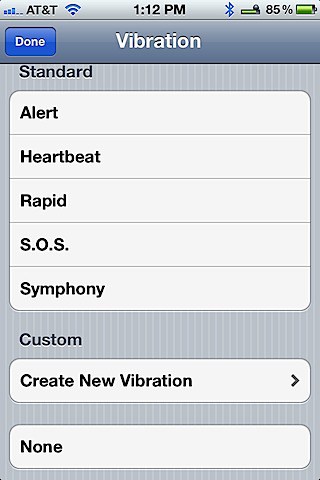
- Locate Vibration and tap it.You can now select from five standard options by tapping any one of the following: Alert, Heartbeat, Rapid, S.O.S. or Symphony. If you don’t want one of those, then tap Create New Vibration and follow the next steps below.
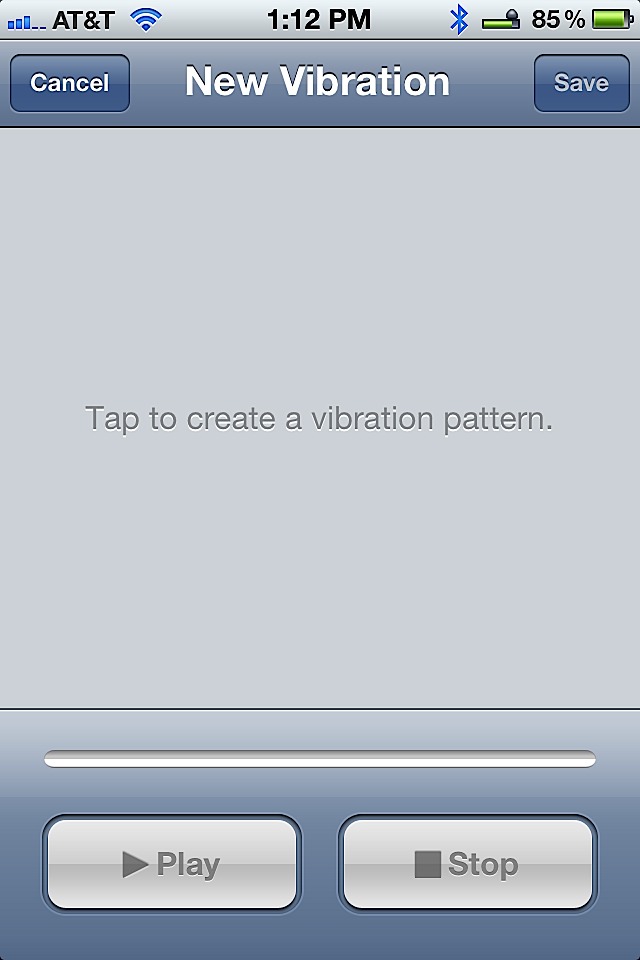
- Tap out the new vibration pattern on your iPhone screen.
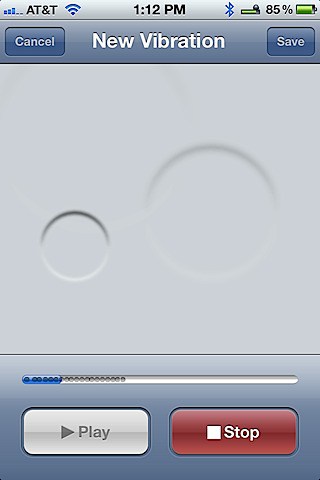
- Tap Stop when you are finished.
- Press Play to test it.
- If you are satisfied, tap Save or press cancel if you aren’t and try again.
Once you have all your favorite contacts set up with customer vibration alerts, just let your iPhone dance across your desk to the beat of each one. Just pick it up quick before it jumps off your desk or wakes everyone up in the meeting you are attending.


![custvibrations Shake Things Up By Making Your Own Custom Vibration Alerts in iOS 5 [iOS Tips]](http://cultofmac.cultofmaccom.netdna-cdn.com/wp-content/uploads/2011/10/custvibrations.jpg)
![vibcontact Shake Things Up By Making Your Own Custom Vibration Alerts in iOS 5 [iOS Tips]](http://cultofmac.cultofmaccom.netdna-cdn.com/wp-content/uploads/2011/10/vibcontact.jpg)
![vibset Shake Things Up By Making Your Own Custom Vibration Alerts in iOS 5 [iOS Tips]](http://cultofmac.cultofmaccom.netdna-cdn.com/wp-content/uploads/2011/10/vibset.jpg)
![creatvib Shake Things Up By Making Your Own Custom Vibration Alerts in iOS 5 [iOS Tips]](http://cultofmac.cultofmaccom.netdna-cdn.com/wp-content/uploads/2011/10/creatvib.jpg)
David W. Martin has more than 20 years of experience in the industry as a programmer, systems and business analyst, author, and consultant. David has written for CNET's iPhoneatlas.com, MacLife.com, CultofMac.com, BYTE.com and recently for aNewDoman.net. He comes to Cult of Mac's website with deep knowledge and passion for the all things Apple. Follow David on Twitter ![Read "From Your iPhone, With Love: Thank You Pen Does What Cards App Can’t [Feature]" Read "From Your iPhone, With Love: Thank You Pen Does What Cards App Can’t [Feature]"](http://cultofmac.cultofmaccom.netdna-cdn.com/wp-content/uploads/2012/05/Screen-Shot-2012-05-21-at-12.52.17-AM-300x250.jpg)
![Read "The Best iPhone Cases & Protectors [Best Of]" Read "The Best iPhone Cases & Protectors [Best Of]"](http://cultofmac.cultofmaccom.netdna-cdn.com/wp-content/uploads/2012/05/fugly-300x250.jpg)
![Read "Was IBM Right? Is Siri A Threat To Businesses? [Feature]" Read "Was IBM Right? Is Siri A Threat To Businesses? [Feature]"](http://cultofmac.cultofmaccom.netdna-cdn.com/wp-content/uploads/2012/05/siri-banned-300x250.jpg)
![Read "Monster’s Turbine Earphones: I Find Your Lack of Clarity Disturbing [Review] at Cult of Android" Read "Monster’s Turbine Earphones: I Find Your Lack of Clarity Disturbing [Review] at Cult of Android"](http://cultofmac.cultofmaccom.netdna-cdn.com/wp-content/uploads/2012/05/moster-turbine-2-300x250.jpg)
![Read "Why You Might Be Disappointed By The Resolution Of Those New Retina Display Macs [Feature]" Read "Why You Might Be Disappointed By The Resolution Of Those New Retina Display Macs [Feature]"](http://cultofmac.cultofmaccom.netdna-cdn.com/wp-content/uploads/2012/05/MacBook-Pro-with-Retina-Display_1-300x250.jpg)
