Apple Support Document Addresses iPhone Overheating Concerns
Apple has a support document called “Keeping iPhone 3G and iPhone 3GS within acceptable operating temperatures” to which the company has directed those with concerns about alleged overheating problems with 3G and 3GS models of the device.
In addition to offering practical advice such as “Don’t leave the device in your car” (as car interiors can exceed the recommended operating range of -20º to 45º C [-4º to 113º F]), the document also warns that CPU-intensive applications, such playing music or using the GPS while in direct sunlight may also overheat the iPhone.
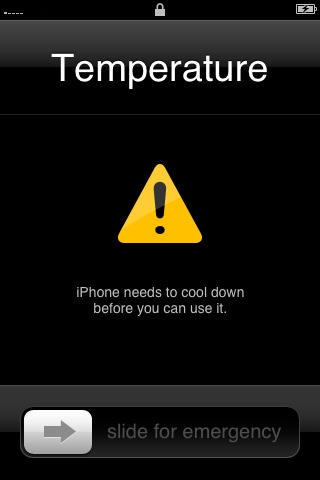
The OS has a temperature warning screen built in, that appears to indicate when the phone could be running into problems and may not work properly.
Using the iPhone in temperatures over 95 degrees can trigger the temperature warning, according to at least one report. “Low- or high-temperature conditions might temporarily shorten battery life or cause the device to temporarily stop working properly,” Apple warns in the support document, though it says when the temperature warning appears, the phone “may still be able to make emergency calls.”
Recent anecdotal reports of 3GS iPhones overheating, with some white models turning pink as a result, have led to speculation that Apple may have a recall situation on its hands, but the company so far is relying on the fact that “iPhone 3G and iPhone 3GS comply with the safety standard for Safety of Information Technology Equipment, IEC 60950-1,” and has had no further comment on the overheating issue.
[GearLog]
More from Cult of Mac
- Apple May Treat Overheated iPhones Like Waterlogged iPhones: You’re SOL
- Reports Indicate Some iPads Prone to Overheating in the Sun
- Apple Updates iPod Battery Warning after Consumer Org Launches Probe
- Another French iPhone Fries Owner As EU Investigation Heats Up
- Users With Scalding First-Gen iPod Nanos Begin Receiving Their Replacements

![Read "How The iPad Is Revolutionizing Branding [Exclusive Book Excerpt]" Read "How The iPad Is Revolutionizing Branding [Exclusive Book Excerpt]"](http://cultofmac.cultofmaccom.netdna-cdn.com/wp-content/uploads/2012/02/marcolina-250x150.jpg)


![Read "EA Sports Gearing Up For The Super Bowl, Discounts MADDEN NFL 12 To $0.99 [Deal Alert]" Read "EA Sports Gearing Up For The Super Bowl, Discounts MADDEN NFL 12 To $0.99 [Deal Alert]"](http://cultofmac.cultofmaccom.netdna-cdn.com/wp-content/uploads/2012/02/maddennfl12-640x313-250x150.jpg)

![Read "ZAGGFolio Keyboard Case Is Tough, Stylish And A Delight To Use [Review]" Read "ZAGGFolio Keyboard Case Is Tough, Stylish And A Delight To Use [Review]"](http://cultofmac.cultofmaccom.netdna-cdn.com/wp-content/uploads/2012/02/P1020394-250x150.jpg)
![Read "If iBooks Author Is Overkill For Your Simple eBook Project, Try Book Creator For iOS Instead [Review]" Read "If iBooks Author Is Overkill For Your Simple eBook Project, Try Book Creator For iOS Instead [Review]"](http://cultofmac.cultofmaccom.netdna-cdn.com/wp-content/uploads/2012/02/bookcreator-250x150.jpg)
![Read "Stuck On Earth, Perhaps, But Not Stuck For Lovely Photos To Look At [Review]" Read "Stuck On Earth, Perhaps, But Not Stuck For Lovely Photos To Look At [Review]"](http://cultofmac.cultofmaccom.netdna-cdn.com/wp-content/uploads/2012/02/stuckonearth-250x150.jpg)
![Read "How To Type Like A Hacker On Your iPad [Review]" Read "How To Type Like A Hacker On Your iPad [Review]"](http://cultofmac.cultofmaccom.netdna-cdn.com/wp-content/uploads/2012/02/hackertyper-250x150.jpg)

![Read "Use A Screensaver As Your Desktop Wallpaper [Video How-To]" Read "Use A Screensaver As Your Desktop Wallpaper [Video How-To]"](http://cultofmac.cultofmaccom.netdna-cdn.com/wp-content/uploads/2012/01/033-250x150.jpg)
![Read "I Can’t Reinstall Snow Leopard After Installing Lion [Ask MacRx]" Read "I Can’t Reinstall Snow Leopard After Installing Lion [Ask MacRx]"](http://cultofmac.cultofmaccom.netdna-cdn.com/wp-content/uploads/2012/01/mac_os_x_lion_install-250x150.jpg)
![Read "Customize Notification Center To Fit Your Every Need [Video How-To]" Read "Customize Notification Center To Fit Your Every Need [Video How-To]"](http://cultofmac.cultofmaccom.netdna-cdn.com/wp-content/uploads/2012/01/Notification-250x150.jpg)


