Five Favorite Hidden Features of iPhone 3

iphone_3gs_camera

After using the iPhone 3GS for a week, here’s five of my favorite, non-obvious tricks I’ve picked up.

Show Battery Percentage
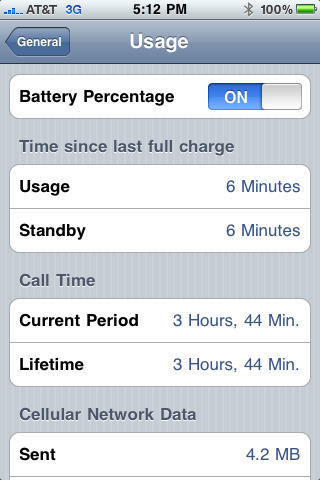
The iPhone battery meter is so imprecise as to be useless. But in iPhone 3, you can show the percentage charge. To show the battery percentage, go to Settings>General>Usage and turn on Battery Percentage.
img_0187

Variable Speed Scrubbing
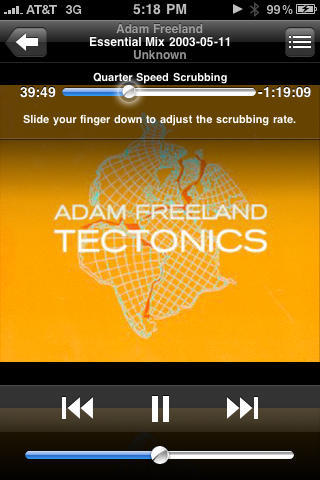
I listen to a lot of radio shows on the iPhone from my hometown, London. These shows can be a couple of hours long so I often “scrub” through to the best parts. On the iPod with a scroll wheel, this was easy. But on the iPhone, it became an ordeal — the song bar was notoriously fiddly and the track would often jump when you pulled your finger off. But with the 3.0 software, scrubbing can now done be at different speeds. When you hit the song bar it starts glowing, allowing you to scrub through the track from left to right. But the further you drag your finger vertically *down*, toward the “Home” button, the finer you can control the scrolling speed: it goes from “high speed” to “half speed,” “quarter speed,” and finally “fine scrubbing.” No more jumping tracks.
img_0189

Double Tap “Home” To Launch Camera
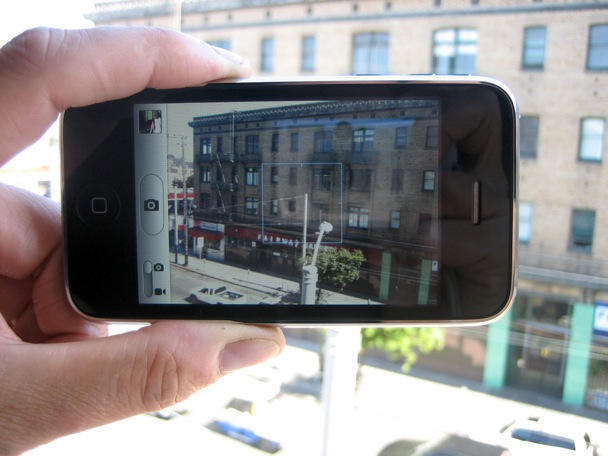
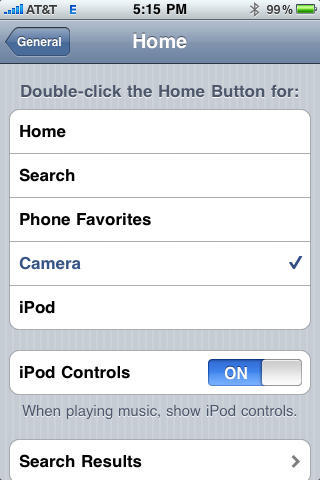
I’m using the camera a lot on the new iPhone 3GS. Instead of going to the Home Screen and hunting for the Camera icon, the camera can be launched with a double tap of the Home button. Go to Settings>General>Home and select “Camera.”
(Alternatively, you can map the Home button double-tap to iPod, Phone Favorites, Search or Home).
img_0188

Easy Email Suffixes
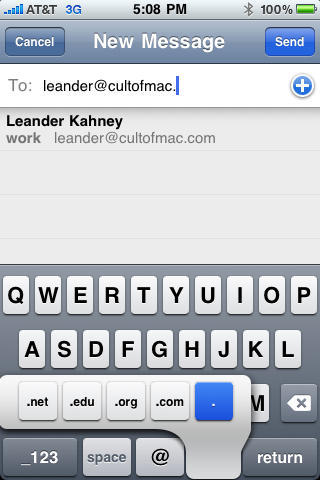
When typing out an email address in the “To” field, there’s a shortcut for adding .net .edu .org .com suffixes. Press and hold the “.” key (the period key) and the suffix options pop up.
DON'T MISS
How To Display The Battery Percentage On Your iPhone [iOS Tips]

img_0181

Sound Check
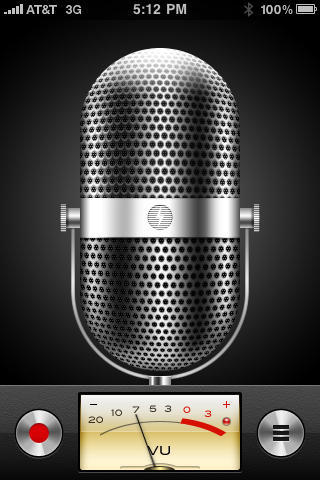
This is really an Easter Egg, not a hidden feature, but delightful nonetheless. The new Voice Memos app shows the image of a microphone. Tap the image of the mic, and the VU meter jumps as if you were tapping a real microphone.

img_0186

About the author

Leander Kahney

is the editor and publisher of Cult of Mac, and author of three books about technology culture: Inside Steve’s Brain, the New York Times bestseller about Steve Jobs; Cult of Mac; and Cult of iPod. Leander has written for Wired, MacWeek, Scientific American, and The Guardian in London. Follow Leander on Twitter @lkahney and Facebook.

(sorry, you need Javascript to see this e-mail address)| Read more posts by .

Posted in iPhone, iPhone 3G S, Software, Top stories |

  • Dylan

    I’m running 3.0 on a 3G. I’m able to do all of these things EXCEPT show the battery percentage, the one thing I really wanted. Lame.

  • Daniel

    The changing of what the double tap does was there even in iPhone 3G with software 2.0.

  • Mary Hunt

    I do NOT see any battery percentage indicator in my General settings under usage. :-(

  • Fact Check

    The “Easy Email Suffixes” was in 2.2 (and possibly earlier)…

  • angusshangus

    no battery % on my 3g??? WTF??? Also, I’m pretty sure the email suffixes were there prior to 3.0.

  • Kesem

    Because I have terrible ATT coverage at my home I use call forwarding. My favorite new feature is the new icon next to the wifi indicator reminding me it’s on.

  • http://www.flickr.com/peterpreston Peter

    Email suffixes was there prior to iPhone 3.0.

  • Jimm

    The battery % can be done as a hack on a jialbroken 3G. Otherwise it is not available and 3GS only.
    http://gizmodo.com/5302258/how-to-get-the-iphone-3gs-battery-indicator-on-all-iphones-and-ipod-touches

  • Jon

    The email suffix hint is really useful. I found the .com button does the same thing in Safari too. I’d not known either of these before. I’ve learnt something today.
    Thanks

  • Dave W

    The battery percentage is really nice and I have it working on my 3G. You have to jailbreak for it to work. Not sure why it is not in the settings. I guess it is only unique to 3GS.

  • Jim

    As stated above the only thing that wasn’t already there is the Battery thing and the mic/VU meter connection. But that VU thing is rather lame for a favorite ‘hidden’ feature. That’s what any VU meter is supposed to do if you tap or heaven forbid you blow on a mic connected to anything with a VU meter on it. DOH! And there are other apps that will show sound levels and indicate the same ‘tapping’ response. :rolleyes:

    But I’m glad you’ve found more things to help you enjoy your new phone, but you really should get out more… 8-) 8-P

  • mike

    You’re a dick, Jim!

  • AdamBitTheApple

    Dude, first of all, none of these features are “hidden.” Second of all, at least one of these features has been around since at least the release of iPhone OS 2.0. You guys at CoM are REALLY falling off your game. Might have to remove you from my RSS feeds if you don’t get it together.

    What happened to the good, informative posts you guys used to do? Now it’s just improperly-titled link-bait and incorrect articles. I’m really disappointed.

    I miss the old, GOOD Cult Of Mac. I hope it returns. :(

  • Pooch

    ditto on what AdamBitTheApple said!
