

The “sealed” battery in Apple’s new 13-inch MacBook Pro is easily replaced with standard screwdrivers, a teardown by iFixit shows.
The MacBook battery is not supposed to be changed by the user. Sealed inside the case, Apple encourages customers to pay Apple $130 to change the battery and dispose of the old one.
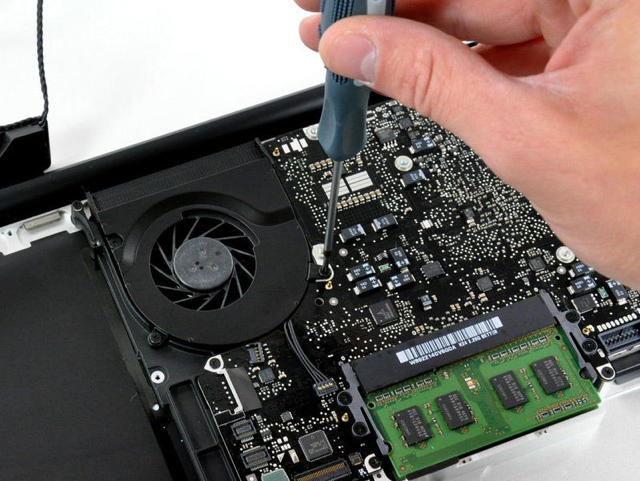
However, the battery is easily accessed with a standard Phillips screwdriver, and the battery removed with a tri-wing screwdriver, iFixit found when dissassmbling the device on Tuesday.
In addition, iFixit notes that the single audio jack (see post below) is innapropriate for a “Pro” machine. The jack supports analog and digital audio-out, and analog audio-in, but not digital audio-in.
“If you need digital audio-in, this is not the machine for you.” said iFixit CEO Kyle Wiens in an email.
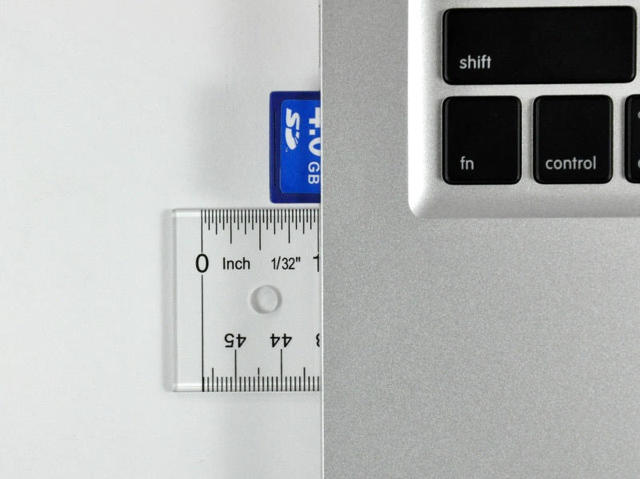
Wiens also said the MBP’s new SD card slot is “rather unimaginative.”
“Half the card hangs outside the computer,” said Wiens. “Apparently, Apple couldn’t free up enough space for a slot that would make the card completely captive.”
Wiens notes the battery is beefier (360 grams, about 60 grams heavier than the old one), but is rated 60 Watt-hours, compared to the older battery’s 45 W-h. Apple claims the battery will last for 7 hours. The previous MacBook’s battery was rated 5 hours (yeah, right!)
More details and pictures from iFixit after the jump.
* The new battery is not interchangeable at all with the older MacBook Unibody. The connectors, size, and shape are different, preventing easy DIY battery rigging.
* The mid wall dividing the MacBook Pro is now attached to the top case. In the previous model, it was held in by four Phillips screws — just goes to show that Apple is trying to help out its DIY customers.
* Aside from a couple of visual cues found outside, a casual user would not be able to discern if this was a MacBook Unibody or MacBook Pro.
* Most screw layouts and brackets are identical to the old MacBook Unibody.


Leander Kahney is the editor and publisher of Cult of Mac.
Leander is a longtime technology reporter and the author of six acclaimed books about Apple, including two New York Times bestsellers: Jony Ive: The Genius Behind Apple’s Greatest Products and Inside Steve’s Brain, a biography of Steve Jobs.
He’s also written a top-selling biography of Apple CEO Tim Cook and authored Cult of Mac and Cult of iPod, which both won prestigious design awards. Most recently, he was co-author of Cult of Mac, 2nd Edition.
Leander has been reporting about Apple and technology for nearly 30 years.
Before founding Cult of Mac as an independent publication, Leander was news editor at Wired.com, where he was responsible for the day-to-day running of the Wired.com website. He headed up a team of six section editors, a dozen reporters and a large pool of freelancers. Together the team produced a daily digest of stories about the impact of science and technology, and won several awards, including several Webby Awards, 2X Knight-Batten Awards for Innovation in Journalism and the 2010 MIN (Magazine Industry Newsletter) award for best blog, among others.
Before being promoted to news editor, Leander was Wired.com’s senior reporter, primarily covering Apple. During that time, Leander published a ton of scoops, including the first in-depth report about the development of the iPod. Leander attended almost every keynote speech and special product launch presented by Steve Jobs, including the historic launches of the iPhone and iPad. He also reported from almost every Macworld Expo in the late ’90s and early ‘2000s, including, sadly, the last shows in Boston, San Francisco and Tokyo. His reporting for Wired.com formed the basis of the first Cult of Mac book, and subsequently this website.
Before joining Wired, Leander was a senior reporter at the legendary MacWeek, the storied and long-running weekly that documented Apple and its community in the 1980s and ’90s.
Leander has written for Wired magazine (including the Issue 16.04 cover story about Steve Jobs’ leadership at Apple, entitled Evil/Genius), Scientific American, The Guardian, The Observer, The San Francisco Chronicle and many other publications.
Leander has a postgrad diploma in artificial intelligence from the University of Aberdeen, and a BSc (Hons) in experimental psychology from the University of Sussex.
He has a diploma in journalism from the UK’s National Council for the Training of Journalists.
Leander lives in San Francisco, California, and is married with four children. He’s an avid biker and has ridden in many long-distance bike events, including California’s legendary Death Ride.
You can find out more about Leander on LinkedIn and Facebook. You can follow him on X at @lkahney or Instagram.

