

Today the tip is for all you neat freaks out there. I get pretty sloppy when I’m working on a project and I tend to leave a bunch of different files on my Finder desktop. I tend to gather all these up after I complete the project and later I throw them into a folder. I used to do it the hard way, but not any more.
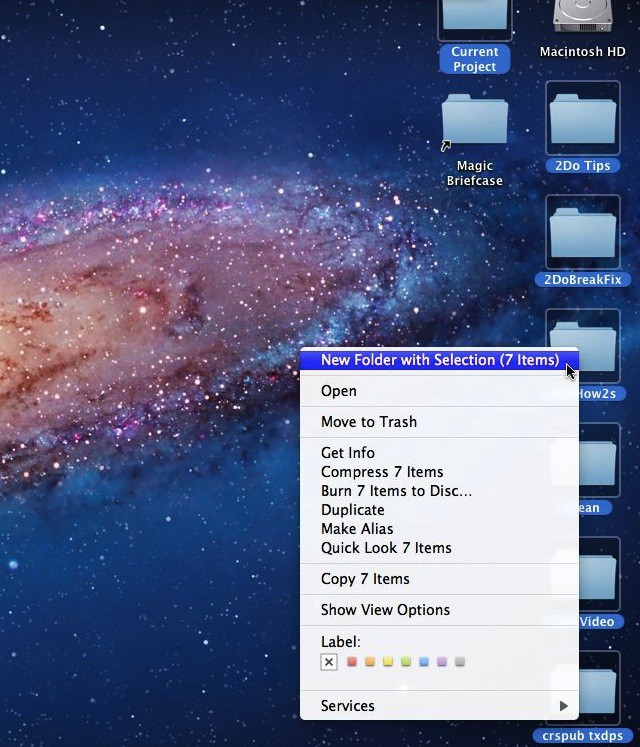
Finder consolidates the items and then sets you up to change the default name of New Folder With Items to something of your own choosing.
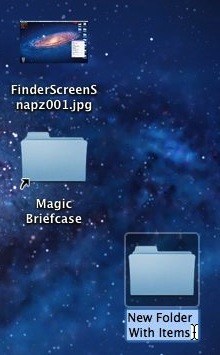
If this isn’t fast enough for you or you don’t like all the mouse action try Command+Control+N from the keyboard after you’ve selected the items you want to combine into one folder.
I think this is my most favorite tip so far and I’ll be using it a lot.

David W. Martin has more than 20 years of experience in the industry as a programmer, systems and business analyst, author, and consultant. David has written for CNET’s iPhoneatlas.com, MacLife.com, CultofMac.com, BYTE.com and recently for aNewDoman.net. He comes to Cult of Mac’s website with deep knowledge and passion for the all things Apple. Follow David on Twitter @david_w_martin or see what he’s up to now at davidwmartin.com.

